
Yes, you can create a website for free! Modern website builders make it possible to build and publish a website quickly and easily - with no coding or technical skills required. In this guide you'll learn:
- How to create a website for free
- What features free website builders include
- The exact steps to launch your website
- How to upgrade later when your website grows
If you want to get started immediately, you can use our free website builder to create your website.
Creating an Awesome Website for Your Business is Easy!
Since 2000, we've provided businesses with the tools they need to create websites that:
- look professional
- perform reliably
- help promote and sell products or services online
- grow a business' online presence
With our feature rich website builder, you can create your own website, online shop, or booking system - all without needing any technical knowledge.
Building your website is simple. With just six easy steps, you can have your website online within hours rather than weeks.
Create Your Website in 6 Easy Steps
- Start your free trial
- Choose your template
- Choose your colours and fonts
- Add your content
- Register your domain name
- Go live
It’s that simple to create a website for free with Website World.
1. Start Your Free Website Trial
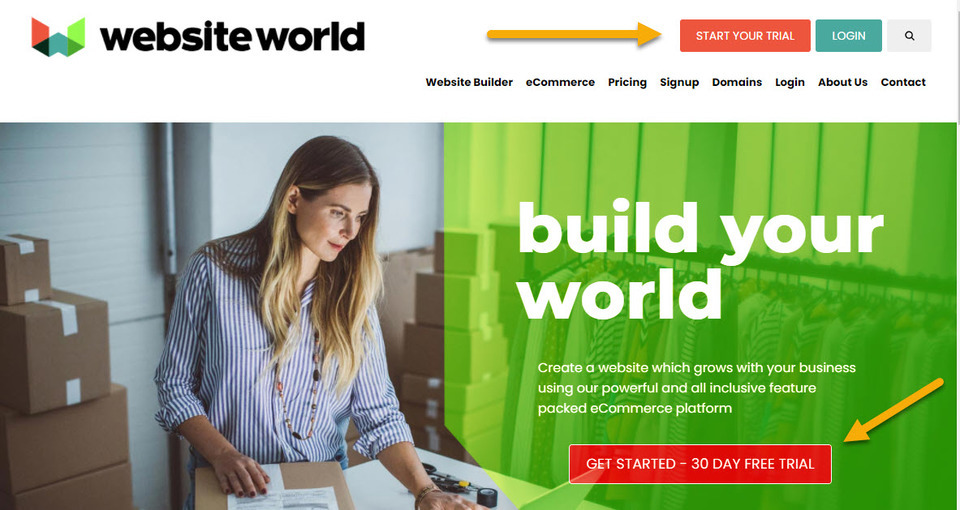
To begin, click the Start Your Trial button and create your free account. This will give you access to the full website builder so that you can start designing your website immediately.
2. Choose Your Template
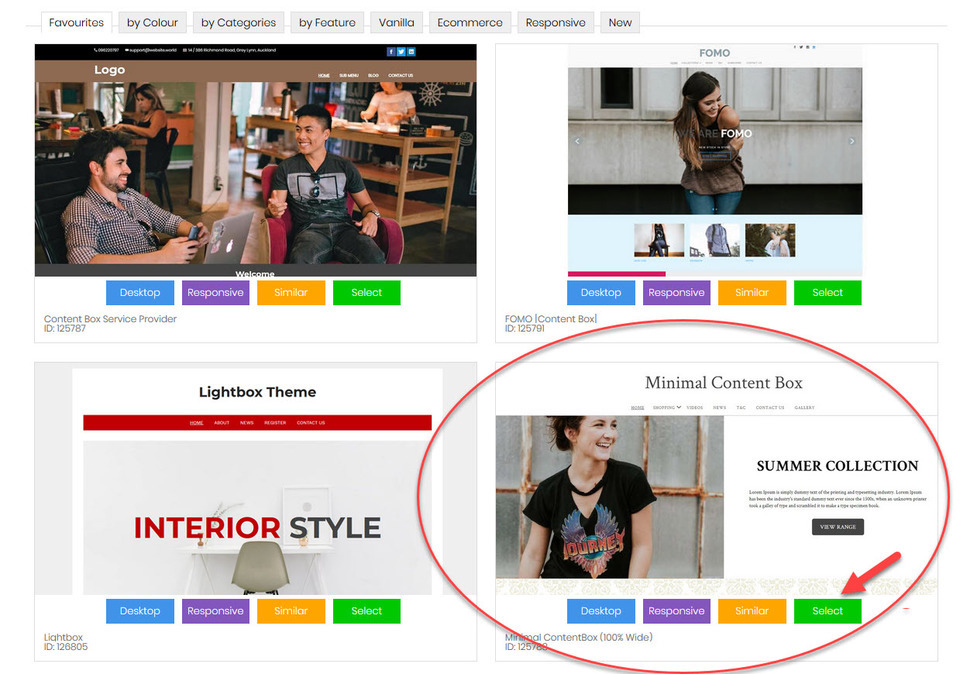
Next, choose from our range of professionally designed website templates. All our website templates are designed to be:
- SEO friendly
- Easy to customise
- Mobile responsive
- Fast loading
- Flexible for different industries
You can filter templates by:
- Colour
- Features
- Categories
- eCommerce functionality
This makes it easy to find the perfect design for your website.
For this demonstration, we are using the Minimal ContentBox (100% Wide) template.
Select Your Website Type
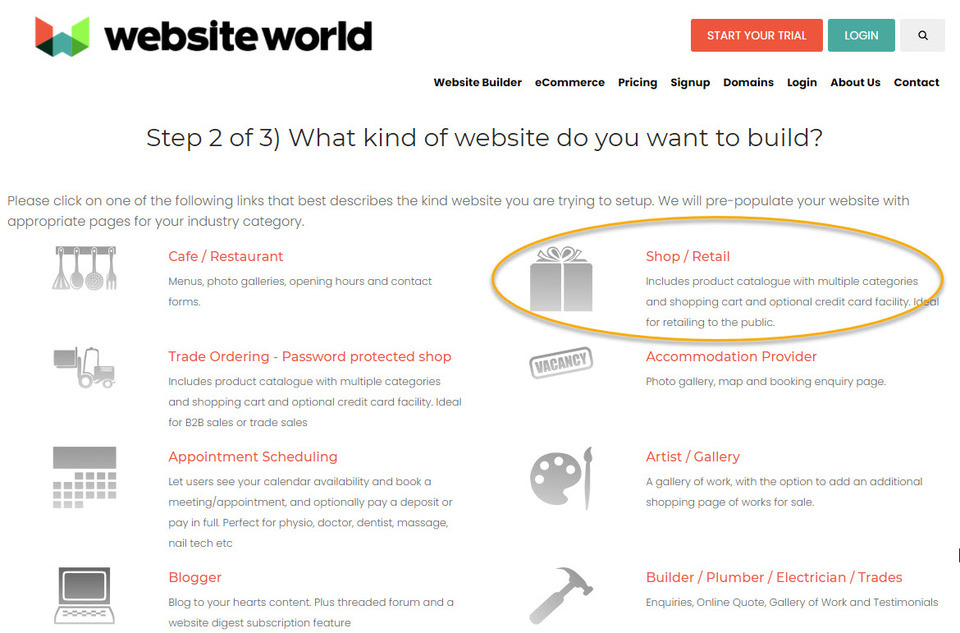
After you've chosen your template, you'll be asked to select the type of website you want to build (restaurant, shop, trade ordering, accommodation, artist, blogger, appointment scheduling, tradie). This lets us pre-populate your website with the appropriate pages for your industry. We've chosen to build a shop for our demonstration, as this includes a built in shopping cart to sell online with.
After choosing your template, you’ll be asked what type of website you want to build.Options include:
- Restaurant website
- Online shop
- Trade ordering site
- Accommodation website
- Artist portfolio
- Blog
- Appointment scheduling
- Tradie website
Create Your Account
Next, you will enter:
- Your website name
- Your contact details
After submitting your details, you will receive a confirmation email.
This email includes:
- Your login link
- A temporary password
- Access to your website dashboard
Once logged in, you will see the Welcome Dashboard, where you can manage every aspect of your website.

3. Choose Your Colours and Fonts
You can customise the appearance of your website by adjusting fonts, colours and styling.
To change fonts:
- Go to the Design menu
- Select Fonts
Here you can edit:
- General font type
- Heading font
- Font size
- Line height
- Font colours
You can also upload your own fonts from providers such as Google Fonts.
Customise Your Website Colours
To change your website colours:
- Open the Design tab
- Select Colours and Background
Here you can edit colours across different parts of your website.
Colours are identified using HEX codes, which provide a precise colour reference.
You can either:
- Enter the HEX code manually
- Use the Colour Wizard to select colours visually
Once you are happy with your design, click Save Changes and then Publish.
4. Add Your Content
Website templates are highly flexible and allow you to customise your pages easily.
You can:
- Add or remove pages
- Change text and headings
- Insert images and videos
- Add buttons and calls-to-action
- Link to other pages or external websites
You can edit content using several editors, including:
- Word-style editor (TinyMCE)
- Drag-and-drop editor
- ContentBox editor
These tools make it simple to create a professional website layout without needing design experience.
5. Register Your Domain Name
Your domain name is your website’s online address.
If you’re unsure what domain name to choose, read our guide on tips for choosing a domain name.
If you already own a domain hosted elsewhere, it can be transferred to Website World free of charge.
You can also manage domains through the Domains/Email section of the CMS.
To register a new domain:
- Go to Domains/Email in your dashboard
- Select Register New Domain Name
Most New Zealand businesses choose:
-
.co.nz -
.nz
Domains are typically registered for one year but can be secured for up to 10 years.
6. Make Your Website Live!
Once you’re happy with your website, it’s time to publish it.
Simply click the Go Live button and activate your website hosting.
Hosting can be paid monthly or yearly. Many users choose automatic payments to ensure their website stays online.
After your website goes live, you can continue to:
- Add new pages
- Update content
- Improve your design
- Expand your website
For SEO reasons, we recommend not deleting old pages or products. Instead, mark them as hidden or out of stock.
Need Help? We're Here to Support You
The team at Website World is always available to help you succeed online.
You can also explore our training guides and tutorials for additional support.
And remember — the websites we host are super fast, helping your website load quickly and perform well in search engines.
