
It is easy to take bookings for services from customers. This feature might be used by physios, dentists, massage therapists, or tour operators running regular service times.
Kundenerlebnis
- Customer adds services (aka products) to their cart.
- Some services can have an optional duration selection.
- Services are assumed to be completed sequentially (one after the other)
- Beim Bezahlvorgang wird der Kunde aufgefordert, einen Buchungszeitraum (für die Gesamtdauer aller benötigten Leistungen) auszuwählen.
- The customer will only see availability for the staff/resources who are available to complete all the services required.
- The availability calendar has many formats, so the customer can quickly find days and times that are suitable.
- If there are multiple staff/resources matching a booking, the customer can select a specific staff member to complete the booking.
- Der Kunde kann aufgefordert werden, eine Anzahlung zu leisten, den vollen Betrag zu bezahlen oder gar nichts zu bezahlen und die Bestellung abzuschließen.
Getting Started
1. Configuring Services Booking
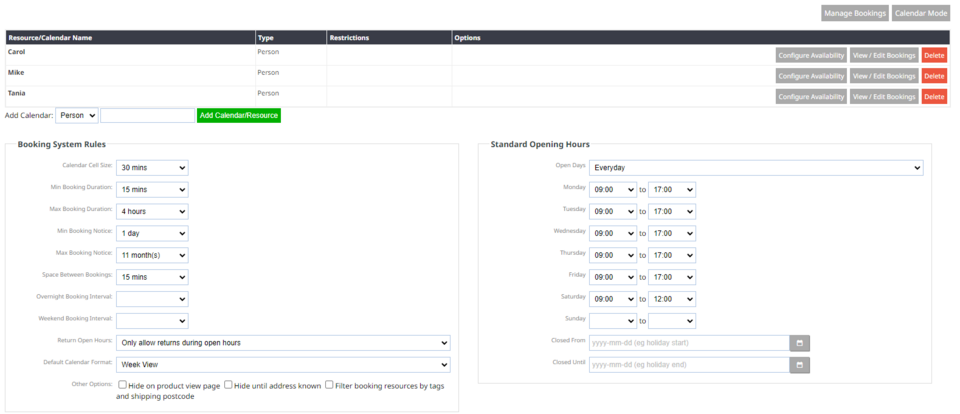
- To do this go to E-Commerce > Setup Options (under bookings section)
- First configure your normal office hours.
- Configure any spacing you want between bookings.
- Configure the minimum notice you want before taking a booking, eg to avoid same day bookings.
- Configure the maximum notice, to avoid customers booking you out of your future holidays.
- If you are selling tours or training sessions, you should set the calendar interval to something longer than the service duration, so that all services sold will be bunched into preferred timeslots.
2. Add your Staff or Rooms
- Fügen Sie alle Ihre Mitarbeiter, Räume oder Fahrzeuge als „Ressourcenkalender“ hinzu. Geben Sie alle Fähigkeiten oder Merkmale der Ressource für die spätere Verwendung an.
- For each resource calendar, only configure their hours if it's different to the standard office hours. Customers can only book what is within the standard office hours, but it's understood some staff don't work some days. If a staff member doesn't work some days, then you can either add a recurring booking to that day, or you can setup the hours that they do work.
- If needed view the plans and pricing page for the amount of calendars you can use on the site.
3. Add each Service as a Product
- Fügen Sie jede Dienstleistung als neues Produkt vom Typ „buchbare Dienstleistung“ hinzu.
- Choose ADD PRODUCTS, then ADD BOOKABLE SERVICE as the product type.
- A bookable service product is one that has a timeframe (perhaps a range) and the purchase of multiple units, or multiple services, will result in consecutive resource bookings (eg a longer over all booking time, as each service will be completed sequentially, not concurrently).
- For each service, you can optionally specify tag filters, so that only matching resources are used. This is important if you have skilled staff and unskilled staff, and only skilled staff can perform a particular service. If you leave the filters blank, then all your available staff are made available for booking.
- If you are selling tours or training sessions for multiple people, then you will need to add 1 calendar per "seat" or "space".
4. Setting deposits
Deposits can be set per-product via the PRICING tab when editing the product, or you can set a payment option itself to allow deposits via its payments settings (this would be applicable for any product that uses the gateway)
Restricting Services/Products to specific Staff
When editing the bookable product You can use the Calendar Filter Tags: Setting in the Products Bookable Item Settings to restrict bookings to specific Staff Members.
- In the product booking settings Set the required filter name in the Calendar Filter Tags: Area e.g. Massage.
- In the Configure Resources area, click the Configure Availability option for the required person.
- In the Resource Tags field, add the relevant tag e.g. Massage. You can add multiple resource tags seperated with a comma.
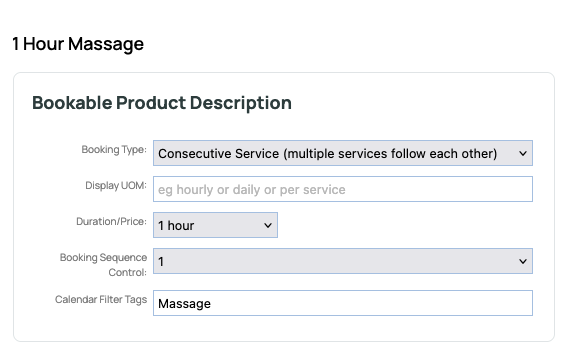
A Bookable Product with a Massage Calendar Filter Tag set.
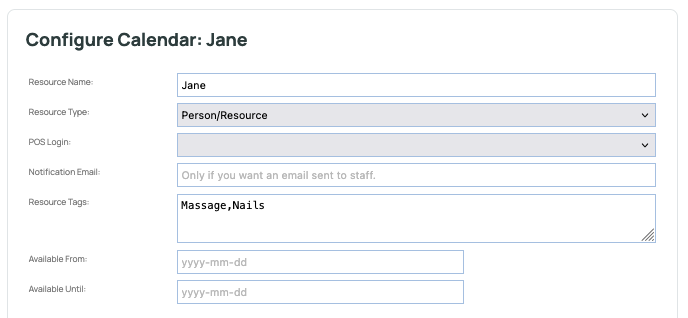
The resource Jane tagged as available for both Massage and Nails
When the customer clicks the massage Bookable Product, only the people who have the Massage resource tag will be available for the booking.
Ensure that at least one person has the tag added to their availability settings.
If no Calendar Filter Tag is set in the Bookable Product, every calendar resource will be available for the booking.
If only one person/resource is tagged for the Bookable Product, there will be no resource selection screen it will go immediately to their Calendar.
Booking Management
Buchungen verwalten
- Following the completion of a successful booking, you can manage the bookings in the back end, either under the Bookings tab on the left hand menu or under the E-commerce tab.
- You can assign a booking to a new staff member
- You can change the time of a booking
- You can view the ecommerce order related to a booking under Orders.
Kalendersynchronisierung
- Alle Buchungen werden mit Google Kalender synchronisiert, sodass Sie Ihre Buchungen ganz einfach über Ihre bevorzugte Kalenderanwendung oder sogar auf Ihrem Smartphone verwalten können.
- Change a booking on your phone calendar, and it will update automatically on our server. (you will need to manually contact your customer about the change)
- Change a booking on our system, and it will automatically update on your phone. (Synchronisation happens every hour or so, depending on how busy your booking calendar is.)
More From This Section
FAQ Topics
The Basics
Building your site
- Pages
- Content Editor Modes Explained
- - DRAG DROP Editor (Default)
- - CONTENTBOX Editor (Advanced)
- - WORD STYLE Editor (TinyMCE)
- - LIVE Editor (Click to Edit Mode)
- Styling Content
- Images / Backgrounds
- Banners and Sliders
- Uploading content
- Design Templates
- Formulare
- More Q & A
- Menus
- Mobile Styling and Optimisation
Advanced Page Types
E-Commerce
- Shopping Basics
- Product Pricing, Currencies
- Category Management
- Produkte
- Product Options
- Layout and Formatting
- Zahlungsoptionen
- Freight - Couriers
- Processing Orders
- Orders / Invoices
- Advanced Ecommerce
- Plugins
- Großhandel
- Bookings Management System
- Stock & Quantities
- Vouchers, Discounts, Loyalty Points
- Selling Photos / Prints
- Shopping Cart Add-on Page types
- Advanced APIs / Add ons
- Kassensystem (POS)
- Berichte
Email & Membership
- Member Management
- Members Pages / Template Customisations
- From Addresses and Reply To Email Notifications
- Global Enquiry form options
- Standard Field Names
- Webmail
- Bulk Email
- CRM Features
- Email Campaigns
- Forums & Blogs
- Pop3/Imap Email Services
- Scams and Hoaxes
- Lead Magnets / Growing Your Customer Database
Promoting your site
Advanced
- Power User Options
- Form Spam Filtering
- Wordpress
- PHP Setup
- [TAGS]
- FONTS - Embedding Web Fonts
- jQuery snippets
- FONTS - Uploading local font files
- Search External Links / Import external content
- HTML / CSS Snippets
- Loading additional Material Symbols styles
- FAQ Help Map
- Advanced Template Customisation, CSS, etc
- Languages and Translations
- Importing Content from Another Platform
