
Add a list of products to share with friends and Family
Der Bridal Wishlist option is different from the standard Wish List option where customers can save products.
This option allows a customer add a list of products to a shopping cart, which can then be shared as a Bridal Wish list with friends and family.
The Bride/Groom Perspective:
- Das glückliche Paar sucht sich die gewünschten Hochzeitsgeschenke aus und legt sie in den Warenkorb.
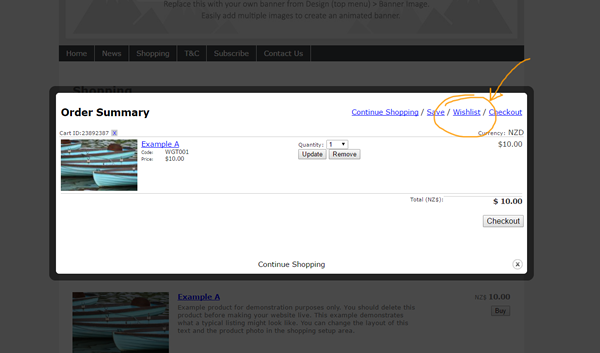
- On the shopping cart page (before going to the checkout page) they will have an options to Continue Shopping / Save / Wunschliste / Checkout - visible at top right on the popup window. (screenshot below)
- Clicking WISHLIST will prompt to save a custom wishist.
- Sie geben die Standardversanddetails, den Namen der Veranstaltung und das Datum der Veranstaltung ein.
- Sie drücken auf Speichern und erhalten daraufhin eine URL auf dem Bildschirm und per E-Mail, die sie mit Freunden und Familie teilen können.
- The couple may add/remove items from their list - or delink the list - at any time.
The Friends and Family Perspective:
- Freunde und Familie folgen dem speziellen Link, den das Brautpaar bereitgestellt hat.
- Sie sehen eine Liste der gewünschten und verfügbaren Artikel.
- Sie können Artikel von der Wunschliste oder andere gewünschte Artikel kaufen.
- Sobald die Bestellung eines Artikels abgeschlossen ist, wird die entsprechende Menge von der Wunschliste abgezogen. Dadurch können verschiedene Personen Artikel in unterschiedlichen Mengen bestellen.
- Sollte jemand versuchen, mehr als die gewünschte Menge zu kaufen, erhält er eine Fehlermeldung und die Menge im Warenkorb wird reduziert. Dies kann einigen Nutzern im letzten Schritt des Bestellvorgangs passieren, wenn jemand anderes gleichzeitig denselben Artikel gekauft hat.
- Die Versanddetails für die Bestellung entsprechen standardmäßig den Angaben des Brautpaares. Der Käufer trägt die Versandkosten für seine Artikel. Er kann die Lieferadresse jedoch nach Belieben ändern.
The Shop Owners Perspective:
- Enable the wedding list feature by checking the Include Gift Wishlist / Bridal Registry Option checkbox located in the Shopping Setup area > Shopping Cart Options.
- Im Berichtsbereich sind „laufende Hochzeitslisten“ mit einigen Verwaltungsoptionen verfügbar.
- Wenn Artikel nicht bezahlt werden, ist ein manueller Eingriff erforderlich, um die gewünschte Menge zu erhöhen... Und Sie müssen möglicherweise die unvollständige Bestellung löschen, damit der Kauf nicht auf der Wunschlistenseite angezeigt wird.
- Sie müssen die Ausführung Ihrer Bestellungen selbst koordinieren, da diese Schritte bei der Bestellung nicht berücksichtigt wurden.
- Sie können, wenn Sie möchten, über den normalen Frachtverwaltungsbereich Sonderpreise für den Versand von Hochzeitslisten anbieten.
Screenshot below: The save cart to wishlist link.
Example Screenshots

When the Bride/Groom has added the products and clicked the WISHLIST link in the cart as shown above, they can add some details about the list, once saved a link is generated as shown above, which is also emailed out to the Bride/Grooms email address.

When the Friends and Family click the link, they are shown the list of items still available to purchase.
How to enable the Bride/Groom Wishlist option:
Check the Include Gift Wishlist / Bridal Registry Option checkbox at the side of the CHECKOUT OPTIONS area - accessible via E-COMMERCE > DISPLAY OPTIONS (Checkout Options button)
More From This Section
FAQ Topics
The Basics
Building your site
- Pages
- Content Editor Modes Explained
- - DRAG DROP Editor (Default)
- - CONTENTBOX Editor (Advanced)
- - WORD STYLE Editor (TinyMCE)
- - LIVE Editor (Click to Edit Mode)
- Styling Content
- Images / Backgrounds
- Banners and Sliders
- Uploading content
- Design Templates
- Formulare
- More Q & A
- Menus
- Mobile Styling and Optimisation
Advanced Page Types
E-Commerce
- Shopping Basics
- Product Pricing, Currencies
- Category Management
- Produkte
- Product Options
- Layout and Formatting
- Zahlungsoptionen
- Freight - Couriers
- Processing Orders
- Orders / Invoices
- Advanced Ecommerce
- Plugins
- Großhandel
- Bookings Management System
- Stock & Quantities
- Vouchers, Discounts, Loyalty Points
- Selling Photos / Prints
- Shopping Cart Add-on Page types
- Advanced APIs / Add ons
- Kassensystem (POS)
- Berichte
Email & Membership
- Member Management
- Members Pages / Template Customisations
- From Addresses and Reply To Email Notifications
- Global Enquiry form options
- Standard Field Names
- Webmail
- Bulk Email
- CRM Features
- Email Campaigns
- Forums & Blogs
- Pop3/Imap Email Services
- Scams and Hoaxes
- Lead Magnets / Growing Your Customer Database
Promoting your site
Advanced
- Power User Options
- Form Spam Filtering
- Wordpress
- PHP Setup
- [TAGS]
- FONTS - Embedding Web Fonts
- jQuery snippets
- FONTS - Uploading local font files
- Search External Links / Import external content
- HTML / CSS Snippets
- Loading additional Material Symbols styles
- FAQ Help Map
- Advanced Template Customisation, CSS, etc
- Languages and Translations
- Importing Content from Another Platform
