
While winter can be rather dull and dingy, your website doesn't have to be! In our May newsletter, we're focusing on an awesome new template, and the ways you can use images on your website to increase conversions. We're also going to explain how you can optimise your images and show you the different ways you can upload images to your site.
Our May 2018 newsletter:
- Ventura - New Content Box Template!
- Sehenswürdigkeiten des Monats
- Join our new business networking group, with free directory listing
- Using Images to Increase Conversion Rates
- Optimising Your Images
- Uploading Images to Your CMS
- Understanding Your Role with GDPR
- Website-Migration
- Systemaktualisierungen
- Schulungswebinare (Neue Sitzungen)
- Empfohlene Support-Videos
- Neue Facebook-Supportgruppe
- Gewinnen Sie ein E-Commerce-Paket im Wert von 4600 $
- Professionelle Website-Designoptionen
- WordPress- und PHP-Websites
- Benötigen Sie eine Schulung?
- 25 % Rabatt auf das Hosting
- Gründen Sie Ihr eigenes Unternehmen – Reseller-Optionen
- Coole Links/Systemlinks
- Webseiten des Monats
Ventura - New Content Box Template
We're excited to introduce a brilliant new website template which will soon be available for you to use!
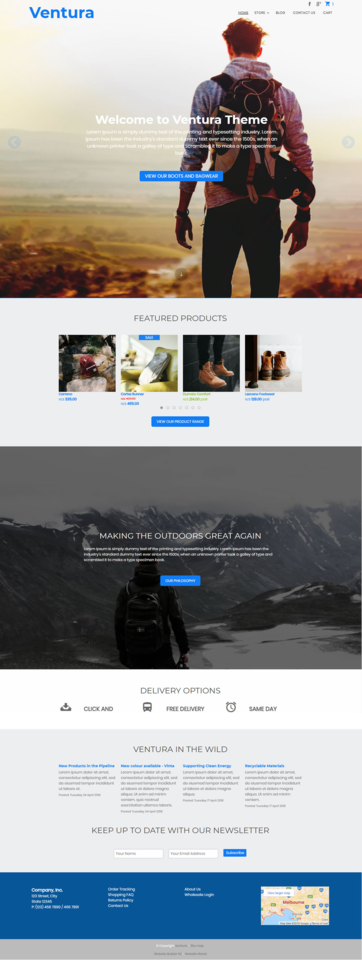
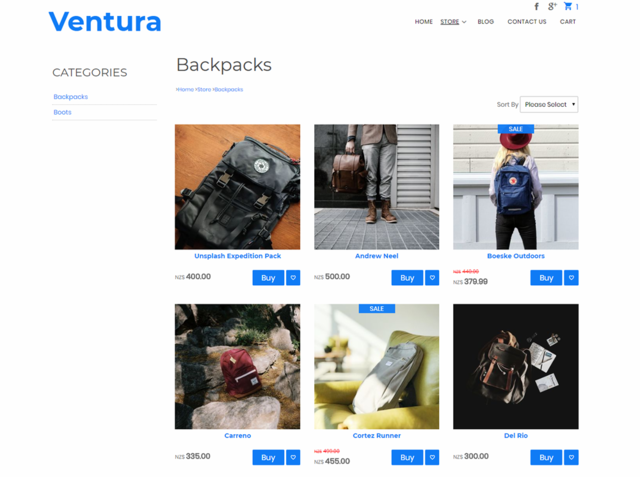
New Content Box TemplateAndrew von Fury Ltd, has been working on a great new template, Ventura, based on maximising our new Content Box editor. This template incorporates100% wide background image strips, with a mobile responsive drag and drop content editing feature over the top. There's a re-positionable featured products area, and a new combined social icons with a shopping cart counter. The possibilities of home pages are now limitless! Below you'll see another screenshot of the Ventura template in action, demonstrating how a shopping catalogue might look on the same site. Stay tuned for updates on when you can try out the Ventura template on your website! |
 |
Webseite des Monats
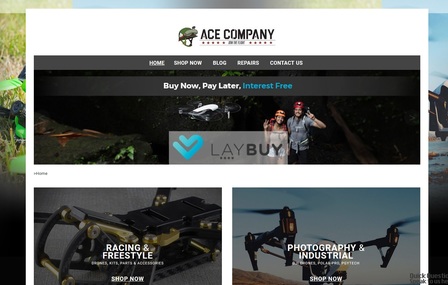
The Ace Company website is a great example of a well branded and easy to navigate site. Selling drones and their components, it uses a range of images to not only promote their products, but to also creates an active and exciting feeling for visitors to experience.
You can take a look at their site Hier.
Reseller-Website des Monats
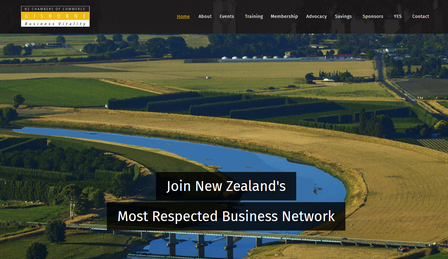
Reseller WebFoot was commissioned to create the Gisborne Chamber of Commerce website and together with Andrew's graphic design skills, they have designed an attractive and easy to navigate site.
Ein besonderes Merkmal dieser Website ist das rotierende Fotobanner auf der Startseite, das abwechselnd Bilder von Orten und Personen aus der Umgebung zeigt. Auch die anderen Seiten sind übersichtlich gestaltet, und die große, statische Fußzeile auf jeder Seite ermöglicht den schnellen Zugriff auf Kontaktdaten und den direkten Zugriff auf wichtige Seiten mit nur einem Klick.
You can see this website Hier.
Join our new Business Networking Group
Wir haben ein neues Facebook-basiertes Geschäftsnetzwerk. Please join the group, even if you are not a customer of website world.
Alle Unternehmen haben außerdem Anspruch auf eine kostenlose Verzeichniseintrag. If you are a website builder customer, you can manage your directory listings from within our CMS under SEO tab, to ensure your listing gets enhanced listing status. If you are not a customer of website world, then you can register a new listing in the directory.
Using Images to Increase Website Conversions
Images are incredibly powerful tools to use on your website. For many businesses, our websites are the only way in which our clients or customers can learn who we are, what we can help them with and whether they'd like to do business with us.
Here are four ways in which you can use your website images to increase customer conversions:
- Consider emotions - use images to convey to visitors how they will feel upon buying and using your products or services. This can include photos of people using your products.
- Avoid overusing stock images - while some stock images are great, many aren't. The problem with using stock images are that they are not personalised to your business and they can be used by anyone. Try using professionally taken photos related to your business instead.
- Use large, clear images. Research has shown that larger images promote higher conversion rates. For tips on taking product photos, take a look at our article Wie professionelle Website-Fotografie Ihren Umsatz steigern kann.
- Offer multiple product views - as your website is often all a customer has to make a decision about purchasing your product, you need to give them plenty of information. This includes showing your products at different angles, plus in use.
Optimising Your Website Images
Optimising an image simply means saving it in a web friendly format and an image of a suitable file size.There are three things you will need to consider:
- the actual size the image appears on a screen
In our CMS, we have two image sizes (what you see on your screen):
- the original size of the image you uploaded, which may be reduced depending on the template you are using and where the image is going.
- Ein 320x320 Pixel großes Vorschaubild. Dieses Format wird nur in Galerien, Produktlisten und Verzeichniseinträgen verwendet, wo viele Bilder auf einer Seite vorhanden sind.
Here are the common image sizes we offer:
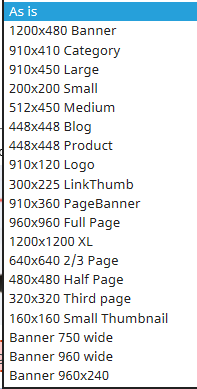
Where there is no default image size, you'll be automatically suggested an maximum image size of 960x960 pixels. You can however override this by selecting the button Change Default Image Sizes.
2. die Dateigröße des Bildes
The file size is the amount of data or information saved within an image. There are many websites online which provide free or paid tools for you to shrink the file size of your images including Image Optimizer, Optimizilla and Kraken Image Optimizer.
The aim when optimising your images is not to reduce the quality of the image, though in some cases this does happen, but to shrink the file size.
3. der Bilddateityp
There are two file formats you can use for your website:
- JPEG - this is best for photos
- PNG - this is best for logos and images created by a graphic designer
When you save your images, you can choose which file type it is by right clicking in the drop down box where you enter the filename. It's a good idea to give an image a meaningful file name, such as bluebabybib.jpeg not 343232.jpeg as it helps with your website SEO as search engines can 'read' text, not images.
Uploading Images to Your CMS
When it comes to uploading images onto your website, there are multiple ways to do this. They include:
- Dragging images from your computer into the open web browser you are using to work in your CMS. Our system will them automatically import these images. This can be done in different areas of your CMS such as with Galleries and Products.
To be able to drag the image, you will need to have the file open where the image is saved and then click and hold on the image to bring it over to the text 'Or drag & drop a photo here (JPEG, PNG or GIF).
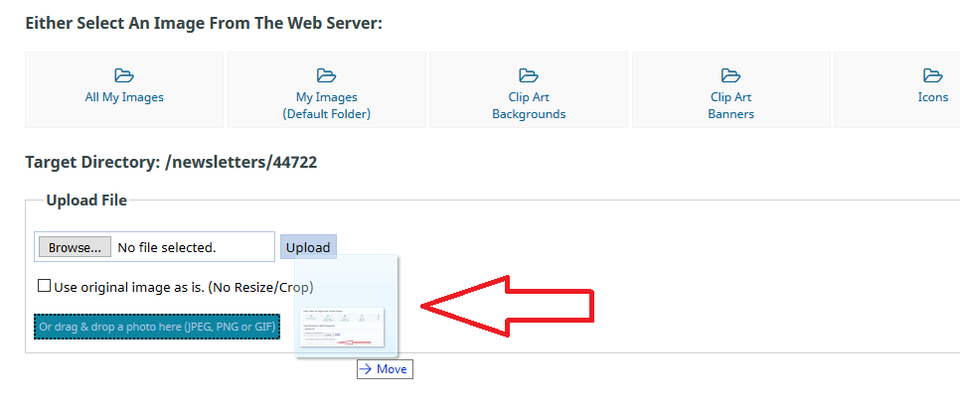
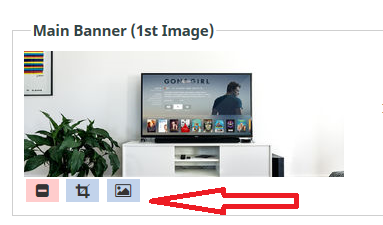
- You can drag a photo into your CMS wherever you see the image icon. The image will them automatically upload your image. Or you could click on the image icon to have access to additional controls over how your image looks, such as cropping and rotating.
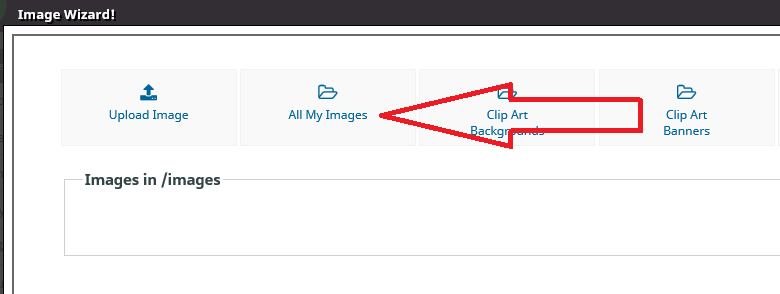
- You can use an image you have previously uploaded. It will be found in the Image Wizard, under the tab All My Images.
- Using the Image Wizard, you can upload a new image file using Upload File. Simply choose the Browse button and it will open access to your computer files, from where you can select an image. Click on the image and then back in the CMS, click on Upload. You are then given the option of editing your image and how you would like it to appear on your website, depending on where you are uploading it.
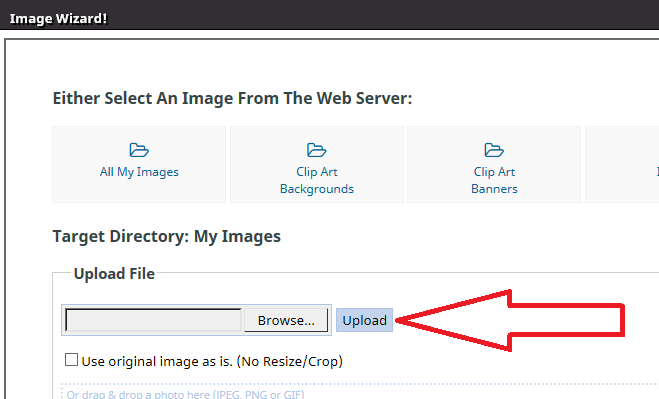
- In the Image Wizard, you can copy an image which is hosted on another website. Using the Firefox browser, simply right click on the image you want and select the option which says Copy Image Location. Then paste that image URL into the Import Image box. You can also enter the URL of the page the image is on, but this may upload every image on that page.

It's important to remember though that you should be optimising your images before uploading them.
Die Datenschutz-Grundverordnung (DSGVO) verstehen
Aufgrund zunehmender Bedenken hinsichtlich des Datenschutzes von EU-Bürgern im Internet wird die Datenschutz-Grundverordnung (DSGVO) die bisherige Datenschutzkommission (DSK) ersetzen. Die DSK wurde nämlich eingerichtet, bevor das Internet die heutige Form annahm. Ziel der DSGVO ist es, die Sicherheit personenbezogener Daten, die Unternehmen innerhalb der EU speichern, zu erhöhen.
The information which the GDPR is concerned with includes:
- Namen, Adressen, Ausweisnummern
- Gesundheits- und Geninformationen
- Politische Meinungen
- Sexual orientation
- Webinformationen wie IP-Adressen, Cookie-Daten und RFID-Tags
- Biometric data
- Ethnic or racial data
You (and your company) are subject to the GDPR if you store or process information about citizens of the EU within EU states, even if you do not have a physical presence within the EU.
Take a read of our informative article Die Datenschutz-Grundverordnung (DSGVO) verstehen for details about how you can comply with the GDPR and Web Widget's interpretation of the GDPR.
This is a must read for all website owners.
Website-Migration mit optimaler SEO-Linkstruktur
Wir können jetzt Websites von den meisten anderen CMS- und Shopping-Plattformen importieren und dabei die perfekte SEO-Linkstruktur sowie die vollständige Replikation der bestehenden Vorlage und Inhalte beibehalten.
Der Migrationsdienst erstellt eine perfekte Momentaufnahme aller SEO-Meta-Tags und URL-Dateinamen, um sicherzustellen, dass sich alle Seiten am richtigen Ort befinden und dieselben SEO-Informationen enthalten, die Google vor der Migration gewohnt war.
Nach der Migration können Sie Ihre Meta-Tags mithilfe unserer SEO-Tools selbst verwalten und Ihr Google-Ranking weiter verbessern, ohne sich um die Einrichtung von 301-Weiterleitungen kümmern zu müssen. Dieser Schritt ist nicht erforderlich, da Ihre Sitemap erhalten geblieben ist.
Systemaktualisierungen
- Neuer URL-Weiterleitungsdienst im SEO-Tab
- Bereich zur Erstellung von Mitgliederbildern für Mitglieder, die Inhalte beisteuern.
- Ziehen Sie Bilder per Drag & Drop in ein beliebiges Bild-Upload-Feld.
- Neue Tools für die Website-Migration
- Image Wizard wurde überarbeitet, um die Upload-Funktion für große Bilder zu verbessern.
New Training Webinars
|
 |
Empfohlene Support-Videos
|
Andrew hat fleißig neue Support-Videos erstellt. |
 |
Facebook-SupportgruppeMöchten Sie sich mit anderen Website World-Kunden vernetzen? Und Zugang zu allgemeinem Geschäftssupport von anderen Kunden sowie zu einer Fragerunde mit unseren Webdesignern und Wiederverkäufern erhalten? Tritt der neuen Facebook-Gruppe bei Wenn Sie mit Website World positive Erfahrungen gemacht haben, würden wir uns sehr über eine Bewertung freuen. Rezension auf unserer Facebook-Seite. |
 |
Gewinnen Sie ein E-Commerce-Paket im Wert von 4600 $
Wir haben einen fantastischen Preis für dich zu gewinnen.
- Premium-SSL-Webhosting für Unternehmen (1 Jahr)
- Professionelles Webdesign oder Web-Relaunch (20 Stunden)
- Konfiguration einer E-Commerce-Website (7 Stunden)
- Suchmaschinenoptimierung (3 Stunden)
Gewinner der Ziehung im Dezember 2018: Cats n Clover
Unser nächster Wettbewerb findet im Mai 2018 statt.
Aber Moment mal, es gibt noch mehr. Wenn Sie der Werber des Gewinnerkunden sind, gewinnen Sie ein Jahr lang kostenloses Webhosting.
Bitte teilen Sie diesen Link, damit Ihre Freunde ihre eigene Testwebsite einrichten können. Solange sie eine Testwebsite haben und unseren Newsletter abonniert bleiben, nehmen sie an der Verlosung teil. Und Sie gewinnen ein Jahr kostenloses Webhosting, falls einer Ihrer Partnerkunden den Hauptpreis gewinnt.
Link zur Teilnahme am Empfehlungswettbewerb: https://www.website.world/Win-Free-Ecommerce-Website-Competition.html?aid=[MBR_ID]
Benötigen Sie professionelle Hilfe?
In Neuseeland und weltweit gibt es professionelle Webdesigner, die Ihnen bei der individuellen Gestaltung Ihrer Website helfen können. Unser hauseigenes Team bietet Ihnen eine Website-Optimierung für nur 100 NZD zzgl. MwSt. an. Alternativ können Sie einen unserer gelisteten Webdesigner kontaktieren, um ein Angebot für eine komplette Website-Gestaltung oder -Überarbeitung zu erhalten. Unabhängig davon, für welchen Webdesigner Sie sich entscheiden, bleibt Ihre Website stets mit unserem leistungsstarken Content-Management-System ausgestattet, sodass Sie Ihre Website auch langfristig problemlos aktualisieren können.
WordPress-/PHP-Hosting (superschnell) verfügbar
Wir können jetzt PHP- und WordPress-Websites auf unseren neuen und verbesserten PHP-Webservern hosten, mit einem Zielwert von 5 % CPU-Auslastung, wodurch 95 % freie Kapazität zur Verfügung stehen, um sicherzustellen, dass Ihre Websites jederzeit schnell geladen werden.
Unsere PHP-Server sind lastverteilt und verfügen über eine MultiAZ-Datenbankausfallsicherheit, um maximale Verfügbarkeit zu gewährleisten. Alle PHP-Websites erhalten ein kostenloses SSL-Zertifikat und kostenloses HTTPS-Hosting. Wir unterstützen die neueste Version von WordPress 4.8, die auf PHP 7 basiert. Die Hostinggebühren entsprechen denen von Websites, die auf unserer CMS-basierten Plattform erstellt und gehostet werden.
Benötigen Sie eine Schulung zum Website-Baukasten?
Es gibt verschiedene Trainingsmöglichkeiten

Erhalten Sie 25 % Rabatt auf Ihr Webhosting, indem Sie einen Freund werben.
Wussten Sie schon, dass Sie 25 % Rabatt auf Ihr Hosting erhalten, wenn Sie einen Freund für unseren Website-Baukasten werben? Bei vier geworbenen Freunden ist Ihr Webhosting quasi kostenlos! Und nicht nur das: Auch Ihre Freunde bekommen den zweiten Monat Webhosting gratis. Das ist ein netter Anreiz für sie, unseren Service auszuprobieren, und gibt uns die Möglichkeit, Ihnen den Rabatt zu gewähren. Beide Rabatte gelten auch für Ihre zweite und alle weiteren Websites. Ob es Ihre eigene ist, die eines Freundes, Familienmitglieds oder einer fremden Person – die Rabatte gelten, sobald beide Websites online sind. Bitte teilen Sie uns die Empfehlung so früh wie möglich mit.

Wiederverkäuferoptionen
Wir haben ein fantastisches neues Angebot für Webdesigner und ambitionierte Netzwerker. Wir statten jeden interessierten Webdesigner kostenlos mit allem aus, was er für den Einstieg in die Webentwicklung benötigt.
- Es fallen keine Einrichtungsgebühren an, und es müssen keine Verträge unterzeichnet werden.
- Sie erhalten 2+ US-Dollar für jeden verkauften Domainnamen (basierend auf einer unverbindlichen Preisempfehlung von 19 US-Dollar pro Jahr).
- Sie erhalten eine Provision von (25%-50%) für das Hosting.
- Sie können alle Inhalte, Domains, E-Mails usw. Ihrer Kunden ganz einfach mit nur einem Login verwalten.
- Wir kümmern uns um alle Abrechnungsmodalitäten, sodass kein Verwaltungsaufwand entsteht.
Kennen Sie jemanden, der daran interessiert sein könnte? Dann leiten Sie ihn bitte auf unsere Händlerseite weiter. Wir bieten eine Vermittlungsprovision von 100 US-Dollar für jeden Bestandskunden, der uns einen neuen Händler vermittelt, der innerhalb der ersten drei Monate mindestens drei Websites live schalten kann.
Hilfe benötigt! ist zur Stelle...
Es gibt zahlreiche Anlaufstellen, an denen Sie Antworten auf Fragen zum Erstellen Ihrer Website und zum Hinzufügen von Funktionen finden (und davon gibt es viele), und die Suche ist für Sie kostenlos:
Wenn Sie die benötigte Antwort nicht finden können – dann können Sie Kontakt – Webdesigner oder eine Anzeige einreichen Support-Ticket

Coole Links
- http://www.wikihow.com/Clear-Your-Browser's-Cache - Leeren Sie Ihren Browser-Cache.
-
http://word2cleanhtml.com Bereinigt Word-Dokumente für den CMS-Editor
-
GoogleFonts - Online-Webfonts
-
http://pinterest.com/ - Eine Pinnwand für soziale Netzwerke
-
http://pixlr.com/ - Online-Fotoeditor
-
http://www.photoshop.com - Online-Fotoeditor
-
http://www.jotform.com/ - Online-Formulargenerator
-
www.needanerd.co.nz - IT-Nerds in ganz Neuseeland
-
www.geeksonwheels.co.nz - IT-Experten in ganz Neuseeland
-
https://www.pexels.com/ - Kostenlose Stockfotos
-
www.ninite.com - die beste Methode, um neue Software auf einem neuen Computer zu installieren
-
www.2talk.co.nz - günstigere VoIP-Anrufe und Weiterleitung eingehender 0800-Anrufe
Alle diese Links und mehr finden Sie auf unserer neuen Toolbox-Seite:
Aktuelle Go-Lives
Hier ist eine Auswahl einiger unserer letzten Go-Live-Veranstaltungen.
- https://www.percypowerpublishing.co.nz
- https://www.contractcontrol.nz
- http://www.twd3pl.co.nz
- http://www.earthworkshire.co.nz
- http://www.spiritualskyincense.com/
- https://www.ballroomdancing.nz/
- https://www.businessnetworking.nz
- https://www.printedbooks.co.nz
- https://www.moonacrealpacas.co.nz
- http://www.monarchbookkeeping.co.nz
- http://www.medd.co.nz
- https://www.anomalywhangarei.nz
- http://www.mouterelavender.co.nz
- https://www.jewellerysupplies.nz
- https://www.pctimes.co.nz
- https://www.voodoomolly.nz
- https://www.notebooksbypeter.co.nz
- http://www.acecompany.co.nz
Weitere Beispiel-Websites ansehen
Bitte Kontaktieren Sie uns für weitere Informationen.
Vom Team von Web Widgets Ltd.
Website World – Kostenloser Website-Baukasten
Posted: 18 May 2018
