
While winter can be rather dull and dingy, your website doesn't have to be! In our May newsletter, we're focusing on an awesome new template, and the ways you can use images on your website to increase conversions. We're also going to explain how you can optimise your images and show you the different ways you can upload images to your site.
Tā mātou pānui o Mei 2018:
- Ventura - New Content Box Template!
- Nga Pae o te Marama
- Join our new business networking group, with free directory listing
- Te Whakamahi i ngā Whakaahua hei Whakanui i ngā Reiti Tahuri
- Te Arotau i ō Whakaahua
- Uploading Images to Your CMS
- Understanding Your Role with GDPR
- Te Hekenga Paetukutuku
- Whakahōu Pūnaha
- Whakangungu Paetukutuku (Watū Hou)
- Ngā Ataata Tautoko Matua
- Rōpū Tautoko Pukamata Hou
- Winihia te Mōkihi Tauhokohoko $4600
- Nga whiringa hoahoa paetukutuku ngaio
- paetukutuku Wordpress me PHP
- Me whakangungu koe?
- 25% hekenga mo te manaaki
- Tīmatahia tāu ake pakihi - ngā kōwhiringa kaihoko
- He hononga pai / hononga punaha
- Ngā paetukutuku o te marama
Ventura - New Content Box Template
We're excited to introduce a brilliant new website template which will soon be available for you to use!
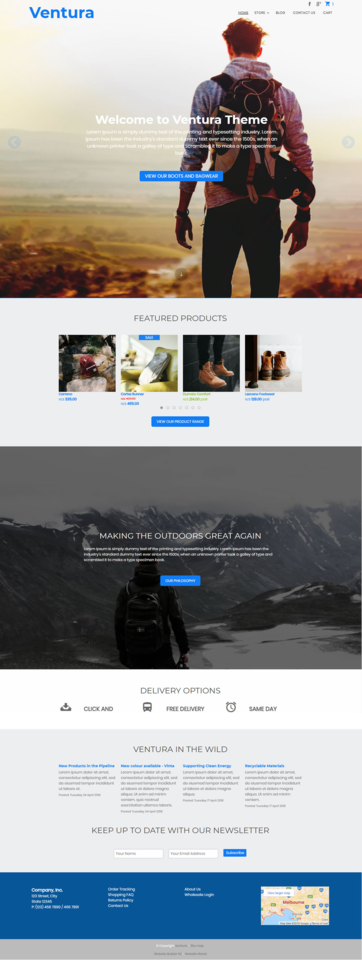
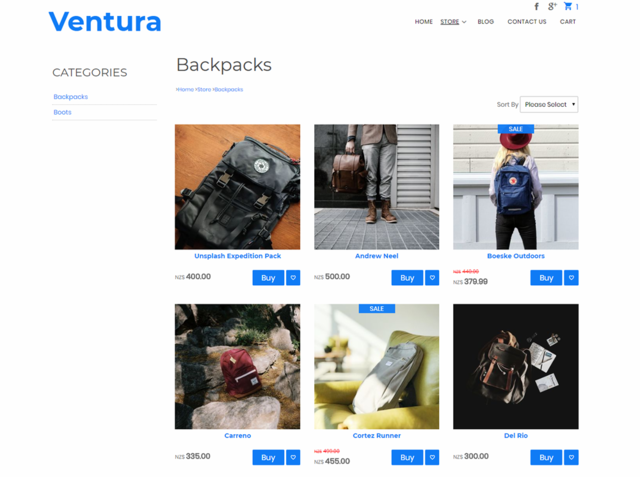
New Content Box TemplateAnaru mai Fury Ltd, has been working on a great new template, Ventura, based on maximising our new Content Box editor. Kei roto i tēnei tauira ngā rīpene whakaahua papamuri whānui 100%, me te āhuatanga whakatika ihirangi tōia me te whakataka e arotau ana ki ngā waea pūkoro. There's a re-positionable featured products area, and a new combined social icons with a shopping cart counter. The possibilities of home pages are now limitless! Kei raro ka kite koe i tetahi atu whakaahua o te tauira Ventura e mahi ana, e whakaatu ana me pehea te ahua o te putumōhio hokohoko i runga i taua pae. Stay tuned for updates on when you can try out the Ventura template on your website! |
 |
Pae o te Marama
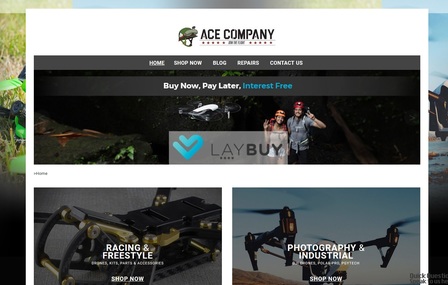
The Ace Company website is a great example of a well branded and easy to navigate site. Selling drones and their components, it uses a range of images to not only promote their products, but to also creates an active and exciting feeling for visitors to experience.
You can take a look at their site konei.
Pae Kaihoko o te Marama
Reseller WebFoot was commissioned to create the Gisborne Chamber of Commerce website and together with Andrew's graphic design skills, they have designed an attractive and easy to navigate site.
Ko tetahi ahuatanga nui o tenei papaanga ko te kara whakaahua hurihuri o te whaarangi ka huri i nga whakaahua o nga rohe me nga taangata. Ko etahi atu wharangi he ngawari te tiro, a ko te hiku nui o ia wharangi ka tere te uru atu ki nga kaiwhakamahi ki nga taipitopito whakapā me nga pao kotahi ki nga wharangi nui.
You can see this website konei.

Join our new Business Networking Group
Kua tīmata mātou i tētahi pūnaha hou e hangai ana ki Facebook roopu whatunga pakihi. Please join the group, even if you are not a customer of website world.
Ka whai mana hoki nga pakihi katoa ki te utu kore utu rārangi whaiaronga. If you are a website builder customer, you can manage your directory listings from within our CMS under SEO tab, to ensure your listing gets enhanced listing status. If you are not a customer of website world, then you can register a new listing in the directory.
Using Images to Increase Website Conversions
He taputapu tino kaha ngā whakaahua hei whakamahi i runga i tō paetukutuku. Mō te nuinga o ngā pakihi, ko ā mātou paetukutuku anake te huarahi e taea ai e ā mātou kiritaki te ako ko wai mātou, he aha ngā mea ka taea e mātou te āwhina i a rātou, me te hiahia rānei rātou ki te mahi pakihi ki a mātou.
Here are four ways in which you can use your website images to increase customer conversions:
- Whakaarohia nga kare-a-roto - whakamahia nga whakaahua hei whakaatu ki nga manuhiri ka pewhea o ratou whakaaro ina hoko me te whakamahi i o hua, ratonga ranei. Ka taea e tenei te whakauru i nga whakaahua o nga tangata e whakamahi ana i o hua.
- A ape i te whakamahi i nga whakaahua kararehe - ahakoa he pai etahi o nga whakaahua kararehe, he maha nga mea kaore. Ko te raru ki te whakamahi i nga whakaahua kararehe ko te mea kaore i te whakawhaiaro ki to pakihi ka taea e tetahi te whakamahi. Me ngana ki te whakamahi i nga whakaahua i tangohia ngaio e pa ana ki to pakihi.
- Whakamahia ngā whakaahua nunui, mārama hoki. Kua whakaatuhia e ngā rangahau he nui ake ngā reiti tahuritanga mai i ngā whakaahua nunui. Mō ngā tohutohu mō te tango whakaahua hua, tirohia tā mātou tuhinga. Te Huarahi e Whakanuia ai ō Hokonga e te Whakaahua Paetukutuku Pai.
- Offer multiple product views - as your website is often all a customer has to make a decision about purchasing your product, you need to give them plenty of information. This includes showing your products at different angles, plus in use.
Optimising Your Website Images
Optimising an image simply means saving it in a web friendly format and an image of a suitable file size.There are three things you will need to consider:
- the actual size the image appears on a screen
I roto i tā mātou CMS, e rua ā mātou rahi whakaahua (ko tāu e kite ana i runga i tō mata):
- the original size of the image you uploaded, which may be reduced depending on the template you are using and where the image is going.
- he pikitia karakōnui 320x320 pika. Ka whakamahia noa tenei i roto i nga taiwhanga, rarangi hua me nga raarangi whaiaronga he maha nga whakaahua kei runga i te wharangi.
Here are the common image sizes we offer:
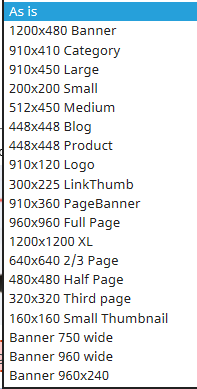
Where there is no default image size, you'll be automatically suggested an maximum image size of 960x960 pixels. You can however override this by selecting the button Change Default Image Sizes.
2. te rahi o te kōnae o te ahua
Ko te rahi o te kōnae ko te nui o ngā raraunga, ngā mōhiohio rānei e tiakina ana i roto i tētahi whakaahua. He maha ngā paetukutuku ipurangi e whakarato ana i ngā taputapu kore utu, utu rānei hei whakaiti i te rahi o ō whakaahua, tae atu ki te Image Optimizer, Optimizilla me te Kraken Image Optimizer.
The aim when optimising your images is not to reduce the quality of the image, though in some cases this does happen, but to shrink the file size.
3. te momo kōnae whakaahua
There are two file formats you can use for your website:
- JPEG - this is best for photos
- PNG - he pai rawa atu tēnei mō ngā waitohu me ngā whakaahua i hangaia e te kaihoahoa whakairoiro
When you save your images, you can choose which file type it is by right clicking in the drop down box where you enter the filename. It's a good idea to give an image a meaningful file name, such as bluebabybib.jpeg not 343232.jpeg as it helps with your website SEO as search engines can 'read' text, not images.
Uploading Images to Your CMS
When it comes to uploading images onto your website, there are multiple ways to do this. They include:
- Dragging images from your computer into the open web browser you are using to work in your CMS. Our system will them automatically import these images. This can be done in different areas of your CMS such as with Galleries and Products.
To be able to drag the image, you will need to have the file open where the image is saved and then click and hold on the image to bring it over to the text 'Or drag & drop a photo here (JPEG, PNG or GIF).
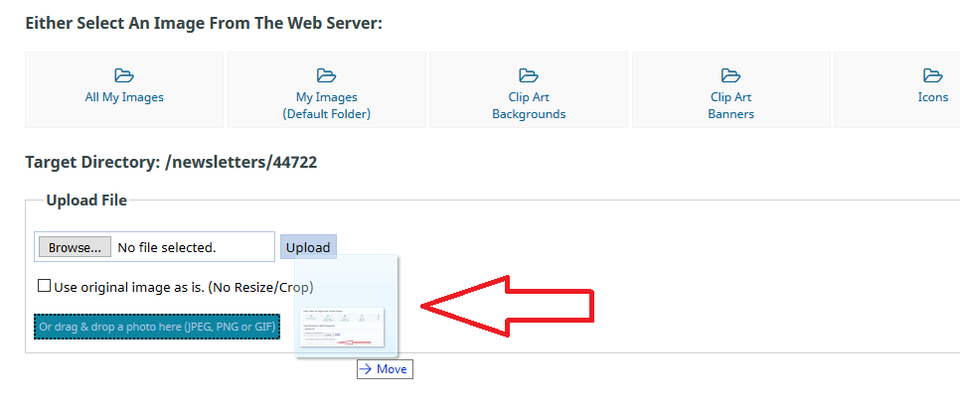
- Ka taea e koe te tōia he whakaahua ki roto i tō CMS ki ngā wāhi katoa e kite ai koe i te ata o te ahua. Mā te ahua ka tukuatu aunoa tō ahua. Ka taea rānei e koe te pāwhiri i te ata o te ahua kia uru atu ai ki ngā mana whakahaere anō mō te āhua o tō ahua, pērā i te tapahi me te hurihuri.
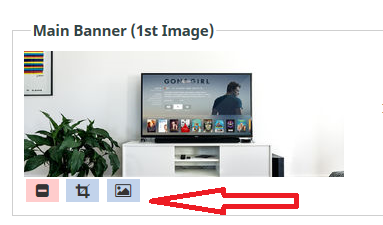
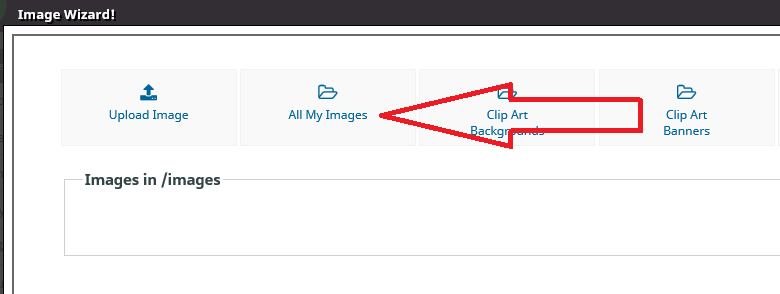
- You can use an image you have previously uploaded. It will be found in the Image Wizard, under the tab All My Images.
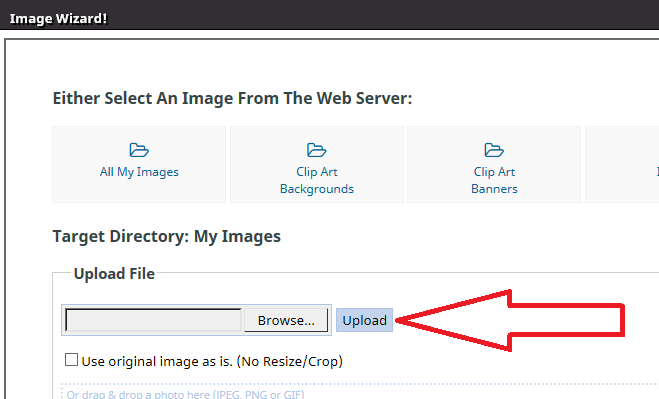
- Using the Image Wizard, you can upload a new image file using Upload File. Simply choose the Browse button and it will open access to your computer files, from where you can select an image. Click on the image and then back in the CMS, click on Upload. You are then given the option of editing your image and how you would like it to appear on your website, depending on where you are uploading it.
- In the Image Wizard, you can copy an image which is hosted on another website. Using the Firefox browser, simply right click on the image you want and select the option which says Copy Image Location. Then paste that image URL into the Import Image box. You can also enter the URL of the page the image is on, but this may upload every image on that page.

It's important to remember though that you should be optimising your images before uploading them.
Te Mārama ki te Ture Tiaki Raraunga Whānui (GDPR)
Nā te pikinga ake o ngā āwangawanga mō te tūmataitinga o ngā tāngata o te EU i runga ipurangi, ka whakakapia e te GPRD te Raraunga Tiakitanga tawhito. Nā te mea i whakatūria te DPC i mua i te taenga mai o te ipurangi ki tōna āhua o nāianei. Ko te whāinga o te GDPR he whakapiki i te haumarutanga mō ngā mōhiohio mō ngā tāngata takitahi e puritia ana e ngā pakihi i roto i te EU.
Ko ngā mōhiohio e pā ana ki te GDPR ko:
- Ngā ingoa, ngā wāhitau, ngā tau ID
- Nga korero mo te hauora me te ira
- Ngā whakaaro tōrangapū
- Te aronga ā-ira tangata
- Ngā mōhiohio tukutuku, pērā i ngā wāhitau IP, ngā raraunga pihikete me ngā tūtohu RFID
- Te raraunga koiora
- Ngā raraunga iwi, iwi rānei
Kei raro koe (me tō kamupene) i te GDPR mēnā ka rongoa, ka tukatuka rānei koe i ngā mōhiohio mō ngā tāngata whenua o te EU i roto i ngā whenua o te EU, ahakoa kāore koe e noho tūturu ana i roto i te EU.
Take a read of our informative article Te Mārama ki te Ture Tiaki Raraunga Whānui (GDPR) for details about how you can comply with the GDPR and Web Widget's interpretation of the GDPR.
This is a must read for all website owners.
Hekenga Paetukutuku me te Huka Hononga SEO Tino
Ka taea e taatau te kawemai i nga paetukutuku mai i te nuinga atu o nga CMS me nga papaa hokohoko, ma te pupuri i te wai hono SEO tino pai me te taapiri katoa o te tauira me nga ihirangi.
Ka tangohia e te ratonga hekenga he whakaahua tino tika o ngā tohu meta SEO katoa me ngā ingoa kōnae URL, me te whakarite kei te wāhi tika ngā whārangi katoa, me te tohu i ngā mōhiohio SEO ōrite, pērā i te mea kua taunga a Google ki te kite i mua i te hekenga.
I muri i te hekenga, ka taea e koe te whakamahi i a maatau taputapu SEO ki te whakahaere i o tohu meta, me te whakapai ake i to tohu google, me te kore e manukanuka ki te whakatinana i te 301 redirects. Kaore e tika ana taua taahiraa, i te mea kua mau tonu to mapi pae.
Whakahōu Pūnaha
- Ratonga Whakatere URL Hou i te ripa SEO
- Wāhi ruānuku whakaahua mema mō ngā mema e tuku ihirangi ana.
- Tōia me te whakataka atahanga ki tetahi mara tukuake atahanga.
- Ngā taputapu hekenga paetukutuku hou
- Kua whakatikahia te Ruānuku Whakaahua hei whakapai ake i te kaha tukuake whakaahua nui
New Training Webinars
|
 |
Ngā Ataata Tautoko Matua
|
Kua pukumahi a Andrew ki te hanga ataata tautoko hou |
 |
Rōpū Tautoko PukamataKei te hiahia koe ki te hono atu ki ētahi atu kiritaki o te Website World? Ā, kei te hiahia hoki koe ki te uru atu ki te tautoko pakihi whānui mai i ētahi atu kiritaki, tae atu ki ngā pātai me ngā whakautu me ā mātou kaihoahoa tukutuku me ngā kaihoko anō hoki? Hono atu ki te Rōpū Pukamata Hou Ano hoki, mena he pai to wheako ki te whakamahi i te Ao Paetukutuku, ka pai matou mena ka taea e koe te tuku a arotake i runga i to tatou pakitara Pukamata. |
 |

Riro $4600 Ecommerce Package
He taonga whakamataku ta matou hei wikitoria.
- Kounga pakihi utu SSL manaaki paetukutuku mo te (1 tau)
- Hoahoa paetukutuku ngaio, whakarereke ranei (20 haora)
- Te whirihoranga paetukutuku Ecommerce (7 haora)
- Te arotautanga miihini rapu (3 haora)
Toa o Hakihea 2018 te tuhi: Cats n Clover
Ka tū te whakataetae e whai ake nei i te marama o Mei 2018.
Engari tatari, he maha ano. Mena ko koe te kaikorero mo te kaihoko toa, ka riro koe i te 1 tau te manaaki paetukutuku koreutu.
Tena koa tohatohahia tenei hononga ka taea e o hoa te whakarite i a raatau ake paetukutuku whakamatautau. I te mea kei a raatau he paetukutuku whakamatautau me te ohauru tonu ki ta maatau panui, katahi ka wikitoria, ka wikitoria koe mo te 1 tau te manaaki paetukutuku koreutu mena ka riro i tetahi o o kaihoko hononga te taonga nui.
Hononga Whakauru Whakataetae Tohutoro: https://www.website.world/Win-Free-Ecommerce-Website-Competition.html?aid=[MBR_ID]
Kei te hiahia awhina ngaio?
He kaihoahoa tukutuku ngaio puta noa i Aotearoa me te ao ka taea te awhina i a koe ki te whakarite i to hoahoa paetukutuku. Ka taea e ta maatau roopu o-whare te whakapai i to paetukutuku mo te $100+GST noa. Whakapaa atu ranei ki tetahi o o maatau kaihoahoa paetukutuku kua whakarārangihia mo te hoahoa paetukutuku katoa, ki te korero whakarereke ranei. Ahakoa ko wai ka whakamahia e koe mo to hoahoa paetukutuku, kei te kaha tonu to paetukutuku e to maatau punaha whakahaere ihirangi whakamataku, na reira ka ngawari koe ki te whakahou i to paetukutuku mo te wa roa.
Kei te waatea te manaaki WordPress / PHP (Super Tere).
Ka taea e matou te manaaki i nga paetukutuku PHP me WordPress i runga i o maatau paetukutuku PHP hou me te whakapai ake, me te whainga o te 5% te whakamahi CPU, ka waiho he 95% te kaha e manawapa ana kia tere te uta o o paetukutuku i nga wa katoa.
He taurite te kawenga o ā mātou tūmau PHP, me te manawanui hapa pātengi raraunga MultiAZ, kia roa ai te wā mahi. Ka whiwhi ngā paetukutuku PHP katoa i tētahi tiwhikete SSL kore utu me te manaaki https kore utu. Ka tautoko mātou i te putanga hou o Wordpress 4.8 e whakahaere ana i runga i te PHP7. He rite tonu ngā utu manaaki ki ngā paetukutuku i hangaia me te manaakihia i runga i tā mātou tūāpapa CMS.
Me whai whakangungu kaihanga paetukutuku koe?
He maha ngā kōwhiringa whakangungu

Whiwhi i te hekenga 25% mai i tō manaaki tukutuku, mā te tuku i tētahi hoa
I mohio koe mena ka kii koe i tetahi hoa ki te whakamahi i ta maatau ratonga hanga paetukutuku whakamataku, ka whiwhi koe i te 25% hekenga mai i to manaaki? Mena ka korero koe i nga hoa 4, katahi ka whiwhi koe i to manaaki paetukutuku mo te kore utu! Ehara i te mea anake, engari ka whiwhi hoki o hoa i a raatau manaaki paetukutuku 2nd marama kore utu. He akiaki iti pai tena mo ratou ki te tirotiro i ta maatau ratonga me te whai waahi ki te whakarite i to utu utu. Ka pa nga utu e rua mo o paetukutuku tuarua me o muri mai. Kare he aha mena nau, he hoa, he whanau, he tauhou ranei. Ka timata nga utu i te wa e ora ana nga paetukutuku e rua. Me mohio koe, ko to hoa ranei te korero i te korero i te wa wawe.

Kōwhiringa Kaihoko
He tuku hou tino pai mo nga kaihoahoa paetukutuku me nga kaipakihi pakihi whakamataku. Ka taea e matou te whakarite i tetahi kaihoahoa paetukutuku e aro ana ki nga mea katoa e hiahia ana ratou ki te tiimata hei kaihoahoa paetukutuku kaore he utu:
- Kaore he utu tatūnga, kaore he kirimana hei haina.
- Ka whiwhi koe i te $2+ mo ia ingoa rohe kua hokona (i runga i te RRP $19 ia tau).
- Ka whiwhi koe (25%-50%) komihana mo te manaaki
- Ka taea e koe te whakahaere i nga ihirangi katoa o nga kaihoko, nga rohe, nga imeera me etahi atu, ngawari mai i te 1 takiuru noa.
- Ma matou e tiaki nga whakaritenga nama katoa, kia kore ai he raruraru whakahaere.
Ki te mōhio koe ki tētahi e hiahia ana, tohua mai ki tā mātou whārangi kaihoko. Ka tukuna e mātou he komihana utu kimi $100 mō tētahi kiritaki o nāianei e kimi ana i tētahi kaihoko hou mā mātou, ā, kua whakatūria e ia he paetukutuku ora neke atu i te 3 i roto i ngā marama tuatahi e 3 o te kaihoko.
Me āwhina! kei te tata mai...
He maha nga waahi ka kitea e koe nga whakautu ki nga paatai mo te hanga i to paetukutuku me te taapiri i nga ahuatanga (he maha nga waahanga) me te kore utu maau e titiro:
Ki te kore e kitea e koe te whakautu e hiahia ana koe - katahi ka taea e koe Whakapā - Kaihoahoa Tukutuku noho ranei a Tikiti tautoko

He hononga pai
- http://www.wikihow.com/Clear-Your-Browser's-Cache - Ūkuia tō keteroki pūtirotiro
-
http://word2cleanhtml.com - Ka horoi i nga tuhinga Word mo te Etita CMS
-
Ngā Momotuhi Google - Ngā Momotuhi Tukutuku Ipurangi
-
http://pinterest.com/ - He Poari Pini whatunga hapori
-
http://pixlr.com/ - ētita whakaahua ipurangi
-
http://www.photoshop.com - ētita whakaahua ipurangi
-
http://www.jotform.com/ - kaihanga puka ipurangi
-
www.needanerd.co.nz - Ngā Tohunga Hangarau Mōhiohio o Aotearoa
-
www.geeksonwheels.co.nz - NZ Wide IT Geeks
-
https://www.pexels.com/ - Whakaahua Hoa Koreutu
-
www.ninite.com - te huarahi pai ki te tāuta pūmanawa hou ki tētahi rorohiko hou
-
www.2talk.co.nz - waea VOIP iti ake me te ararere waea taumai 0800
Katoa enei hononga me etahi atu i ta maatau wharangi pouaka taputapu hou:
Haere Ora tata nei
Anei etahi o a maatau Go Lives tata nei.
- https://www.percypowerpublishing.co.nz
- https://www.contractcontrol.nz
- http://www.twd3pl.co.nz
- http://www.earthworkshire.co.nz
- http://www.spiritualskyincense.com/
- https://www.ballroomdancing.nz/
- https://www.businessnetworking.nz
- https://www.printedbooks.co.nz
- https://www.moonacrealpacas.co.nz
- http://www.monarchbookkeeping.co.nz
- http://www.medd.co.nz
- https://www.anomalywhangarei.nz
- http://www.mouterelavender.co.nz
- https://www.jewellerysupplies.nz
- https://www.pctimes.co.nz
- https://www.voodoomolly.nz
- https://www.notebooksbypeter.co.nz
- http://www.acecompany.co.nz
Tirohia etahi atu tauira paetukutuku
Tena koa whakapā mai mo etahi atu korero.
Mai i te Team @ Web Widgets Ltd
Paetukutuku Ao - Kaihanga Paetukutuku Koreutu
Posted: 18 May 2018
