
While winter can be rather dull and dingy, your website doesn't have to be! In our May newsletter, we're focusing on an awesome new template, and the ways you can use images on your website to increase conversions. We're also going to explain how you can optimise your images and show you the different ways you can upload images to your site.
Our May 2018 newsletter:
- Ventura - New Content Box Template!
- 今月のサイト
- Join our new business networking group, with free directory listing
- Using Images to Increase Conversion Rates
- Optimising Your Images
- Uploading Images to Your CMS
- Understanding Your Role with GDPR
- ウェブサイトの移行
- システムアップデート
- トレーニングウェビナー(新しいセッション)
- 注目のサポートビデオ
- 新しいFacebookサポートグループ
- 4,600ドル相当のeコマースパッケージを獲得
- プロフェッショナルなウェブサイトデザインオプション
- WordpressとPHPのウェブサイト
- トレーニングが必要ですか?
- ホスティング25%割引
- 自分のビジネスを始める - 再販業者のオプション
- クールなリンク/システムリンク
- 今月のウェブサイト
Ventura - New Content Box Template
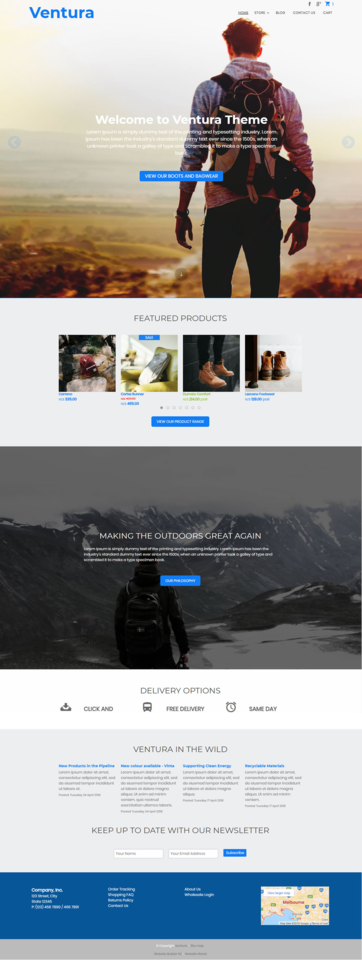
We're excited to introduce a brilliant new website template which will soon be available for you to use!
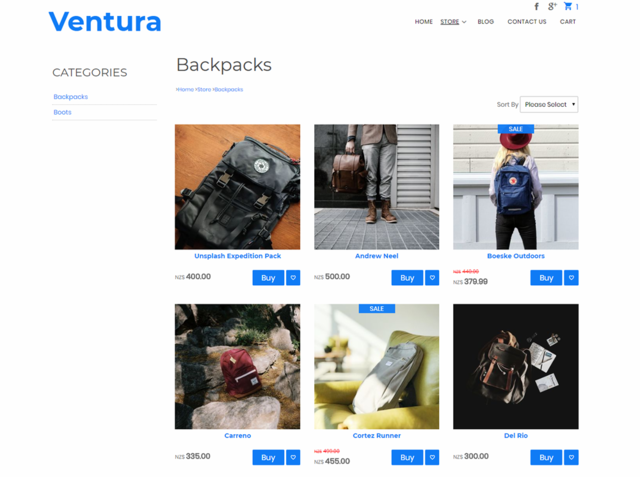
New Content Box Templateアンドリュー Fury Ltd, has been working on a great new template, Ventura, based on maximising our new Content Box editor. This template incorporates100% wide background image strips, with a mobile responsive drag and drop content editing feature over the top. There's a re-positionable featured products area, and a new combined social icons with a shopping cart counter. The possibilities of home pages are now limitless! Below you'll see another screenshot of the Ventura template in action, demonstrating how a shopping catalogue might look on the same site. Stay tuned for updates on when you can try out the Ventura template on your website! |
 |
今月のサイト
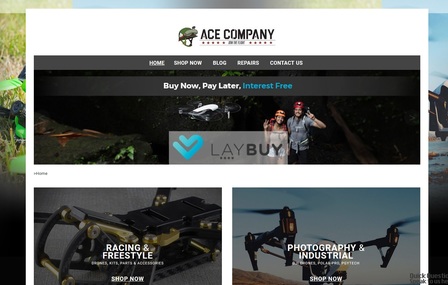
The Ace Company website is a great example of a well branded and easy to navigate site. Selling drones and their components, it uses a range of images to not only promote their products, but to also creates an active and exciting feeling for visitors to experience.
You can take a look at their site ここ。
今月の再販業者サイト
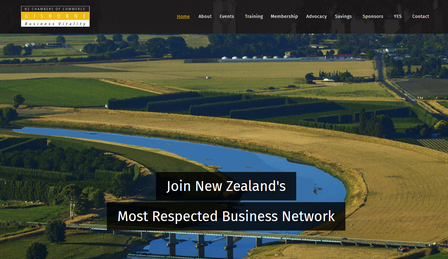
Reseller WebFoot was commissioned to create the Gisborne Chamber of Commerce website and together with Andrew's graphic design skills, they have designed an attractive and easy to navigate site.
このサイトの大きな特徴は、ホームページの回転するフォトバナーで、地域や人物の写真が交互に表示されます。他のページも見やすく、各ページの大きな固定フッターからは連絡先情報に簡単にアクセスでき、重要なページへはワンクリックで移動できます。
You can see this website ここ。
Join our new Business Networking Group
Facebookベースの新しい ビジネスネットワーキンググループ. Please join the group, even if you are not a customer of website world.
すべての企業は無料で ディレクトリリスト. If you are a website builder customer, you can manage your directory listings from within our CMS under SEO tab, to ensure your listing gets enhanced listing status. If you are not a customer of website world, then you can register a new listing in the directory.
Using Images to Increase Website Conversions
Images are incredibly powerful tools to use on your website. For many businesses, our websites are the only way in which our clients or customers can learn who we are, what we can help them with and whether they'd like to do business with us.
Here are four ways in which you can use your website images to increase customer conversions:
- Consider emotions - use images to convey to visitors how they will feel upon buying and using your products or services. This can include photos of people using your products.
- Avoid overusing stock images - while some stock images are great, many aren't. The problem with using stock images are that they are not personalised to your business and they can be used by anyone. Try using professionally taken photos related to your business instead.
- Use large, clear images. Research has shown that larger images promote higher conversion rates. For tips on taking product photos, take a look at our article 優れたウェブサイト写真が売上を伸ばす方法.
- Offer multiple product views - as your website is often all a customer has to make a decision about purchasing your product, you need to give them plenty of information. This includes showing your products at different angles, plus in use.
Optimising Your Website Images
Optimising an image simply means saving it in a web friendly format and an image of a suitable file size.There are three things you will need to consider:
- the actual size the image appears on a screen
In our CMS, we have two image sizes (what you see on your screen):
- the original size of the image you uploaded, which may be reduced depending on the template you are using and where the image is going.
- 320×320ピクセルのサムネイル画像。ギャラリー、商品リスト、ディレクトリリストなど、ページに多数の画像が掲載されている場合にのみ使用されます。
Here are the common image sizes we offer:
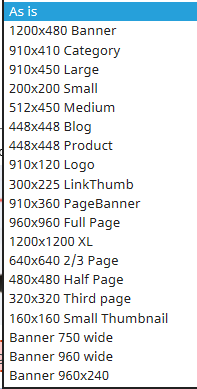
Where there is no default image size, you'll be automatically suggested an maximum image size of 960x960 pixels. You can however override this by selecting the button Change Default Image Sizes.
2. 画像のファイルサイズ
The file size is the amount of data or information saved within an image. There are many websites online which provide free or paid tools for you to shrink the file size of your images including Image Optimizer, Optimizilla and Kraken Image Optimizer.
The aim when optimising your images is not to reduce the quality of the image, though in some cases this does happen, but to shrink the file size.
3. 画像ファイルの種類
There are two file formats you can use for your website:
- JPEG - this is best for photos
- PNG - this is best for logos and images created by a graphic designer
When you save your images, you can choose which file type it is by right clicking in the drop down box where you enter the filename. It's a good idea to give an image a meaningful file name, such as bluebabybib.jpeg not 343232.jpeg as it helps with your website SEO as search engines can 'read' text, not images.
Uploading Images to Your CMS
When it comes to uploading images onto your website, there are multiple ways to do this. They include:
- Dragging images from your computer into the open web browser you are using to work in your CMS. Our system will them automatically import these images. This can be done in different areas of your CMS such as with Galleries and Products.
To be able to drag the image, you will need to have the file open where the image is saved and then click and hold on the image to bring it over to the text 'Or drag & drop a photo here (JPEG, PNG or GIF).
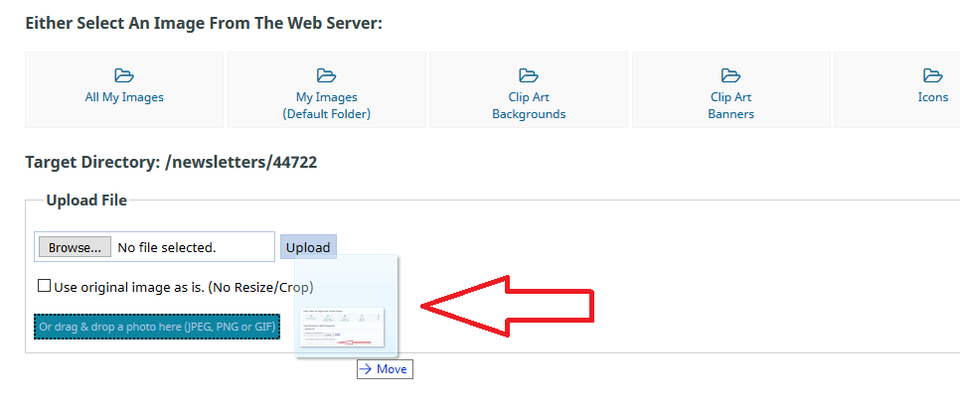
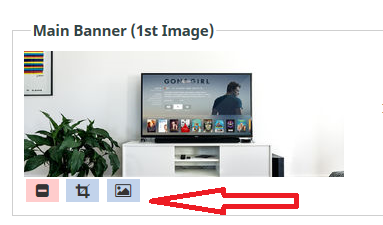
- You can drag a photo into your CMS wherever you see the image icon. The image will them automatically upload your image. Or you could click on the image icon to have access to additional controls over how your image looks, such as cropping and rotating.
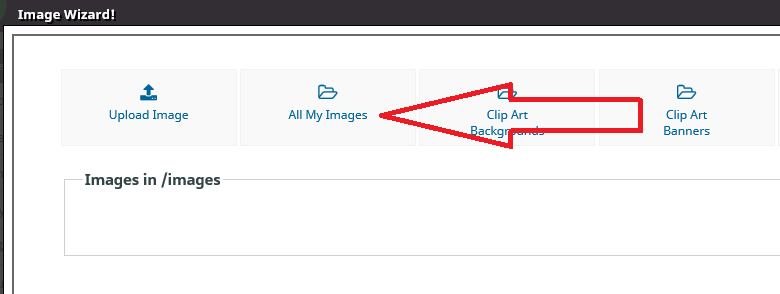
- You can use an image you have previously uploaded. It will be found in the Image Wizard, under the tab All My Images.
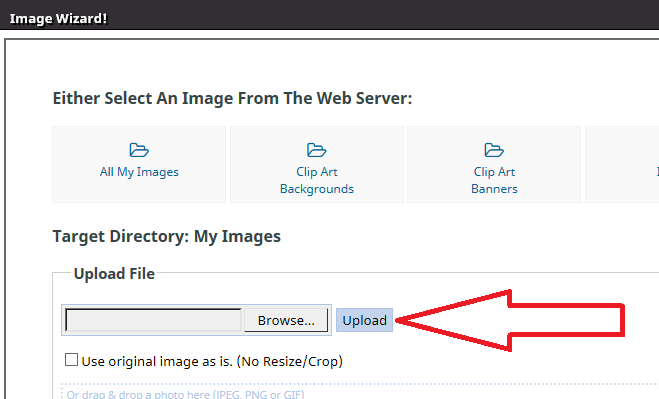
- Using the Image Wizard, you can upload a new image file using Upload File. Simply choose the Browse button and it will open access to your computer files, from where you can select an image. Click on the image and then back in the CMS, click on Upload. You are then given the option of editing your image and how you would like it to appear on your website, depending on where you are uploading it.
- In the Image Wizard, you can copy an image which is hosted on another website. Using the Firefox browser, simply right click on the image you want and select the option which says Copy Image Location. Then paste that image URL into the Import Image box. You can also enter the URL of the page the image is on, but this may upload every image on that page.

It's important to remember though that you should be optimising your images before uploading them.
一般データ保護規則(GDPR)を理解する
EU市民のオンラインプライバシーに対する懸念の高まりを受け、GPRDが旧データ保護共同体(DPC)に取って代わります。これは、DPCがインターネットが現在の形になる前に設立されたためです。GDPRの目的は、EU域内の企業が保有する個人情報のセキュリティを強化することです。
The information which the GDPR is concerned with includes:
- 氏名、住所、ID番号
- 健康と遺伝情報
- 政治的意見
- Sexual orientation
- IPアドレス、Cookieデータ、RFIDタグなどのWeb情報
- Biometric data
- Ethnic or racial data
You (and your company) are subject to the GDPR if you store or process information about citizens of the EU within EU states, even if you do not have a physical presence within the EU.
Take a read of our informative article 一般データ保護規則(GDPR)を理解する for details about how you can comply with the GDPR and Web Widget's interpretation of the GDPR.
This is a must read for all website owners.
完璧なSEOリンクジュースによるウェブサイト移行
現在では、他のほとんどの CMS やショッピング プラットフォームから Web サイトをインポートでき、完璧な SEO リンク ジュースと既存のテンプレートおよびコンテンツの完全な複製が維持されます。
移行サービスでは、すべての SEO メタタグと URL ファイル名の完全なスナップショットを取得し、すべてのページが適切な場所にあることを確認して、移行前に Google が認識していたのと同じ SEO 情報を指定します。
移行後は、SEOツールを使用してメタタグをご自身で管理し、Googleランキングをさらに向上させることができます。301リダイレクトの実装を気にする必要はありません。サイトマップは維持されているため、この手順は不要です。
システムアップデート
- SEOタブの新しいURLリダイレクトサービス
- コンテンツを投稿するメンバーのためのメンバー画像ウィザード領域。
- 画像を任意の画像アップロード フィールドにドラッグ アンド ドロップします。
- 新しいウェブサイト移行ツール
- 画像ウィザードを編集して、大きな画像のアップロード機能を改善しました
 |
注目のサポートビデオ
|
アンドリューは新しいサポートビデオの制作に忙しい |
 |
FacebookサポートグループWebsite Worldの他のお客様とのネットワークを構築しませんか?他のお客様からのビジネス全般に関するサポートや、WebデザイナーやリセラーとのQ&Aセッションもご利用いただけます。 また、Website Worldをご利用いただき、良いご経験をお持ちの方は、ぜひご投稿ください。 Facebookのウォールでのレビュー. |
 |
4,600ドル相当のEコマースパッケージを獲得
あなたには素晴らしい賞品が当たります。
- プレミアムビジネスグレードSSLウェブホスティング(1年間)
- プロフェッショナルなウェブデザインまたはイメージチェンジ(20時間)
- 電子商取引ウェブサイトの構成(7時間)
- 検索エンジン最適化(3時間)
2018年12月の抽選の当選者:Cats n Clover
次回のコンテストは2018年5月に開催されます。
でも、待ってください。当選したお客様をご紹介いただいた方には、1年間の無料ウェブホスティングをプレゼントいたします。
お友達がトライアルウェブサイトを作成できるこのリンクを共有してください。トライアルウェブサイトをお持ちで、ニュースレターの購読を継続していただければ、当選のチャンスが与えられます。また、あなたのアフィリエイト顧客が大賞を獲得した場合、あなたには1年間の無料ウェブホスティングが贈られます。
紹介コンテストエントリーリンク: https://www.website.world/Win-Free-Ecommerce-Website-Competition.html?aid=[MBR_ID]
専門家の助けが必要ですか?
ニュージーランドおよび世界中に、ウェブサイトデザインのカスタマイズをお手伝いできるプロのウェブデザイナーがいます。当社の社内チームが、ウェブサイトのリフォームをわずか100ドル+GSTで承ります。また、ウェブサイトのデザイン全体またはリニューアルのお見積りについては、掲載されているウェブデザイナーまでお問い合わせください。どのデザイナーにウェブサイトのデザインを依頼される場合でも、当社の優れたコンテンツ管理システムがウェブサイトの運営をサポートいたしますので、長期的な更新も簡単に行えます。
WordPress / PHP(超高速)ホスティング利用可能
新しく改良された PHP ウェブ サーバーで PHP および WordPress のウェブサイトをホストできるようになりました。CPU 使用率を 5% に抑え、95% の予備容量を残して、ウェブサイトが常にすばやく読み込まれるようにします。
当社のPHPサーバーは、MultiAZデータベースのフォールトトレランス機能と負荷分散により、最大限の稼働時間を実現します。すべてのPHPウェブサイトには、無料のSSL証明書と無料のhttpsホスティングが提供されます。PHP7で動作する最新バージョンのWordPress 4.8をサポートしています。ホスティング料金は、当社のCMSプラットフォームで構築・ホスティングされたウェブサイトと同額です。

お友達を紹介していただくと、ウェブホスティングが25%割引になります
弊社の優れたウェブサイトビルダーサービスをご利用いただくようお友達をご紹介いただくと、ホスティング料金が25%割引になることをご存知ですか?4人のお友達をご紹介いただくと、実質無料でウェブホスティングをご利用いただけます!さらに、ご紹介いただいたお友達は2ヶ月目のウェブホスティング料金も完全無料となります。これは、お友達に弊社のサービスを試していただくきっかけとなり、割引設定のチャンスにもなります。両方の割引は、2つ目以降のウェブサイトにも適用されます。ご自身のウェブサイトでも、ご友人、ご家族、または第三者のウェブサイトでも、どちらでも構いません。割引は両方のウェブサイトが公開された時点から適用されます。ご紹介いただいた方は、できるだけ早くお友達にその旨をお伝えください。

再販業者オプション
ウェブデザイナーと優秀なビジネスネットワーク構築者の皆様に、素晴らしい新プランをご用意しました。ウェブデザイナーとしてスタートするために必要なものはすべて無料でご提供いたします。
- セットアップ料金や契約書への署名は必要ありません。
- 販売されたドメイン名ごとに 2 ドル以上の収益が得られます (年間希望小売価格 19 ドルに基づく)。
- ホスティングで25%~50%のコミッションを獲得できます
- たった 1 回のログインで、すべての顧客コンテンツ、ドメイン、電子メールなどを簡単に管理できます。
- 当社がすべての請求手続きを担当しますので、管理上の煩わしさはありません。
ご興味をお持ちいただける方がいらっしゃいましたら、ぜひ弊社の再販業者ページをご紹介ください。既存のお客様から新規の再販業者をご紹介いただき、その再販業者が最初の3ヶ月間で3件以上のウェブサイトを開設された場合、紹介手数料として100ドルをお支払いいたします。
助けが必要です!が近づいています...
ウェブサイトの構築方法や機能の追加方法(たくさんあります)に関する質問への回答を見つけられる場所はいくつかあり、無料で参照できます。
必要な答えが見つからない場合は、 お問い合わせ - Webデザイナー または提出する サポートチケット

クールなリンク
- http://www.wikihow.com/Clear-Your-Browser's-Cache - ブラウザのキャッシュをクリアする
-
http://word2cleanhtml.com - CMS エディター用に Word ドキュメントをクリーンアップします
-
Googleフォント - オンラインウェブフォント
-
http://pinterest.com/ - ソーシャルネットワーキングピンボード
-
http://pixlr.com/ - オンライン写真編集ソフト
-
http://www.photoshop.com - オンライン写真編集ソフト
-
http://www.jotform.com/ - オンラインフォームビルダー
-
www.needanerd.co.nz - ニュージーランドのITオタク
-
www.geeksonwheels.co.nz - ニュージーランドワイドITギーク
-
https://www.pexels.com/ - 無料のストックフォト
-
www.ninite.com - 新しいコンピュータに新しいソフトウェアをインストールする最良の方法
-
www.2talk.co.nz - より安価なVOIP通話と0800着信通話ルーティング
これらのリンクとその他の情報は、新しいツールボックス ページをご覧ください。
最近の稼働開始
以下は、最近開始された Go Live の一部です。
- https://www.percypowerpublishing.co.nz
- https://www.contractcontrol.nz
- http://www.twd3pl.co.nz
- http://www.earthworkshire.co.nz
- http://www.spiritualskyincense.com/
- https://www.ballroomdancing.nz/
- https://www.businessnetworking.nz
- https://www.printedbooks.co.nz
- https://www.moonacrealpacas.co.nz
- http://www.monarchbookkeeping.co.nz
- http://www.medd.co.nz
- https://www.anomalywhangarei.nz
- http://www.mouterelavender.co.nz
- https://www.jewellerysupplies.nz
- https://www.pctimes.co.nz
- https://www.voodoomolly.nz
- https://www.notebooksbypeter.co.nz
- http://www.acecompany.co.nz
Posted: 18 May 2018
