Connecting to Fashionbiz to import products
To import products from both Fashionbiz's Biz Collection 和 Syzmik collections, you will need to add an individual plugin for each.
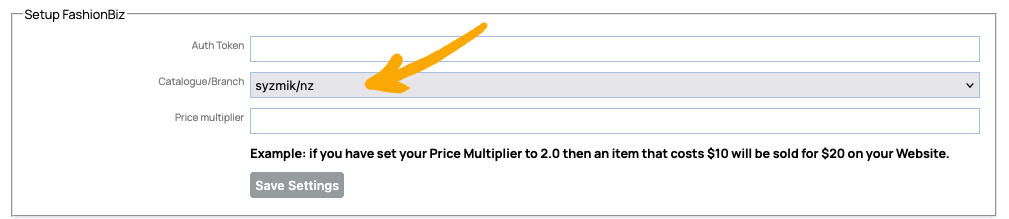
Once added you can choose which collection will be managed via the CATALOGUE/BRANCH option in the plugin settings area.
Importing Products - Why do some of my Products when imported in bulk, not contain any product information?
The Fashionbiz api allows you to import the base products in bulk, but they do not necessarily import the product data at the same time.
There may be a delay before an additional sync catches up / populates the information. Manually syncing a product would pull in the relevant product information immediately.
Fashionbiz Product Variations are not linked Individually
While other integrations allow you to invidually link / sync peoduct variations - the Fashionbiz integration imports them via the mail product.
As such any attempt to sync individually will result in the product variation not being found on lookup.
How to add the plugin
- Click E-commerce in the left menu.
- Scroll down to the Plugins section and find Fashionbiz.
- Click the + button to add the plugin, then confirm the addition.
How to remove the plugin
Open the plugin settings and click the red Remove Plugin button at the bottom of the page.
More From This Section
We have several plugins for courier integration, please see our dedicated area for courier plugins and features. eg NZPost, Aramex, StarShipIT, GoSweetSpot, Zappy (ParcelPort) etc
You can add store-related plugins via the E-Commerce Area
We integrate with several payment plugins.
You can add a comprehensive reviews and ratings system to your ecommerce website very easily.
Use Stamped.IO as your reviews engine and send new orders to Stamped so customers are asked to review what they bought.
Enable Facebook Reviews for the products in your shop. This plugin has no extra settings to configure.
You can add wishlist functionality to your website shopping pages to allow customers to favourite products prior to purchase.
When enabled makes it possible for users to enrol for stock notifications.
With the Stock Sync Multi Site plugin you have the option to sync product information between multiple ecommerce websites by product code between sites by setting one to be a master website.
Set up your Google Shopping product feed and connect Google Analytics to your online shop.
Add automated translations to your website using your own Google Translate credentials.
How to link your existing Xero account in order to push through draft orders to Xero.
Sync products, stock, prices, customers, invoices and payments between your online shop and QuickBooks Online.
Send website orders to MYOB as draft invoices and choose how products and stock sync between the two systems.
Connect your online shop with the NetSuite ERP system for inventory updates, sales orders and customer accounts.
Sync products, stock, prices and customers from Zoho Inventory and send paid orders as sales orders.
Send invoices directly to customers over the Peppol network instead of by email. Enter your business details and Peppol ID.
Connect Akahu to bring in bank fees and other transaction data sources.
Connect your Square account to sync products, customers and invoices with your website.
You can create an order in the system with an order status: quote, setting titles and expiry status
Information on the Repeat Order Service aka Standing Orders subscription plugin
Frequently asked questions
Information for the Fashionbiz Plugin
PricySpy compares your product and pricing against others that are similar the same for consumer decision making on their purchase. If you would like to add your products to this site, you can read the instructions here:
Add custom Order Statuses so that your team can manage your workflows. You cannot delete system statuses. Many system actions will update your status, such as when paid or shipped.
Let authorised customers edit or cancel an order before it is delivered. Ideal for shuttles, tours and pre orders.
Customise your order and invoice emails with your logo, tax details, price display and notification settings.
Email an order docket to your warehouse, dispatch desk or courier so orders are packed and sent on time.
Create customer statements for a calendar month that summarise the payment status of each invoice. View them as a PDF or email them to customers.
You can add additional currency options, setting the currencies to a fixed conversion rate or using live rates.
Help customers convert product or checkout prices into another currency using a trusted third party tool.
Members can be imported/exported between MailerLite and the CMS.
How to connect and configure the Klaviyo Plugin
How to connect and configure the Mailchimp Plugin
Quickly complete stocktakes using a keyboard efficient form.
Create manufacturing products with complicated instant quote pricing, algorithms. You can build all sorts of complex product pricing calculations, well suited to manufactured items For example, where the price is area based, such as used with fabrics, glass, joinery etc, and allowing for edging / wastage.
You can tag your products with features so users can search for Products that match the features required using the advanced search function.
Add detailed product specifications as rows of data, shown in a tab on your product pages.
A part finder that links parts to the make, model and year of the vehicles or machines they fit.
Copy the customisation questions from one product to a whole category of products, or remove a question from many products at once.
Customise the product search form with category, size, colour, style and price fields, option reduction and auto submit.
Suggest products that customers often buy together, based on previous order history. Show suggestions on product pages and at checkout.
You can automatically send follow up emails to your customers with open carts.
Remind customers who saved a cart but never finished the order. Choose the timing, subject and which customer groups receive the reminder.
Let customers pick a reminder date at checkout so they receive an email later offering to repeat the order. Ideal for gifts and replacement goods.
Send an automated email to customers after their order ships, asking if it arrived safely. Choose the timing, subject, button text and which customers receive it.
Automatically remind customers who have not paid for their order. Set the timing for each payment option, add a BCC address and choose which customers receive the reminder.
You can enable customers to earn loyalty points on paid purchases, which can then be applied as a credit on their next order
Let affiliates promote your shop with a tracking code, and reward them with loyalty points or commission reporting.
Connect Website World to hundreds of other apps with Zapier. Automated connections called Zaps, set up in minutes with no coding, can automate your day-to-day tasks and build workflows between apps that otherwise wouldn't be possible.
Access and update your data with JSON, and use webhooks to trigger external actions for specific events.
Let approved apps connect to your online shop securely with the OAuth plugin and its application settings.
Connect vehicle information lookups to your website with the Auto Info plugin and its API settings.
Information on the CIN7 Core plugin
Import products from Unleashed, track stock levels and log your orders as invoices in Unleashed.
Import products from Lightspeed, keep them in sync and send your website orders to Lightspeed for fulfilment.
Import products from ConnectWise and send your website orders to ConnectWise to streamline your processes.
Add an AI chat bot to your website that answers visitor questions using the information you provide.
A chat bot that answers visitor questions using your public website information, with extra instructions you can add.
Connect your website to OpenAI ChatGPT using your API key. You choose what is shared, and can translate your website content into other languages.
This guide explains how to install and configure the TidyStock plugin, to synchronise products, stock levels, pricing, customers and orders with your TidyStock account.
This plugin sends an email at a specified time to you listing out of stock products.
The Scarcity Messages plugin adds eye-catching messages to your website to create a sense of urgency and encourage customers to complete their purchase.
Connect your online shop to Etsy and manage your Etsy listings from your website.
Import AS Colour products into your shop, set your price multiplier and choose which product text to show.
Sell on Amazon from your online shop, keep prices and stock up to date, and receive Amazon orders as website orders.
FAQ Topics

