
Add a list of products to share with friends and Family
El Bridal Wishlist option is different from the standard Wish List option where customers can save products.
This option allows a customer add a list of products to a shopping cart, which can then be shared as a Bridal Wish list with friends and family.
The Bride/Groom Perspective:
- La feliz pareja compra los artículos que realmente desean como regalo de bodas y agrega los artículos deseados a su cesta.
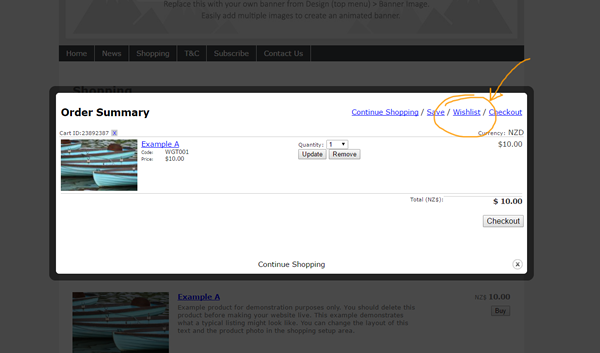
- On the shopping cart page (before going to the checkout page) they will have an options to Continue Shopping / Save / Lista de deseos / Checkout - visible at top right on the popup window. (screenshot below)
- Clicking WISHLIST will prompt to save a custom wishist.
- Ingresan detalles de envío predeterminados, nombre del evento y fecha del evento.
- Presionan guardar y obtendrán una URL en pantalla y por correo electrónico, que pueden compartir con amigos y familiares.
- The couple may add/remove items from their list - or delink the list - at any time.
The Friends and Family Perspective:
- Amigos y familiares siguen el enlace especial proporcionado por los novios.
- Verán una lista de artículos deseados y disponibles.
- Pueden comprar artículos de la lista de deseados, o cualquier otro artículo que deseen agregar.
- Una vez completado el proceso de pedido de un artículo, la cantidad se deducirá de la lista de pedidos. Esto permite que diferentes personas adquieran artículos de varias cantidades.
- Si alguien intenta comprar más de la cantidad deseada, aparecerá un mensaje de error y se reducirá la cantidad en su cesta. Esto puede ocurrirles a algunos usuarios en el último paso del proceso de compra, si alguien más ha comprado el mismo artículo simultáneamente.
- Los detalles de envío del pedido serán los especificados por los novios. El comprador deberá pagar los gastos de envío de sus artículos. El comprador puede modificar el destino de envío según sus preferencias.
The Shop Owners Perspective:
- Enable the wedding list feature by checking the Include Gift Wishlist / Bridal Registry Option checkbox located in the Shopping Setup area > Shopping Cart Options.
- Las "Listas de bodas en proceso" están disponibles en el área de informes, con algunas opciones de gestión.
- Si no se pagan los artículos, se requiere intervención manual para aumentar la cantidad deseada... Y es posible que deba eliminar el pedido incompleto para que la compra no se muestre en la página de la lista de deseos.
- Será necesario que usted mismo coordine el cumplimiento de sus pedidos, ya que no se han tenido en cuenta esos pasos en
- Si lo desea, puede considerar ofrecer precios especiales de flete para la compra de listas de bodas, a través del área de gestión de flete normal.
Screenshot below: The save cart to wishlist link.
Example Screenshots

When the Bride/Groom has added the products and clicked the WISHLIST link in the cart as shown above, they can add some details about the list, once saved a link is generated as shown above, which is also emailed out to the Bride/Grooms email address.

When the Friends and Family click the link, they are shown the list of items still available to purchase.
How to enable the Bride/Groom Wishlist option:
Check the Include Gift Wishlist / Bridal Registry Option checkbox at the side of the CHECKOUT OPTIONS area - accessible via E-COMMERCE > DISPLAY OPTIONS (Checkout Options button)
More From This Section
FAQ Topics
Building your site
- Pages
- Content Editor Modes Explained
- - DRAG DROP Editor (Default)
- - CONTENTBOX Editor (Advanced)
- - WORD STYLE Editor (TinyMCE)
- - LIVE Editor (Click to Edit Mode)
- Styling Content
- Images / Backgrounds
- Banners and Sliders
- Uploading content
- Design Templates
- Formularios
- More Q & A
- Menus
- Mobile Styling and Optimisation
Advanced Page Types
Comercio electrónico
- Shopping Basics
- Product Pricing, Currencies
- Category Management
- Productos
- Product Options
- Layout and Formatting
- Opciones de pago
- Freight - Couriers
- Processing Orders
- Orders / Invoices
- Advanced Ecommerce
- Plugins
- Al por mayor
- Bookings Management System
- Stock & Quantities
- Vouchers, Discounts, Loyalty Points
- Selling Photos / Prints
- Shopping Cart Add-on Page types
- Advanced APIs / Add ons
- Punto de venta (POS)
- Informes
Email & Membership
- Member Management
- Members Pages / Template Customisations
- From Addresses and Reply To Email Notifications
- Global Enquiry form options
- Standard Field Names
- Webmail
- Bulk Email
- CRM Features
- Email Campaigns
- Forums & Blogs
- Pop3/Imap Email Services
- Scams and Hoaxes
- Lead Magnets / Growing Your Customer Database
Promoting your site
Advanced
- Power User Options
- Form Spam Filtering
- Wordpress
- PHP Setup
- [TAGS]
- FONTS - Embedding Web Fonts
- jQuery snippets
- FONTS - Uploading local font files
- Search External Links / Import external content
- HTML / CSS Snippets
- Loading additional Material Symbols styles
- FAQ Help Map
- Advanced Template Customisation, CSS, etc
- Languages and Translations
- Importing Content from Another Platform
