
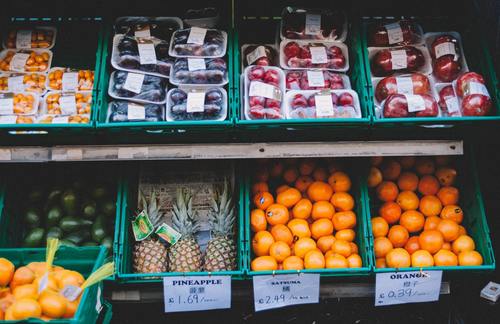
Product categories are essentially groups of products which have been put together based upon being related or having similar characteristics. Both physical and online stores organise their products into categories to make it easier for their customers to find what they are looking for. If you think about a recent trip to the supermarket, you would have seen similar products together, such as all the produce, all the dairy and all the meat. Within these categories, additional classification would have occured, such as putting the vegetables together and the fruit together, followed by specific produce groups such as apples or grapes. Because of these categories, it was easier to find the specific products you wanted to buy and move around the store.
ウェブサイトでも同じことが言えます。商品カテゴリーが整理されたウェブサイトは、ナビゲーションがしやすく、商品を見つけやすく、売上増加につながります。関連商品をカテゴリーにまとめることで、検索エンジンが個々のカテゴリーと商品の両方を見つけやすくなり、インデックスに登録しやすくなります。
したがって、eコマース製品カテゴリを適切に整理することには、次のようないくつかの利点があります。
- 簡単にナビゲートできるウェブサイトで直感的なショッピング体験
- improved customer experiences, which lead to happier customers who are more likely to shop again
- 顧客がまさに欲しいものを見つけることができるため、売上が増加
- より良いSEO
- 簡単にナビゲートできるウェブサイト
- より良い顧客体験
- 売上増加
次に、オンライン ストアがこれをどのように実行したかの例を見てみましょう。
商品のカテゴリーを作成する
The first step in creating categories is to organise your products into related groups. How specific or broad you make those groups will depend upon your product range and the volume of products you sell. In general an online store that has broad main categories, will then break those down into sub categories even further to make finding a specific product easier.
Here's the decision making process the fictional store Mary's Clothing went through to create categories:
Mary's Clothing is an online retailer who purchases clothing at wholesale rates and then resells it to their customers. They decided to break their products down into three types of clothing categories: tops, bottoms and accessories. They then added sub categories to each of the main ones: tops listed shirts, t-shirts and sweaters, bottoms listed shorts, jeans and trousers and accessories listed jewellery, bags and scarves as sub categories.
To add categories in the CMS, click the blue eCommerce button, then choose the option Add a Category. On this page is where you would enter the name of the category and make other specific choices. Here is a video demonstrating how Mary set up her main and sub categories.
1つ以上のカテゴリに製品を追加する
メアリーはメインカテゴリーとサブカテゴリーを設定しました。次は、商品をいずれかのカテゴリーに割り当てる必要があります。もちろん、必要に応じて、1つの商品を複数のメインカテゴリーとサブカテゴリーに追加することもできます。商品をカテゴリーに追加するには、2つの方法があります。1つ目は、「eコマース」オプションの下にある「商品編集」ボタンをクリックします。個々の商品の「商品編集」ボタンをクリックし、追加したいカテゴリーを選択します。2つ目は、チェックマークの四角をクリックし、画面右側の選択肢からカテゴリーまたはサブカテゴリーを選択する方法です。このビデオでは、これらの両方の方法を説明します。
他のeコマースオーナーからカテゴリーの整理に関するアドバイスを得るのに最適な場所は、 Facebook グループ。 競合他社の商品構成を参考にするのも非常に役立ちます。ストアの改善に関する詳しいアドバイスについては、こちらをご覧ください。 電子商取引ウェブサイトのブログ。
Posted: Friday 5 November 2021
