
As web master, you are now able to block individual countries, phrases and IP addresses from viewing or scanning your website. The reasons why you would want to block specific countries include:
- your website is only intended for a local audience
- it is highly unlikely you would ever deliver products to a far away country that could provide the same products but cheaper in their own market
- you are being bombarded by country specific robots that scan websites without identifying themselves as a robot, even adding items to carts
The ability for our system to detect a users' country is a best guess based upon their IP address, which has around a 95% accuracy. Sometimes the countries are identifiable, in which case it will be deemed to be unknown and no blocking would take place. Remember that your customers may travel overseas from time to time, and may still want to place orders on your website for their return. Many flights also offer free Wi-Fi, and some users of satellite ISPs are assigned worldwide IP addresses Therefore you should only block very specific countries that are causing you ongoing issues.
We have deliberately removed some countries from this list to prevent web masters blocking countries that would usually have good traffic, and where blocking that country may have negative effects for our team to provide support, or for search engines to index your site.
How to Block Traffic from Individual Countries
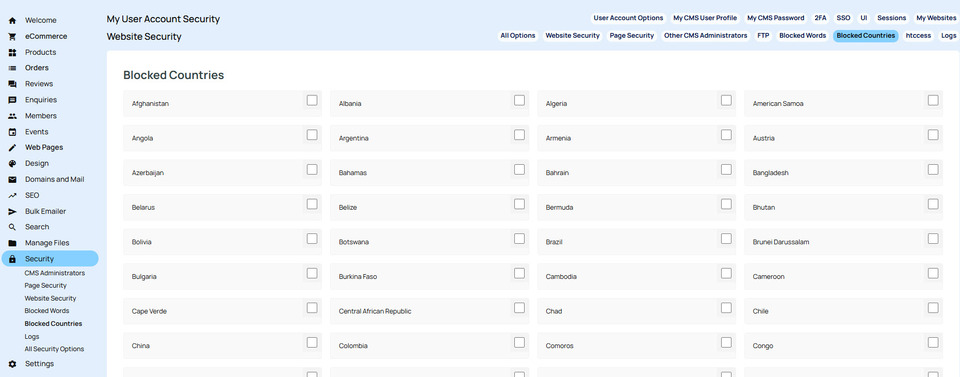
You can access the CMS area to select individual countries to block under the Security menu. You can then scroll down the page till you reach Block Countries, or click on the Block Countries in the sub menu area:

For further assistance, please view the CMS help files available through the Help button at the top of your dashboard when logged in.
Tags: Webhosting
Posted: Friday 3 May 2024
