

The truth is out there: using Pinterest for business brings you in new web traffic. While most business owners agree, few are using this visual social media platform to its fullest. Sure, it requires a different set of skills than posting on Facebook, but the potential benefits are huge!
Research shows that there are over 200 million monthly users of Pinterest worldwide. They're looking for ideas relating your products and services, and if you're not there, they can't find you. Items on Pinterest are often displayed highly in search engine results too, giving people an additional way to find your business.
当我们开始研究如何将 Pinterest 用于商业用途时,我们发现虽然有很多相关信息,但大多是针对美国企业的。因此,我们决定专门为像您这样的新西兰企业编写这份指南!我们将解释什么是 Pinterest,使用它的好处,如何设置 Pinterest 企业帐户,以及新西兰企业主如何有效地使用 Pinterest。
什么是企业版Pinterest?
Pinterest is a visual social media channel in which individual people and businesses can set up an account in. You could say it is like a giant search engine, where people who have an account can search for images called pins, on any topic under the sun. Another way of looking at it, is as a giant bulletin board or bookmarking tool. Upon finding an image or pin they like, they can save it within their account, creating boards of pins.
您可以拥有两种类型的 Pinterest 帐户:个人帐户和企业帐户。它们的使用方式相同,但企业帐户(也称为 Pinterest for Business)提供以下附加功能:
- Pinterest 板块分析
- 创建付费广告的能力
- can include links to your website with your pins
- 可以创建丰富的图钉
Pinterest uses a range of different vocab which users need to understand. Here are the main ones which will help you understand how Pinterest works:
- 别针: 在 Pinterest 上上传图片时,图片被称为“图钉”。图钉还可以包含标题、描述和指向原始网站的链接,这些信息都需要在添加图钉时分别添加。
- 固定: “pinning”是指将图片上传到Pinterest帐户的过程。
- Re-pinnng: 转发(或重新钉图)是指将别人图板上的图片“复制”并发布到自己的图板上。图片仍然保留在原图板上,只是在你的图板上创建了一个副本。图片的内容和链接(以及原作者的署名)保持不变。
- Pin: 不要与复数形式混淆,pin 指的是你在浏览网页时添加到图片上的书签。你可以把它“钉”到你的 Pinterest 画板上,以免丢失。
- 钉子: 在 Pinterest 上收藏了图片的人!
- 板这些就像是你收藏的图钉文件夹。你可以创建任意数量的图钉文件夹,并为每个文件夹命名,以便决定每个文件夹里要放什么图钉。例如,你可以创建关于特定主题或图片类型的图钉文件夹,帮助你整理收藏的图钉。
- 秘密板: 这些是只有你自己或你邀请的人才能看到的看板。
- Group boards: these are boards which have many different pinners sharing content to the board.
- 丰富的图钉: 这些是特殊的徽章,其主人在上面添加了额外的信息。 富图钉 可以免费获取,但需要您在网站上添加元标签。
- 推广帖子: 这些是商家付费推广的徽章,或者换句话说,就是广告徽章。
- 购买同款: Shop the look 是一系列特别的徽章,旨在帮助人们在家居装饰和时尚行业中查找和购买产品。
- 邮政编码: a pincode 它就像条形码一样。你可以把你的PIN码印在人们线下能看到的东西上,比如包装或展示品。人们使用Pinterest应用扫描你的PIN码后,就会被引导到你的Pinterest账号。
- 喂养: 这里收集了您关注的版块和用户发布的图钉,以及广告和图钉推荐。
接下来,我们将讨论您的企业可以从使用 Pinterest 中获得哪些好处。
在新西兰,企业使用 Pinterest 有哪些好处?
If you're still needing some convincing as to why you should go to the effort of using Pinterest for business, here are some great facts to consider:
- 87% 的 Pinterest 用户曾直接通过 Pinterest 购买过商品。
- 月活跃用户数达2亿。
- Pinterest 带来的销售额比其他社交媒体平台高出 3.8 倍
- 服务型企业和产品型企业都能从中受益。
- 93% 的 Pinterest 用户使用 Pinterest 来计划他们要购买的东西。
- 72% 的 Pinterest 用户通过 Pinterest 了解新品牌和服务。
如果以上事实还不够,那么这些好处又如何呢?
- Pinterest 为其他网站带来了大量流量
- Pin 图会给你的网站添加一个反向链接(nofollow)。
- Pinterest 的用户参与度很高。
- Pinterest 让人们更容易找到并购买你的产品(流程步骤更少)。
接下来我们将向您展示如何设置 Pinterest 企业帐户。
如何设置 Pinterest 企业帐户
如果您已经拥有个人 Pinterest 帐户,您可以将其转换为企业帐户,从而获得仅限企业用户使用的额外功能。或者,您也可以创建一个独立于个人帐户的附加帐户。以下是两种操作方法:
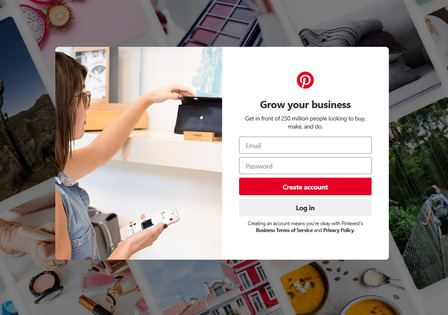
- 创建一个新的 Pinterest 企业帐户——请先注销您的个人帐户(如果您有的话)。然后访问注册页面,您需要在页面上输入您的电子邮件地址、创建密码,以及输入您的公司名称和详细信息。
-
To change your personal Pinterest account to a business one, login to your account and select the convert option in your account settings. Then you go through the same motions as in a business account setup, where you verify your domain and so forth.
如何在 NZ 有效使用 Pinterest
Pinterest 是一款很棒的视觉社交媒体工具。但它也像 Facebook 一样,会让人非常浪费时间。登录后,映入眼帘的是你的信息流,点击一下,再点击一下,然后就开始搜索你原本根本没打算搜索的主题!所以你需要制定一个计划,幸运的是,我们已经为你准备好了:
- 设置你的 Pinterest 画板 由于公开(或普通)看板是受众可以看到的,因此您需要先设置这些看板。您可以创建私密看板来收集想法,但它们对网站引流没有任何帮助。这意味着您需要策略性地设置看板,并使用包含关键词的恰当标题。此外,每个看板还需要撰写引人入胜的描述。
- 将内容固定到您的看板 使用 Canva 等图形设计工具或 Pinterest 的“Pin It”按钮,将内容添加到你的每个图板上。刚开始,每个图板可以添加 5 个不同的 Pin 图。你可以添加博客、产品和技巧等内容。许多企业会像制作 Facebook 帖子一样,为每个 Pin 图制作 Pinterest 图片。争取每周至少在每个图板上添加一个新 Pin 图。
- Engage with other pinners - search out for other businesses and individuals who have boards on areas your business is interested in. Comment, like and repin their pins.
- 添加链接 将你的 Pinterest 帐户添加到你网站上的其他社交媒体图标中。
- 告诉所有人 关于您的新 Pinterest 帐户。引导网站访客访问博客文章或其他页面中的特定图板和图钉。同时,在您的其他社交媒体渠道上分享链接。
现在你准备出发了! 看看我们的Pinterest账号 想了解更多灵感,也请关注我们,获取更多实用建议!
Posted: Monday 21 January 2019
