
You can add a comprehensive reviews and ratings system to your ecommerce website very easily.
購入ボタンのすぐ下に、5つ星評価ウィジェットが表示されます。ユーザーは現在の評価を星の数で確認でき、星をクリックすると評価/レビューウィジェットがポップアップ表示されます。
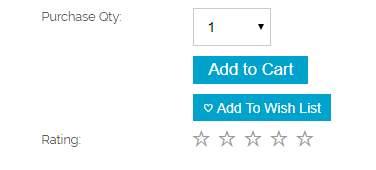
How to enable the Ratings and Reviews widget
- Click the ECOMMERCE button, then scroll down to the Add Plugins (Add Features) section
-
This section will list all the available plugins.Find the Ratings and Reviews widget and click the green + icon to bring up the plugin info page and pricing.
-
Click the green Add Plugin button to enable.
How to disable the Ratings and Reviews widget
- Click the ECOMMERCE button, then scroll down to the My Plugins Enabled section
- This section will list all the available plugins.
- Find the Ratings and Reviews widget and click the Configure Widget button
- Click the red Remove Plugin button to disable.
Widget Features
The Popup Rating / Review Form
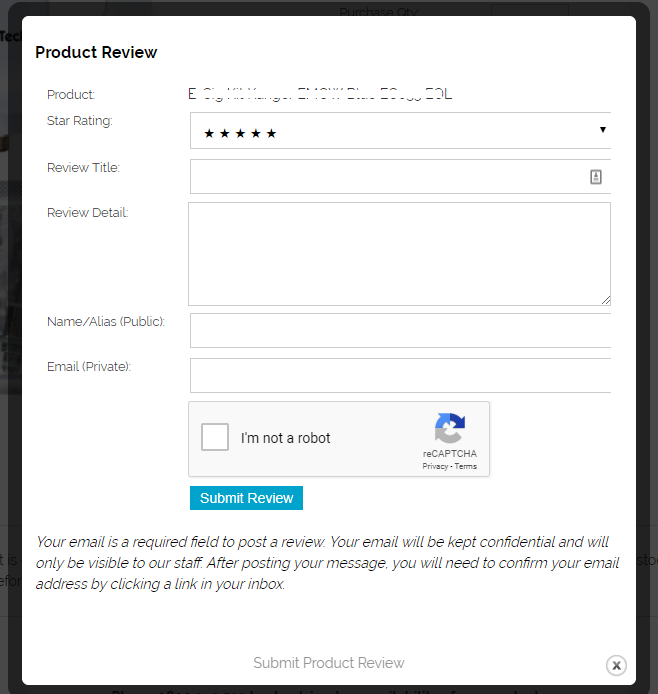
This popup rating/review form allows users to post their review/rating. Either click the rating stars or the the REVIEW button in the reviews tab to see this form.
This form requests their email / robot captcha only if they are not logged in, nor following a link from a ratings / review email.
Automatically Send Rating / Review Request Emails
一定期間後に顧客にメールを送信し、評価やレビューを促すことができます。これは、ショッピングエリアのカスタマイズの通知セクションで有効にできます。
顧客が評価/レビューメール内のリンクをクリックする際、ログインやメールアドレスの入力、ロボットによるキャプチャ入力は必要ありません。ワンクリックで評価を完了し、その後にオプションでレビューテキストを追加できます。
Restrict who receives the review emails requests upon buying a product
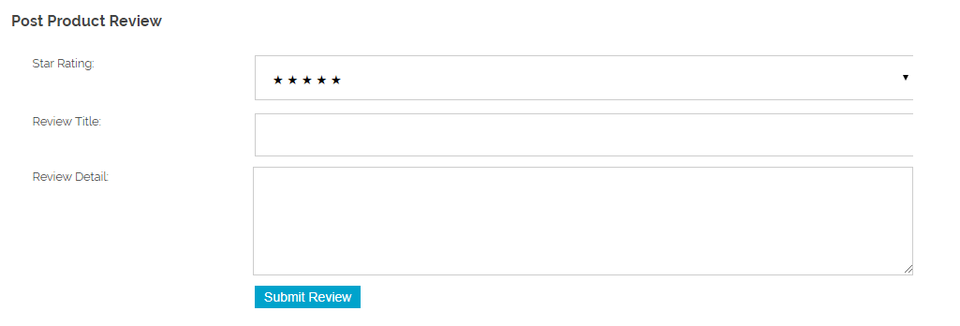
You can choose to send review email followups only to Retail customers, or filter by a member group or authorisation level.
Review Responses / Monitoring Spam
Owner Responses
When editing a review in the CMS, you have the ability to add an owners response that will appear below the review.
The wording of the response title can be reworded via DESIGN > REWORD TITLES AND PROMPTS
Monitoring Spam / Reviewing Reviews
If this is the first rating/review a public website user makes, they will be prompted to verify their email address. There rating/review will not be visible until they verify their email address. Once their address is verified, they will be able to post more reviews more easily.
The webmaster will be sent a notification. They can verify the posters email address on their behalf, thus making the message live. Or the webmaster can delete the post if it appears malicious in nature.
Customers who are sent a rating/review request, can make reviews more easily. These ratings and reviews will be made live immediately.
At any time, the webmaster can review all recent reviews and forums posts via the FORUM tab at the top of our CMS (when logged in to the CMS, and when there exists at least 1 review)
Minor typos in a review can be edited by the webmaster.
You can permanently block some key words like "Rayban Sunglasses" if you like, to prevent form spam.
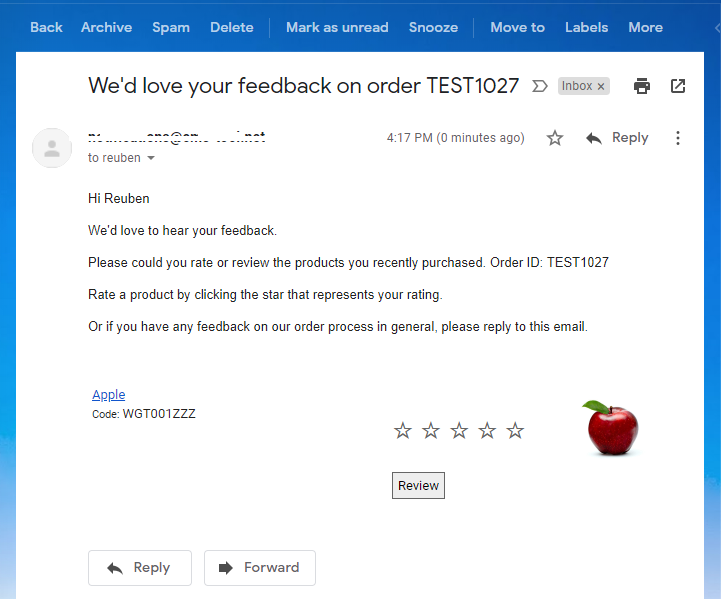
The default email review styling
表示オプション
Showing Stars on the Category/Product List Page
You can set the stars and the current rating to show on the Product List pages on the website via the Category Product Item Customisations dropdown.
Showing Product Reviews on a single category page
A page of reviews can be added as a special Category type (Recent Reviews). For more info see the ALL CATEGORY features help item.
Product View Customisations
You can also choose to promote the views on the Product Detail page, or Customise the Owner response title.
Images:
You can allow users to post images along with their reviews. Things to consider regarding this are as below:
Downsides:
- allowing general public to upload images to your website is quite a risk. (could be any file uploaded disguised as a photo)
- images increase filespace usage
- images could have content that is not suitable for general viewing. etc
Mitigations
- unauthorised users receive an email asking them confirm their post via a link
- if a review is deleted, then so is it's image attached.
- authorised users can post images swiftly
- users who purchased and following the review link email can post reviewshttps://www.help.cms-tool.net/images/ swiftly
- images can only be jpg or png format.
Google Product Search Schema
All rating and some review data will transfer to google advanced product search schema.
注記
- Ratings and reviews require an email address, because anonymous reviews may be of a lesser quality.
- Sending review requests by email after 1 or 2 weeks will allow some time for deliveries to be made, and customers to be at the most enthusiastic mindset for making good reviews. Reviews may diminish after goods have aged .
- Reviews will be ordered on a product with the highest ratings at the top, and reverse date order within each rating band. Only the top 10 reviews will show, which means over time, the reviews will give positive impact to the page.
- You can encourage customers to leave reviews by offering incentives and engaging with each review.
Reviews Custom Templates
Custom Email Template - Review Email Template - Rate/review products
If using the custom email template, please do not forget to include this tag [ReviewEmailLines] so that the products will be listed with rating/review links.
Previewing the customised Review Email
If you want to test the template for a rating/review request email:
- Locate and existing order, or submit a test order.
-
View the order in the ORDERS section, Then go to the "Print/Email Docs" tab while viewing the order in the CMS.
-
In there you can view or submit the rating/review email.
Thank You Template - Tags Available
If creating a custom thank you email you can use the following tags within the email:
The tags need to be added inside [] brackets e.g. [mbr_name]
| mbr_name | pid | p_title |
How can I change when the reviews email is sent out?
Reviews email timing can be set in the eCommerce area-
- Click ECOMMERCE in the left menu
- Click the PLUGINS menu link under eCommerce heading
- Your active plugins will show in the main content area of the cms - find and click the ratings and reviews plugin
- Change the timing option via the TIMING dropdown indicated in the plugin settings
More From This Section
FAQ Topics
The Basics
Building your site
- Pages
- Content Editor Modes Explained
- - DRAG DROP Editor (Default)
- - CONTENTBOX Editor (Advanced)
- - WORD STYLE Editor (TinyMCE)
- - LIVE Editor (Click to Edit Mode)
- Styling Content
- Images / Backgrounds
- Banners and Sliders
- Uploading content
- Design Templates
- フォーム
- More Q & A
- Menus
- Mobile Styling and Optimisation
Advanced Page Types
電子商取引
- Shopping Basics
- Product Pricing, Currencies
- Category Management
- 製品
- Product Options
- Layout and Formatting
- 支払いオプション
- Freight - Couriers
- Processing Orders
- Orders / Invoices
- Advanced Ecommerce
- Plugins
- 卸売
- Bookings Management System
- Stock & Quantities
- Vouchers, Discounts, Loyalty Points
- Selling Photos / Prints
- Shopping Cart Add-on Page types
- Advanced APIs / Add ons
- 販売時点管理(POS)
- レポート
Email & Membership
- Member Management
- Members Pages / Template Customisations
- From Addresses and Reply To Email Notifications
- Global Enquiry form options
- Standard Field Names
- Webmail
- Bulk Email
- CRM Features
- Email Campaigns
- Forums & Blogs
- Pop3/Imap Email Services
- Scams and Hoaxes
- Lead Magnets / Growing Your Customer Database
Promoting your site
Advanced
- Power User Options
- Form Spam Filtering
- Wordpress
- PHP Setup
- [TAGS]
- FONTS - Embedding Web Fonts
- jQuery snippets
- FONTS - Uploading local font files
- Search External Links / Import external content
- HTML / CSS Snippets
- Loading additional Material Symbols styles
- FAQ Help Map
- Advanced Template Customisation, CSS, etc
- Languages and Translations
- Importing Content from Another Platform
