
Add a list of products to share with friends and Family
ال Bridal Wishlist option is different from the standard Wish List option where customers can save products.
This option allows a customer add a list of products to a shopping cart, which can then be shared as a Bridal Wish list with friends and family.
The Bride/Groom Perspective:
- يتسوق الزوجان السعيدان لشراء الأشياء التي يرغبان بها حقاً كهدايا زفاف، ويضيفان الأشياء المرغوبة إلى سلة التسوق الخاصة بهما.
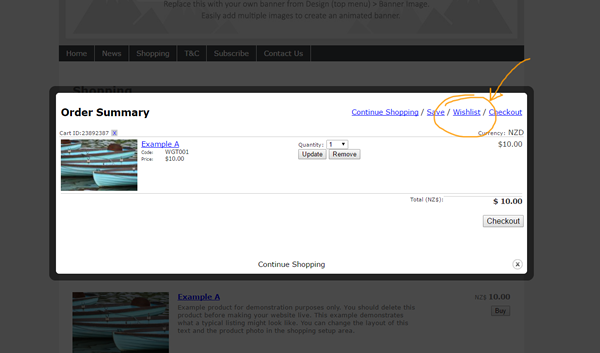
- On the shopping cart page (before going to the checkout page) they will have an options to Continue Shopping / Save / قائمة الأمنيات / Checkout - visible at top right on the popup window. (screenshot below)
- Clicking WISHLIST will prompt to save a custom wishist.
- يقومون بإدخال تفاصيل الشحن الافتراضية، واسم الحدث وتاريخه.
- يضغطون على زر الحفظ وسيحصلون على رابط على الشاشة وعبر البريد الإلكتروني، يمكنهم مشاركته مع الأصدقاء والعائلة.
- The couple may add/remove items from their list - or delink the list - at any time.
The Friends and Family Perspective:
- يمكن للأصدقاء والعائلة متابعة الرابط الخاص الذي يقدمه العروسان.
- سيشاهدون قائمة بالعناصر المطلوبة والمتوفرة.
- يمكنهم شراء العناصر من قائمة المطلوبين، أو أي عناصر أخرى يرغبون في إضافتها
- بمجرد إتمام عملية طلب أحد المنتجات، سيتم خصم الكمية من قائمة الطلبات. وهذا يسمح بشراء كميات متعددة من المنتجات من قبل أفراد مختلفين.
- في حال محاولة أي شخص شراء كمية أكبر من الكمية المطلوبة، ستظهر رسالة خطأ وسيتم تقليل الكمية في سلة التسوق. قد يحدث هذا لبعض المستخدمين في الخطوة الأخيرة من عملية الدفع، إذا قام شخص آخر بشراء نفس المنتج في نفس الوقت.
- ستُحدد تفاصيل الشحن للطلب تلقائيًا وفقًا لما حدده العروسان. يتحمل المشتري رسوم الشحن الخاصة بمشترياته. ويمكن للمشتري تغيير وجهة الشحن حسب رغبته.
The Shop Owners Perspective:
- Enable the wedding list feature by checking the Include Gift Wishlist / Bridal Registry Option checkbox located in the Shopping Setup area > Shopping Cart Options.
- تتوفر "قوائم الزفاف قيد التقدم" في منطقة التقارير، مع بعض خيارات الإدارة.
- إذا لم يتم دفع ثمن المنتجات، فسيلزم تدخل يدوي لزيادة الكمية المطلوبة... وقد تحتاج إلى حذف الطلب غير المكتمل حتى لا يظهر الشراء في صفحة قائمة الأمنيات.
- ستحتاج إلى تنسيق تنفيذ طلباتك بنفسك، حيث لم يتم مراعاة هذه الخطوات في
- يمكنك أن تفكر في تقديم أسعار خاصة للشحن لمشتريات قائمة الزفاف إذا كنت تريد ذلك، من خلال منطقة إدارة الشحن العادية.
Screenshot below: The save cart to wishlist link.
Example Screenshots

When the Bride/Groom has added the products and clicked the WISHLIST link in the cart as shown above, they can add some details about the list, once saved a link is generated as shown above, which is also emailed out to the Bride/Grooms email address.

When the Friends and Family click the link, they are shown the list of items still available to purchase.
How to enable the Bride/Groom Wishlist option:
Check the Include Gift Wishlist / Bridal Registry Option checkbox at the side of the CHECKOUT OPTIONS area - accessible via E-COMMERCE > DISPLAY OPTIONS (Checkout Options button)
More From This Section
FAQ Topics
Building your site
- Pages
- Content Editor Modes Explained
- - DRAG DROP Editor (Default)
- - CONTENTBOX Editor (Advanced)
- - WORD STYLE Editor (TinyMCE)
- - LIVE Editor (Click to Edit Mode)
- Styling Content
- Images / Backgrounds
- Banners and Sliders
- Uploading content
- Design Templates
- النماذج
- More Q & A
- Menus
- Mobile Styling and Optimisation
Advanced Page Types
التجارة الإلكترونية
- Shopping Basics
- Product Pricing, Currencies
- Category Management
- منتجات
- Product Options
- Layout and Formatting
- خيارات الدفع
- Freight - Couriers
- Processing Orders
- Orders / Invoices
- Advanced Ecommerce
- Plugins
- بالجملة
- Bookings Management System
- Stock & Quantities
- Vouchers, Discounts, Loyalty Points
- Selling Photos / Prints
- Shopping Cart Add-on Page types
- Advanced APIs / Add ons
- نقطة البيع (POS)
- التقارير
Email & Membership
- Member Management
- Members Pages / Template Customisations
- From Addresses and Reply To Email Notifications
- Global Enquiry form options
- Standard Field Names
- Webmail
- Bulk Email
- CRM Features
- Email Campaigns
- Forums & Blogs
- Pop3/Imap Email Services
- Scams and Hoaxes
- Lead Magnets / Growing Your Customer Database
Promoting your site
Advanced
- Power User Options
- Form Spam Filtering
- Wordpress
- PHP Setup
- [TAGS]
- FONTS - Embedding Web Fonts
- jQuery snippets
- FONTS - Uploading local font files
- Search External Links / Import external content
- HTML / CSS Snippets
- Loading additional Material Symbols styles
- FAQ Help Map
- Advanced Template Customisation, CSS, etc
- Languages and Translations
- Importing Content from Another Platform
