
To add the Events Booking section to your site please log into the CMS and follow these steps.
- Under Web Pages select Add a Page
- From the page options select Events
- Select the Events page type you require
- Give your Page a Menu Button a Title and a Page Heading
- Save.
Your Events Page has now been created. And you should now be looking at the Events management area.
If not then you can access it through the Web Pages area, you will find your new page in the page list, use the edit function as you do to edit other pages to enter the management area.
Alternatively you will now find a Events Tab on the master navigation to the left of your CMS
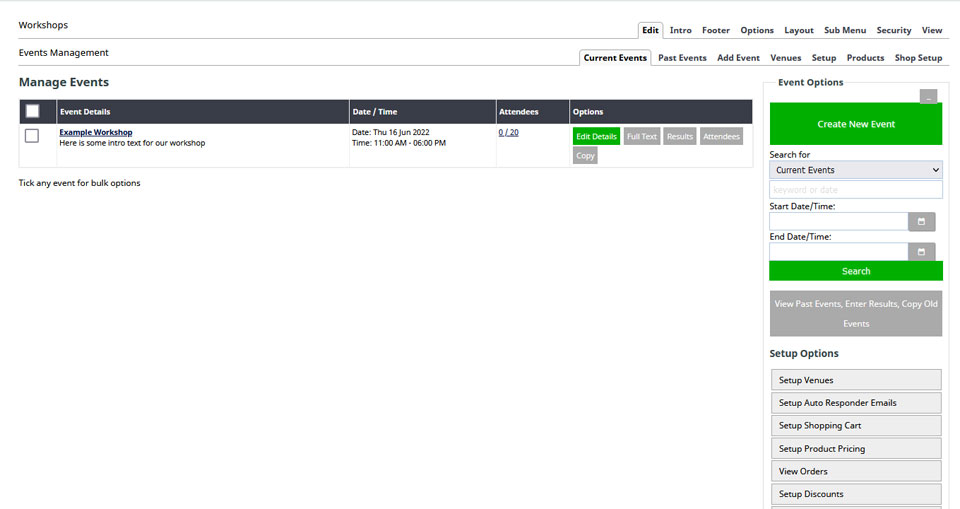
The screenshot above shows the events page with a single event added.
More From This Section
The events management system is an events calendar with an attached booking and shopping cart, suitable for managing, advertising and taking online bookings for upcoming events.
To add the Events Booking section to your site please log into the CMS and follow these steps
Understanding your way around the booking system
Learn how to add a new event within your Events Calendar.
You can specify a Webinar link and connection requirements as part of an event setup.
Learn how to create a venue for an event.
Sell tickets for your events. Learn how to setup your Shopping Cart for events, Create Event Ticket Products / Pricing, Discounts and Payments
You can manage all events and attendees here.
Learn about styling your events and calendars and choosing which option to display on your website.
Events can be assigned to categories to allow your customers to filter the events shown.
When setting up paid events products you can disable delivery address and freight options
Customising who receives the event booking notification
You can automatically set non-bookable events to auto-repeat, and with Bookable events, duplicate the events for additional dates.
FAQ Topics
Building your site
- Pages
- Content Editor Modes Explained
- - DRAG DROP Editor (Default)
- - CONTENTBOX Editor (Advanced)
- - WORD STYLE Editor (TinyMCE)
- - LIVE Editor (Click to Edit Mode)
- Styling Content
- Images / Backgrounds
- Banners and Sliders
- Uploading content
- Design Templates
- Forms
- More Q & A
- Menus
- Mobile Styling and Optimisation
Advanced Page Types
E-Commerce
- Shopping Basics
- Product Pricing, Currencies
- Category Management
- منتجات
- Product Options
- Layout and Formatting
- خيارات الدفع
- Freight - Couriers
- Processing Orders
- Orders / Invoices
- Advanced Ecommerce
- Plugins
- Wholesale
- Bookings Management System
- Stock & Quantities
- Vouchers, Discounts, Loyalty Points
- Selling Photos / Prints
- Shopping Cart Add-on Page types
- Advanced APIs / Add ons
- نقطة البيع (POS)
- Reports
Email & Membership
- Member Management
- Members Pages / Template Customisations
- From Addresses and Reply To Email Notifications
- Global Enquiry form options
- Standard Field Names
- Webmail
- Bulk Email
- CRM Features
- Email Campaigns
- Forums & Blogs
- Pop3/Imap Email Services
- Scams and Hoaxes
- Lead Magnets / Growing Your Customer Database
Promoting your site
Advanced
- Power User Options
- Form Spam Filtering
- Wordpress
- PHP Setup
- [TAGS]
- FONTS - Embedding Web Fonts
- jQuery snippets
- FONTS - Uploading local font files
- Search External Links / Import external content
- HTML / CSS Snippets
- Loading additional Material Symbols styles
- FAQ Help Map
- Advanced Template Customisation, CSS, etc
- Languages and Translations
- Importing Content from Another Platform
