
You have the option to add bulk emailers to any news page on your website.
How to add your Bulk Email to a Newsletter page
You can add the email to a Newsletter page from either the main Bulk Emailer page or when sending the email.
Adding the newsletter from the main Bulk emailer page
- Ensure you have at least one News or Blog page on your website.
- In the Bulk Emailer, check the box to the left of the relevant email
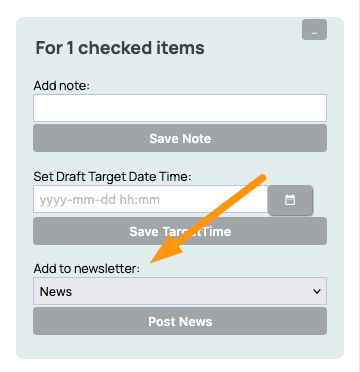
- From the options presented on the right-hand sidebar, select a page from the ADD TO NEWSLETTER dropdown field and press POST NEWS.
- If your newsletter contains bulk mailer [TAGS] or other mailer-specific elements you may need to edit the content to remove or adjust these elements.
Posting a copy when sending the email
To have the bulk emailer post the email to your newsletter when sending an email, set the relevant news page when in the final step via the PUBLISH A COPY ON YOUR NEWS PAGE area.

More From This Section
Our emailer system enables you to send emails to your mailing list. Your mailing list is managed on our server, allowing people to subscribe or unsubscribe.
Login to your CMS and click the blue BULK EMAILER icon found one the side menu of the CMS.
How our system works is that you can either creating a new email with our default template or "repeat/copy" from a previously sent email, using it as your template
In order to send your newsletter to your mailing list, follow this procedure.
Please test your emails on multiple email clients, to ensure your emails look good on all devices, on all apps, in all web mail clients etc. Learn how to format your emails for the most widespread readability and professional layout.
You can pause and restart a mailout that is in progress. Restarting the mailout will not resend emails to those who have received them.
What can and can't be done with our emailer, technically speaking
What are the rules for collecting email addresses. Do I need to provide an opt-in or opt-out address? What about anti-spam laws?
Can my pre-existing mailing list integrate with the content management system's members database?
Our system automatically detects most failed senders, however, every now and again it also sees perfectly valid email addresses as a fail, learn more..
Learn how to make those annoying popup subscribe boxes
Unsubscribe links and other unsubscribe considerations
There a couple of product snippets available for your bulk emails where you can quickly add product information and links to a product.
Learn about the best image size to include in your bulk emails.
You have the option to add bulk emailers to any news page on your website.
FAQ Topics
Building your site
- Pages
- Content Editor Modes Explained
- - DRAG DROP Editor (Default)
- - CONTENTBOX Editor (Advanced)
- - WORD STYLE Editor (TinyMCE)
- - LIVE Editor (Click to Edit Mode)
- Styling Content
- Images / Backgrounds
- Banners and Sliders
- Uploading content
- Design Templates
- Forms
- More Q & A
- Menus
- Mobile Styling and Optimisation
Advanced Page Types
E-Commerce
- Shopping Basics
- Product Pricing, Currencies
- Category Management
- منتجات
- Product Options
- Layout and Formatting
- خيارات الدفع
- Freight - Couriers
- Processing Orders
- Orders / Invoices
- Advanced Ecommerce
- Plugins
- Wholesale
- Bookings Management System
- Stock & Quantities
- Vouchers, Discounts, Loyalty Points
- Selling Photos / Prints
- Shopping Cart Add-on Page types
- Advanced APIs / Add ons
- نقطة البيع (POS)
- Reports
Email & Membership
- Member Management
- Members Pages / Template Customisations
- From Addresses and Reply To Email Notifications
- Global Enquiry form options
- Standard Field Names
- Webmail
- Bulk Email
- CRM Features
- Email Campaigns
- Forums & Blogs
- Pop3/Imap Email Services
- Scams and Hoaxes
- Lead Magnets / Growing Your Customer Database
Promoting your site
Advanced
- Power User Options
- Form Spam Filtering
- Wordpress
- PHP Setup
- [TAGS]
- FONTS - Embedding Web Fonts
- jQuery snippets
- FONTS - Uploading local font files
- Search External Links / Import external content
- HTML / CSS Snippets
- Loading additional Material Symbols styles
- FAQ Help Map
- Advanced Template Customisation, CSS, etc
- Languages and Translations
- Importing Content from Another Platform
