
You can either set specifications via the More Text > Specifications area or via a Custom data table format
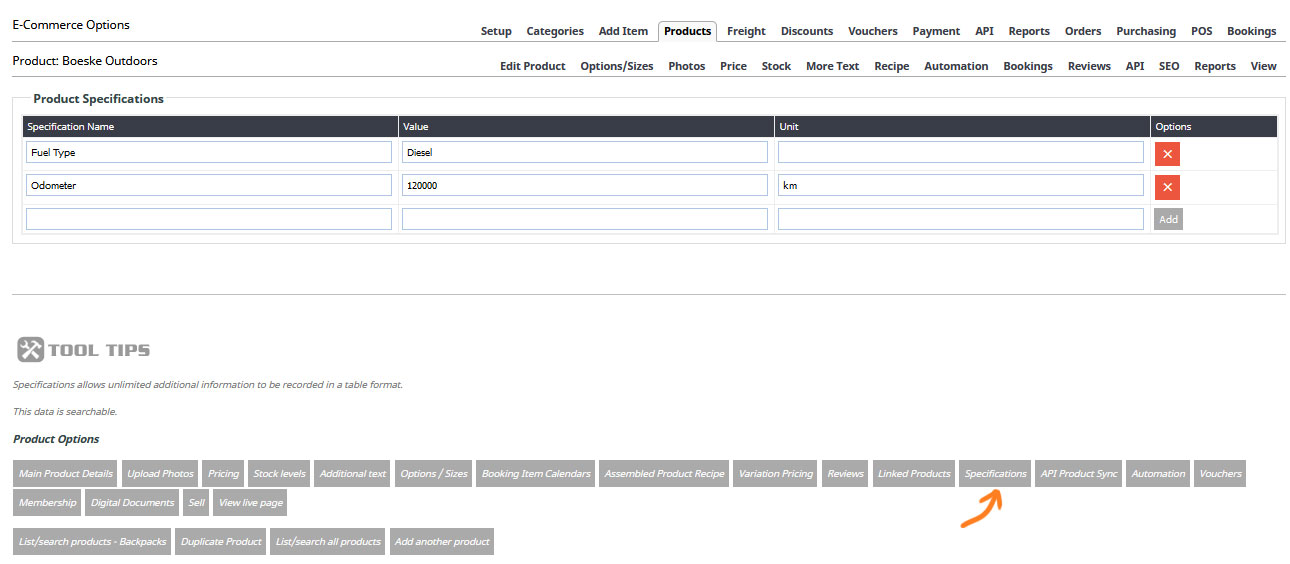
To enter specifications in the data table format, click the SPECIFICATIONS button at the bottom of the product detail page, when editing the product, this will allow you to add your specifications.
Show specifications in a tab
The Specifications Tab plugin displays your specifications as rows of data in a tab on each product page, so customers can compare sizes, materials and other technical details. To add it, click E-commerce in the left menu, scroll down to the Plugins section, find Specifications Tab, click the + button and confirm the addition.
How to remove the plugin
Open the plugin settings and click the red Remove Plugin button at the bottom of the page.
More From This Section
Learn about our affiliate management system here
By default, custom checkout fields appear in an unsorted order when appearing on invoices. You are able to force the order using the following hidden field.
Understand the stock management process deeply for fast selling items.
You can view the history of automated emails sent to a customer or for an order.
Learn about importing products from CSV
You can export Product data from your shopping cart in CSV format.
You can specify 6 extra product fields that will appear as filter options in the advanced search option.
You can add enquiry forms to your product pages globally - or by product.
The content management system logs product enquiries in multiple areas
Within the Enquiries / CRM section of the CMS you can create pre-set responses to be inserted into your replies.
You can now add products to a closed order.
You can now create orders via an Excel spreadsheet upload.
Before you can issue a refund, you need to issue the credits. Either a discount, or a stock item return...
You can add vendor-only pages to allow members to upload and manage their own products a view orders
Learn more about how to setup an art gallery with exhibitions and artists
You can either set specifications via the More Text > Specifications area or via a Custom table format
You can create Gift Packs or Recipe products which will track stock for individual items sold
Prevent checkout continuing, until customer has added enough items to their cart to match the required threshold.
Custom calcs is an optional plugin that can be used to calculate a complex manufacturing cost, using all sorts of interesting formulas.
Using the p_minLevelForSee column you can restrict who can view the products imported.
Sample of rep setup for internal use.
By default, the system uses the product title as alt text for the main product images. However you can over ride the text on additional product images.
FAQ Topics
Building your site
- Pages
- Content Editor Modes Explained
- - DRAG DROP Editor (Default)
- - CONTENTBOX Editor (Advanced)
- - WORD STYLE Editor (TinyMCE)
- - LIVE Editor (Click to Edit Mode)
- Styling Content
- Images / Backgrounds
- Banners and Sliders
- Uploading content
- Design Templates
- Puka
- More Q & A
- Menus
- Mobile Styling and Optimisation
Advanced Page Types
Tauhokohoko Ipurangi
- Shopping Basics
- Product Pricing, Currencies
- Whakahaerenga o te waahanga
- Ngā Hua
- Ngā Kōwhiringa Hua
- Layout and Formatting
- Ngā Kōwhiringa Utu
- Freight - Couriers
- Processing Orders
- Orders / Invoices
- Advanced Ecommerce
- Plugins
- Hokomaha
- Bookings Management System
- Stock & Quantities
- Vouchers, Discounts, Loyalty Points
- Selling Photos / Prints
- Shopping Cart Add-on Page types
- Advanced APIs / Add ons
- Te Wāhi Hoko (POS)
- Ngā Pūrongo
Email & Membership
- Member Management
- Members Pages / Template Customisations
- From Addresses and Reply To Email Notifications
- Global Enquiry form options
- Standard Field Names
- Webmail
- Bulk Email
- CRM Features
- Email Campaigns
- Forums & Blogs
- Pop3/Imap Email Services
- Scams and Hoaxes
- Lead Magnets / Growing Your Customer Database
Promoting your site
Advanced
- Power User Options
- Form Spam Filtering
- Wordpress
- PHP Setup
- [TAGS]
- FONTS - Embedding Web Fonts
- jQuery snippets
- FONTS - Uploading local font files
- Search External Links / Import external content
- HTML / CSS Snippets
- Loading additional Material Symbols styles
- FAQ Help Map
- Advanced Template Customisation, CSS, etc
- Languages and Translations
- Importing Content from Another Platform
