
This is an advanced area, please note there is no free support if a DNS mistake is made - a support fee will apply.
If you are using a third party to monitor your DMARC reports, please do not use this wizard.
We have a wizard within our Domains/Email section to help try to make this process easier.
SPF and DKIM records determine which servers may send email on your behalf (using your email address)
DMARC records determine how failures should be handled, and where failure and aggregate reporting can be directed.
DMARC validation requires that either DKIM or SPF validates any individual sender. A failure only occurs if someone attempts to send email who is not specified in the SPF nor DKIM area.
The format of DMARC, SPF and DKIM records is very exacting. If you make a mistake in the way you enter the information, then your DNS might break, and you could cause an outage to your website or email. Please contact our support team if you want us to setup your email validation for you - this will be a chargeable service.
You may also use bulk mail services, accounting software, payment gateway receipts, etc and these may need to be included in these settings.
How to find the wizard:
1. Go to the Domains and Mail.
2. Select the icon with the two rectangular blocks next to the relevant domain
3. Choose Configure SPF/DMARC Email Validation

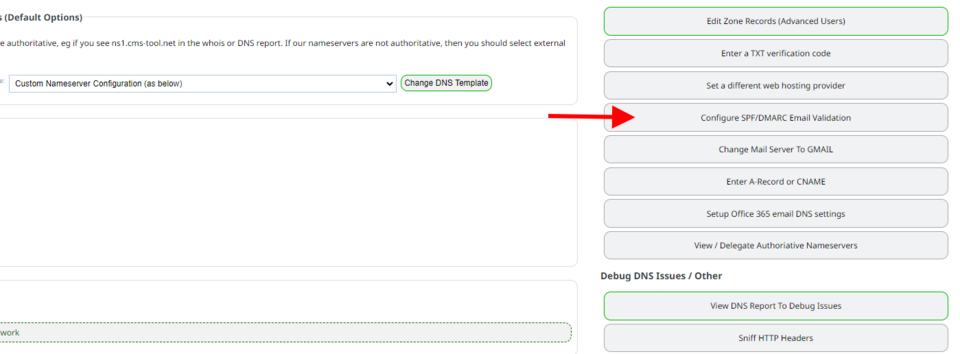
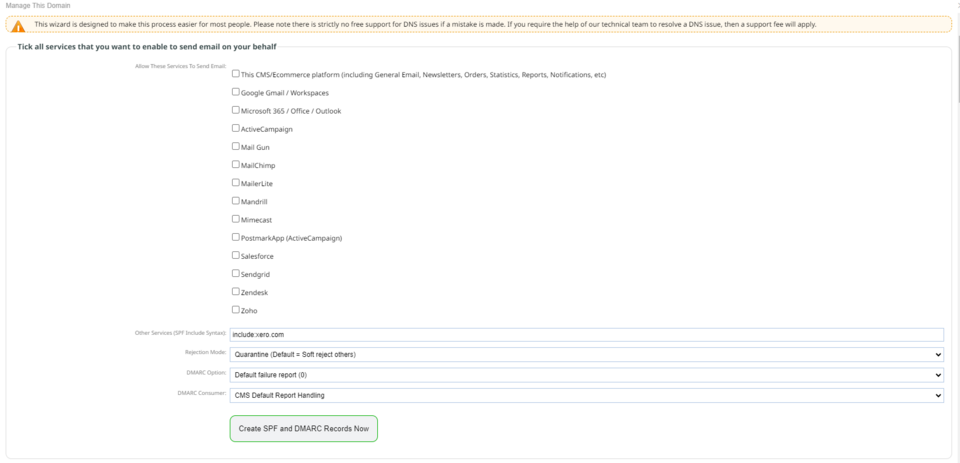
You will then see this screen below.
We have added a preconfigured list of the most used services that will add their last known settings automatically.
By default, our CMS server will be entitled to send email on your behalf (eg for order notifications, receipts, enquiries, etc)
By default, your primary website and configured mail servers will be entitled to send email on your behalf.
Tick the services you use and submit the form if no other changes to the default settings in the drop down boxes are required.
When you submit this form, a DMARC record will be created or updated with default settings (DMARC reports will be sent to our CMS platform for analysis).
To Add DKIM Records
Scroll down further on this page to find DKIM record addition.
This is generally records from your third party that you can cut and paste in, but can still be complicated and may need additional support help.
Please use 1024 bit keys. Please do not use or enter 2048 bit keys.
DMARC RUA and RUF settings
These records aggregate (RUA) and forensic (RUF) can be updated via the DMARC CONSUMER dropdown. These are optional fields so if you have only been provided a RUA entry (which is common) you can set the RUF field blank.
More From This Section
FAQ Topics
Building your site
- Pages
- Content Editor Modes Explained
- - DRAG DROP Editor (Default)
- - CONTENTBOX Editor (Advanced)
- - WORD STYLE Editor (TinyMCE)
- - LIVE Editor (Click to Edit Mode)
- Styling Content
- Images / Backgrounds
- Banners and Sliders
- Uploading content
- Design Templates
- Forms
- More Q & A
- Menus
- Mobile Styling and Optimisation
Advanced Page Types
E-Commerce
- Shopping Basics
- Product Pricing, Currencies
- Category Management
- Ngā Hua
- Product Options
- Layout and Formatting
- Ngā Kōwhiringa Utu
- Freight - Couriers
- Processing Orders
- Orders / Invoices
- Advanced Ecommerce
- Plugins
- Wholesale
- Bookings Management System
- Stock & Quantities
- Vouchers, Discounts, Loyalty Points
- Selling Photos / Prints
- Shopping Cart Add-on Page types
- Advanced APIs / Add ons
- Te Wāhi Hoko (POS)
- Reports
Email & Membership
- Member Management
- Members Pages / Template Customisations
- From Addresses and Reply To Email Notifications
- Global Enquiry form options
- Standard Field Names
- Webmail
- Bulk Email
- CRM Features
- Email Campaigns
- Forums & Blogs
- Pop3/Imap Email Services
- Scams and Hoaxes
- Lead Magnets / Growing Your Customer Database
Promoting your site
Advanced
- Power User Options
- Form Spam Filtering
- Wordpress
- PHP Setup
- [TAGS]
- FONTS - Embedding Web Fonts
- jQuery snippets
- FONTS - Uploading local font files
- Search External Links / Import external content
- HTML / CSS Snippets
- Loading additional Material Symbols styles
- FAQ Help Map
- Advanced Template Customisation, CSS, etc
- Languages and Translations
- Importing Content from Another Platform
