
How to register a new domain in the CMS
- Takiuru to our Content Management System
- Tīpakohia your website (if you have more than one webspace under your account)
- Haere ki te Ngā Rohe/Īmēra ripa.
- Tīpakohia Register a New domain (right hand side green button)
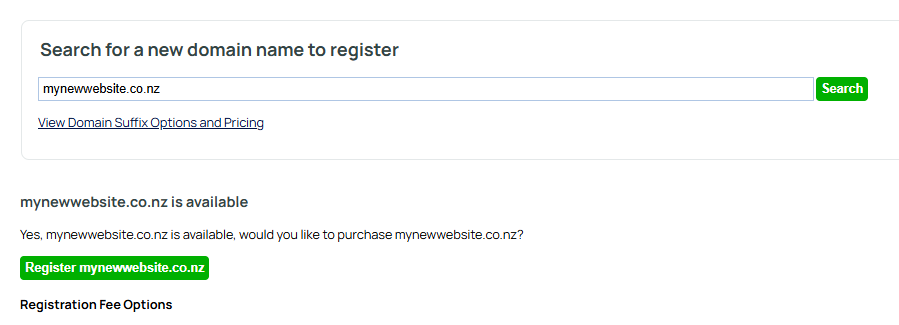
- Enter your domain of choice and click "search" (see the tips on choosing your domains below)
- Repeat if necessary until you find an available name you are happy with.
- Click Register Domain ( it will have your new domain name in the link)
- On the next screen enter your details, tick the terms and conditions box and click continue.
- Follow the payment steps to completion.
- Payment can be made by cheque, online banking or visa card
- Our support team will be notified and action your request as soon as payment is received.
Important Note: Registration is not completed until payment is received, so payment by credit card is a good idea. Anyone can register your domain at another registrar while we await payment, so don't delay.
Tips on choosing domain names -
- Use lowercase characters and numbers only. Dashes - are permitted. Spaces and other punctuation are not - e.g. mycompanyname [.com]
- Remember to select a suitable suffix, e.g. .com .org .net .biz .info .ws .co.nz .net.nz .org.nz .school.nz .ac.nz .maori.nz
- You should normally pick a domain name that closely resembles your company name. It should preferably be short and easy to remember, eg use your company initials, or abbrieviated alias. Leave the "Ltd" or "Pty" part off.
- If you are mainly selling to a domestic market, then you should use a local suffix like .co.nz for New Zealand, .com, .net or .biz for America and Australia etc.
- It is a good idea to register more than just one domain name (they can all seamlessly take people to your site or to specific pages within your site).
- You should also register common misspellings of your name, and the generic names of your products and services.
When is payment required?
Payment for domain names is required within 3 days.You can pay by cheque, online banking or credit card. If you pay late, the registration process may not complete, possibly allowing other people to register your domain name. It takes about 2 working days for registration of your domain name to complete. It can take up to 1 week for a new website address to propogate right around the internet.
Is your countries suffix missing?
He iti noa ngā whenua/whakapiringa ka taea e mātou te rēhita, he uaua ake rānei/he utu nui ake te tukanga i ngā whenua ngaro.
More From This Section
What is a domain name? A domain name is required in order to have a custom web address. Learn how domain names work here.
Follow this procedure to register your new domain name.
If you already have a domain name and want to associate it with your new website, follow these steps:
If you have multiple domains attached to a site, one must be assigned as the primary domain.
To up date the contact details of your registered domains.
How to generate a new authorisation key for your domain managed by us.
The nameservers are the machines that convert web addresses (domain names) to machine IP addresses (numerical addresses)
What happens when your domain name is due for renewal
How to point your domain at a website hosted elsewhere using A Record/CNAME records.
Here is where you need to go to change your authoritative nameservers. Change who is responsible for managing your nameservers.
Warning, this is for advanced users only.
Get the steps to validate your website via the CMS. Domain verification. Verify domain name. You can access all 3 methods of domain verification in the domains tab.
Gmail and Yahoo have announced changes that require you to add a DMARC record on your domain before February 1, 2024 if you’d like to continue sending emails from a branded email address.
What to do if you haven't renewed your domain name on time and decide you want to keep it
How to set up a subdomain eg. example.yourdomain.co.nz
Where do I find and the how do I understand my website's statistics?
Sometimes users experience website outages that may not actually be a website outage, but actually an outage of the clients connection, or some link in the middle. Read on.
Q: Will Google Apps work with a free parked domain name? A: Yes, but we do not provide any free support for this. Our support obligation for free parked domain names is "Master nameservers" and "Registry Contacts" and "Billing". It does not include "A-Records and CNAME and MX" However, DNS is active in any state other than NEW/DELETED.
Some unethical web designers and other registrars fail to set you as the registrant name, and instead use their own name. This is against the .nz rules.
It is a complicated business to purchase a domain name that is registered to someone else. Our support is strictly limited to the following advice.
You can quickly find your domains expiry date in the Domains / Mail area.
You can quickly find some information as to where your domain is managed via the Domains and Mail area.
FAQ Topics
Building your site
- Pages
- Content Editor Modes Explained
- - DRAG DROP Editor (Default)
- - CONTENTBOX Editor (Advanced)
- - WORD STYLE Editor (TinyMCE)
- - LIVE Editor (Click to Edit Mode)
- Styling Content
- Images / Backgrounds
- Banners and Sliders
- Uploading content
- Design Templates
- Forms
- More Q & A
- Menus
- Mobile Styling and Optimisation
Advanced Page Types
E-Commerce
- Shopping Basics
- Product Pricing, Currencies
- Category Management
- Ngā Hua
- Product Options
- Layout and Formatting
- Ngā Kōwhiringa Utu
- Freight - Couriers
- Processing Orders
- Orders / Invoices
- Advanced Ecommerce
- Plugins
- Wholesale
- Bookings Management System
- Stock & Quantities
- Vouchers, Discounts, Loyalty Points
- Selling Photos / Prints
- Shopping Cart Add-on Page types
- Advanced APIs / Add ons
- Te Wāhi Hoko (POS)
- Reports
Email & Membership
- Member Management
- Members Pages / Template Customisations
- From Addresses and Reply To Email Notifications
- Global Enquiry form options
- Standard Field Names
- Webmail
- Bulk Email
- CRM Features
- Email Campaigns
- Forums & Blogs
- Pop3/Imap Email Services
- Scams and Hoaxes
- Lead Magnets / Growing Your Customer Database
Promoting your site
Advanced
- Power User Options
- Form Spam Filtering
- Wordpress
- PHP Setup
- [TAGS]
- FONTS - Embedding Web Fonts
- jQuery snippets
- FONTS - Uploading local font files
- Search External Links / Import external content
- HTML / CSS Snippets
- Loading additional Material Symbols styles
- FAQ Help Map
- Advanced Template Customisation, CSS, etc
- Languages and Translations
- Importing Content from Another Platform
