
Please ensure you are following anti-spam rules. There is some information on this here: Collecting Email Addresses
If you need more information on member status such as general, opt-in, opt-out etc, this can be found here: Member Levels
Ngā mōhiohio
Members from the CMS can be optionally exported based on their member level. By default, opt in members are exported.
You can define a group/list to export the CMS members to.
Subscribers from MailerLite are added to our database to a specified group, and given a specified mbr_level.
How to Integrate
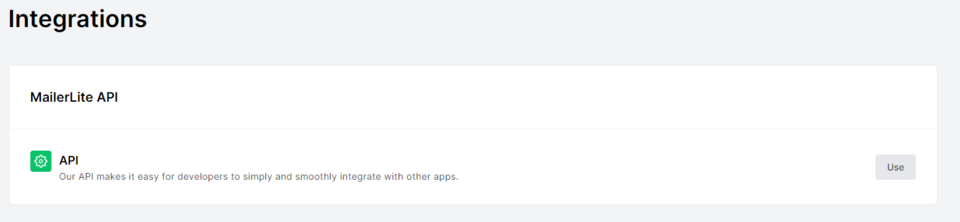
- In MailerLite, go to the Integrations section on the left hand dashboard.
- Click Use next to API
- Generate New Token
- Enter a token name, it can be anything
- Create Token
You will only get to see the token once, so copy and paste to a safe place. You will need this for the steps below.

Come back to the CMS, then:
- Haere ki E-commerce or Shop Setup
- Scroll down to the plugins section and find the MailerLite plugin.
- Click the + button to add the plugin
- Then Add Plugin
- Paste your API Key from Mailerlite into the box, taking care there is not an extra space before or after the key.
- Click Continue

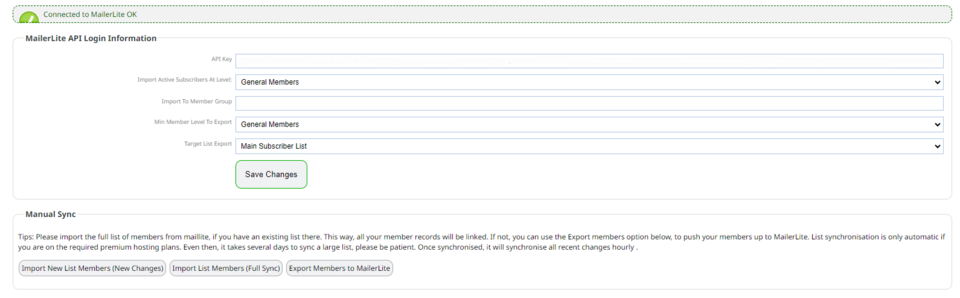
Your next screen should now have a green message "connected to MailerLite OK" as below. If not please review the API Key.
In this new screen you can manage your settings between the CMS and MailerLite.
If you have any existing groups within MailerLite you will find them in Target List Export.
Over a period of days, the CMS will sync the member data up to MailerLite, as well as any recent changes.
The system will only download the first 100 records in the list, if you have a larger list to import, use the manual approach of the import/export buttons below the configuration. There is a next button on the top right of each import/export screen that you will need to manually press once each page has finished.
Tips:
Please import the full list of members from MailerLite, if you have an existing list there. This way, all your member records will be linked. If not, you can use the Export members option to push your members up to MailerLite.
List synchronization is only automatic if you are on the required premium hosting plans. Once synchronised, it will synchronise all recent changes hourly .
More From This Section
FAQ Topics
Building your site
- Pages
- Content Editor Modes Explained
- - DRAG DROP Editor (Default)
- - CONTENTBOX Editor (Advanced)
- - WORD STYLE Editor (TinyMCE)
- - LIVE Editor (Click to Edit Mode)
- Styling Content
- Images / Backgrounds
- Banners and Sliders
- Uploading content
- Design Templates
- Forms
- More Q & A
- Menus
- Mobile Styling and Optimisation
Advanced Page Types
E-Commerce
- Shopping Basics
- Product Pricing, Currencies
- Category Management
- Ngā Hua
- Product Options
- Layout and Formatting
- Ngā Kōwhiringa Utu
- Freight - Couriers
- Processing Orders
- Orders / Invoices
- Advanced Ecommerce
- Plugins
- Wholesale
- Bookings Management System
- Stock & Quantities
- Vouchers, Discounts, Loyalty Points
- Selling Photos / Prints
- Shopping Cart Add-on Page types
- Advanced APIs / Add ons
- Te Wāhi Hoko (POS)
- Reports
Email & Membership
- Member Management
- Members Pages / Template Customisations
- From Addresses and Reply To Email Notifications
- Global Enquiry form options
- Standard Field Names
- Webmail
- Bulk Email
- CRM Features
- Email Campaigns
- Forums & Blogs
- Pop3/Imap Email Services
- Scams and Hoaxes
- Lead Magnets / Growing Your Customer Database
Promoting your site
Advanced
- Power User Options
- Form Spam Filtering
- Wordpress
- PHP Setup
- [TAGS]
- FONTS - Embedding Web Fonts
- jQuery snippets
- FONTS - Uploading local font files
- Search External Links / Import external content
- HTML / CSS Snippets
- Loading additional Material Symbols styles
- FAQ Help Map
- Advanced Template Customisation, CSS, etc
- Languages and Translations
- Importing Content from Another Platform
