
While Contentbox allows you to create stacked content Sections, it uses Drag-drop snippet blocks for its internal section content.
If you havent aready, you should check out the Drag-drop a Contentbox sections of the help-faq.
Updating an old layout or old content to use use the options available in Contentbox

Worst case scenario- an example of an older text-based homepage.

Can be rebuilt as a new dynamic Contentbox homepage.
Changing to the Contentbox editor
You can change any standard text page to the Contentbox or other editors - see how to change editor modes
A breakdown of a Contentbox Homepage
This is an example showing some typical options that might be added, but there are many different approaches and options available.
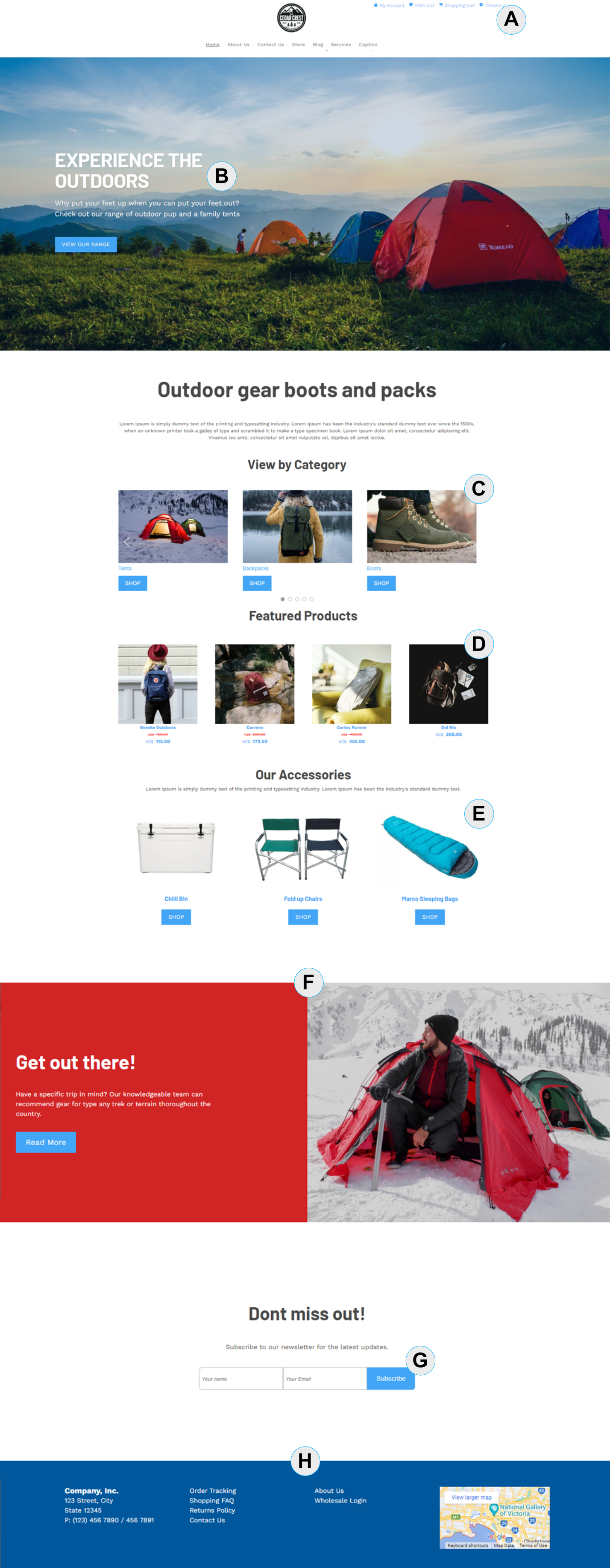
[A] - Standard Shopping Links (Widget)
You can add standard shopping links as a widget to the top of the page. The standard widget area is Top Toys, but you can add to many different locations on the site.
Add My Account / Cart / Checkout Links
[B] - Contentbox Banner
You can use Contentbox to manage and build your banners using all the features available in the editor. There are Single caption image sliders and Multi-caption slider sections ready to use.
[C] Category Slider Widget
You can add a Category (or Product) Slider Widget to load in categories from a shopping page. There is also a grid option available.
You can enable shop buttons in the slider options.
[D] Featured Product Grid Widget
You can add a Featured Product Widget to load in products promoted with a homepage featured status. As above there is also a slider option available.
You can enable shop buttons in the slider options.
About Featured Sliders and Grid widgets
[E] Static Product Snippets
You can feature products using our Product Snippet Blocks.
These a special snippets that allow you to quickly browse to and populate the snippet block with the required product images and pricing.
[F] A 2-Column Contentbox Section
This is a standard section you can add via the ADD-SECTION button in the Contentbox editor. You can add multiple sections of different styles to the Contentbox page. This is just one of the sections on the example page.
[G] Subscribe Snippet Block
This is a ready-made snippet block you can add or drag-drop into the page for subscriber signups.
[H] Template Footer
Add your own template footer content to appear on all pages.
Video Tutorial - Building a Homepage in Contentbox
More From This Section
FAQ Topics
Building your site
- Pages
- Content Editor Modes Explained
- - DRAG DROP Editor (Default)
- - CONTENTBOX Editor (Advanced)
- - WORD STYLE Editor (TinyMCE)
- - LIVE Editor (Click to Edit Mode)
- Styling Content
- Images / Backgrounds
- Banners and Sliders
- Uploading content
- Design Templates
- Forms
- More Q & A
- Menus
- Mobile Styling and Optimisation
Advanced Page Types
E-Commerce
- Shopping Basics
- Product Pricing, Currencies
- Category Management
- Ngā Hua
- Product Options
- Layout and Formatting
- Ngā Kōwhiringa Utu
- Freight - Couriers
- Processing Orders
- Orders / Invoices
- Advanced Ecommerce
- Plugins
- Wholesale
- Bookings Management System
- Stock & Quantities
- Vouchers, Discounts, Loyalty Points
- Selling Photos / Prints
- Shopping Cart Add-on Page types
- Advanced APIs / Add ons
- Te Wāhi Hoko (POS)
- Reports
Email & Membership
- Member Management
- Members Pages / Template Customisations
- From Addresses and Reply To Email Notifications
- Global Enquiry form options
- Standard Field Names
- Webmail
- Bulk Email
- CRM Features
- Email Campaigns
- Forums & Blogs
- Pop3/Imap Email Services
- Scams and Hoaxes
- Lead Magnets / Growing Your Customer Database
Promoting your site
Advanced
- Power User Options
- Form Spam Filtering
- Wordpress
- PHP Setup
- [TAGS]
- FONTS - Embedding Web Fonts
- jQuery snippets
- FONTS - Uploading local font files
- Search External Links / Import external content
- HTML / CSS Snippets
- Loading additional Material Symbols styles
- FAQ Help Map
- Advanced Template Customisation, CSS, etc
- Languages and Translations
- Importing Content from Another Platform
