
You can customise the appearance of receipts, invoices, etc. You can include images and logos, but form fields will not work.
The Invoice & Notification Customisation area allows you to personalise the appearance and content of your customer emails, invoices, quotes, receipts, shipping notifications and other automated communications.
To access these settings: go to
It is recommended to send yourself a test email after making changes.
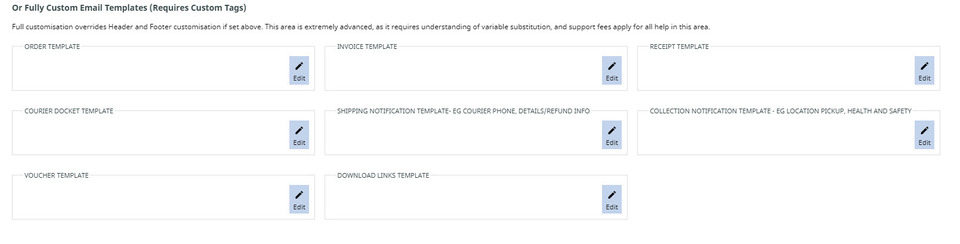
A list of options available in this area follows this image.

Screenshot sample of area
Currency, Pricing & Tax
These settings control how pricing appears throughout invoices, quotes and email notifications.
Tax Number: Enter your business GST, VAT or Sales Tax registration number. This will appear on invoices and other tax documents where applicable.
Price Display Format: Choose how prices are displayed to customers.
Available options include:
- Tax exclusive
- Tax inclusive
- Tax wording displayed
- Dual line pricing (showing both inclusive and exclusive prices)
- Shipping included pricing
- VIP pricing display
Choose the option that matches your country's tax requirements and how you want customers to view pricing.
Note: Tax wording options are only available after you have configured a GST, VAT or Sales Tax rate under Tax & Currency Settings.
Company Name (Official): Enter your official registered business name. This name is used on invoices and other formal documents.
Logo & Email Style
These settings control the branding used across all automated emails.
Email Template Logo: By default, the system will use the logo used on your website. However, if this is white, or rectangular, it may not fit correctly on notifications. The logo appears at the top of invoices, receipts and most customer emails.
For the best results: Use a PNG with a transparent background. 160x160 square works best on notifications.
Email Template Font & Size: Choose the font family and size used throughout your email templates. Using a clean, easy-to-read font improves readability across all devices. Template Style (CSS) Advanced users can customise the email styling using CSS. This allows you to change items such as: Colours, Fonts, Headings, Button styles, Table formatting, Spacing. Changes affect all email templates that use the standard layout.
Email Addresses
Notifications Email : This is the email address that receives order notifications and merchant copies. Usually this is your sales or administration email address.
Reply Address: Customers who click Reply in an email will send their message to this address. This can be different from the notification email if required.
Sales Representative BCC: Enable this option to automatically send a BCC copy of quotes and orders to the assigned sales representative.
Orders & Invoices
These settings control how orders and invoices are generated.
Order or Tax Invoice: Choose whether customer documents are labelled as: Order or Tax Invoice.
Merchant Copy: Choose how the merchant receives notifications. Options include: Email merchant copy, Email with PDF attached, Disable merchant notifications.
Item List Sorting: Choose the order products appear on invoices. Options include: Cart order, Product code, Product title, Stock location, Chronological, Historical.
Barcodes: Optionally include barcodes on invoices. This is useful for warehouses or businesses using barcode scanners.
Login Link: Control whether customers receive an automatic login link within emails. Options include: Include Auto Login Link, Disable Auto Login Link, Hide Login Link.
Order / Invoice Header: Customise the content shown at the top of invoices. Common uses include: Thank you message. HTML formatting is supported.
Order / Invoice Footer: Customise the footer shown on invoices.
Ngā kīanga
These settings customise quote emails.
Quote or Estimate: Choose whether documents are labelled as: Quote, Estimate
Heading / Subject: Customise the email subject line customers receive. Example: Your Quote from ABC Landscaping
Quote Header: Displayed above the quoted items. Often includes: Introduction, Thank you message, Quote validity, Acceptance instructions.
Quote Footer: Displayed below the quote. Common additions include: Terms & Conditions, Payment information, Contact details
Booking Notifications (Staff)
These notifications are sent to staff when bookings are received.
Email Subject: Customise the subject line.
Email Heading: Displayed at the top of the notification.
Booking Email Template: Edit the full booking notification template. HTML formatting is supported.
Receipts
These settings control payment receipt emails.
Kaupapa: The email subject customers receive.
Heading: Displayed at the top of the receipt.
Receipt Options: Available options include: BCC Merchant, Include Additional Order Information.
Receipt Header: Appears above receipt information.
Receipt Footer: Appears below receipt information.
Delivery Dockets
Delivery dockets can be customised separately from invoices.
Docket Weights: Choose whether shipping weights appear on delivery dockets.
Item List Sorting: Choose how products are listed.
Kaupapa: Customise the delivery docket email subject.
Docket Header: Displayed at the top of delivery dockets.
Docket Footer: Displayed at the bottom of delivery dockets.
Shipping Notifications
Shipping notifications inform customers when their order has been dispatched. If you have a courier integration set up, the courier may override this area.
Kaupapa: Set the email subject. Example: Your Order Has Been Shipped
Default Tracking URL: Enter a default courier tracking URL. This can be overridden for individual shipments if required.
Item List Sorting: Choose how products are listed.
Shipping Notification Default Notes: Enter default notes included with every shipping email. Examples include: Delivery expectations, Courier instructions, Tracking information.
Shipping Notification Header: Appears above the shipment information. Common examples: Your order is on its way! Thank you for your purchase.
Shipping Notification Footer: Appears below shipment details. Often includes: Courier contact information, Returns information, Customer support details.
Shipping Template: This controls the complete shipping email layout. Advanced users can fully customise the HTML template.
Collection Notifications
Collection notifications are sent when orders are ready for pickup.
Kaupapa: Customise the email subject. Example: Your Order is Ready for Collection
Default Collection Notes: Displayed within every collection notification. Common information includes: Collection hours, Pickup instructions, Identification requirements.
Collection Notification Footer: Often contains: Pickup address, Parking information, Health & Safety instructions, Contact details
Collection Template: Edit the complete collection email template. HTML formatting is supported.
Order Status & Note Emails
These emails are sent when order statuses are updated or staff add customer notes (and choose to send).
Subject Set the email subject line.
Order Status Header: Displayed above the order update.
Order Status Footer: Displayed below the update.
Download Link Emails:
Used when selling downloadable products.
Kaupapa: Set the email subject.
Download Links Header: Displayed above the download links.
Download Links Footer: Displayed below the download links. Many businesses include: Licence information
Subscription Renewal Notifications
Automatically remind members that their subscription is due for renewal. Templates can be customised for 1 month before and 14 days before.
Default Email Signature
Create a standard signature used across your email templates.
List of Email Notification Tags
|
[CONTENT] |
Includes all standard order information, excluding logo and merchant details |
| [EMAILBODY] | includes order lines plus additional shipping instructions and gift message |
| [ordersummarylines] | Includes only the order details |
| [VOUCHER] | Inserts the voucher code/image |
| [CustomerDetails] | Inserts the customer's details |
| [GifteeDetails] | Includes the shipping details |
| [MerchantDetails] | Inserts your details as shown on your Contact page |
| [ORDERID] | Invoice/order ID |
| [ORDERDATE] | Inserts the date the order was placed in DD/MM/YYYY format |
| [PAYMENTSTATUS] | Displays whether the order has been paid for |
| [GIFT_MESSAGE] | Displays the gift message |
| [SHIP_COMMENTS] | Shows the shipping comments/additional instructions |
| [affiliateInfo] | Order/Invoice only. Shows the affiliate details |
| [paymentmethods] | Order/Invoice only. Displays the payment instructions, links, and methods |
| [FullCustomerAddressAndOrderDetails] | |
| [ReceiptPaymentStatus] |
More Tags
For more Notification Tags - see Creating an Email Template / Email Tags
Additional Shopping related tags see - Custom Invoice / Receipt Tags
For Tags related to building a template see - Custom Template Tags
More From This Section
FAQ Topics
Building your site
- Pages
- Content Editor Modes Explained
- - DRAG DROP Editor (Default)
- - CONTENTBOX Editor (Advanced)
- - WORD STYLE Editor (TinyMCE)
- - LIVE Editor (Click to Edit Mode)
- Styling Content
- Images / Backgrounds
- Banners and Sliders
- Uploading content
- Design Templates
- Forms
- More Q & A
- Menus
- Mobile Styling and Optimisation
Advanced Page Types
E-Commerce
- Shopping Basics
- Product Pricing, Currencies
- Category Management
- Ngā Hua
- Product Options
- Layout and Formatting
- Ngā Kōwhiringa Utu
- Freight - Couriers
- Processing Orders
- Orders / Invoices
- Advanced Ecommerce
- Plugins
- Wholesale
- Bookings Management System
- Stock & Quantities
- Vouchers, Discounts, Loyalty Points
- Selling Photos / Prints
- Shopping Cart Add-on Page types
- Advanced APIs / Add ons
- Te Wāhi Hoko (POS)
- Reports
Email & Membership
- Member Management
- Members Pages / Template Customisations
- From Addresses and Reply To Email Notifications
- Global Enquiry form options
- Standard Field Names
- Webmail
- Bulk Email
- CRM Features
- Email Campaigns
- Forums & Blogs
- Pop3/Imap Email Services
- Scams and Hoaxes
- Lead Magnets / Growing Your Customer Database
Promoting your site
Advanced
- Power User Options
- Form Spam Filtering
- Wordpress
- PHP Setup
- [TAGS]
- FONTS - Embedding Web Fonts
- jQuery snippets
- FONTS - Uploading local font files
- Search External Links / Import external content
- HTML / CSS Snippets
- Loading additional Material Symbols styles
- FAQ Help Map
- Advanced Template Customisation, CSS, etc
- Languages and Translations
- Importing Content from Another Platform
