
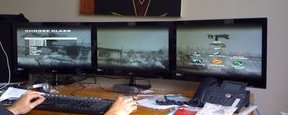
Do you ever find that your computer screen is too small, and you are constantly tabbing through all your windows looking for what you need? Well there is an easier way..
Many people who visit our offices have been inspired by the multiple screens we run on our desks. You can do that too, most computers automatically support 2 screens, including notebook computers. And a new screen can cost as little as $200. Imagine increasing your staff productivity for a mere $2 per week over 2 years...
Après avoir branché votre nouvel écran, il se peut qu'il affiche la même image sur les deux écrans. Faites un clic droit sur votre écran d'accueil pour accéder aux « Propriétés » ou à la « Résolution d'écran », puis sélectionnez l'option « Étendre au bureau ».
If your desktop computer does not physically have the ports to plug in an extra screen, then you will need to buy a graphics card with dual ports also (Approx $100+). If you spend $300 plus, you might get a leading edge graphics card with additional Display PortUn adaptateur DisplayPort vous permettra alors d'utiliser un troisième écran de bureau.
See a photo of my new desktop configuration above and that's a team building application on screen... :-)
Posted: Thursday 18 November 2010
