
Important: Courier integrations will only work if your website is live.
StarShipIT provides integration with a wide range of couriers, including: Australia Post, DHL, NZ Post, Star Track, Aramex, Couriers Please, FedEx, Mainfreight2Home, Zoom2u, Deutsche Post, Royal Mail, TNT, Border Express, New Zealand Couriers, Uber, Team Global Express, DHL, SEKO Logistics, DPD, Amazon Easy Ship, Sherpa, Hunter Express, IncaPost, EVRi, Castle Parcels, UPS, Post Haste RENdr, PBT, Direct Freight Express, USPS, Allied Express, HIVED, The Courier Guy, UniUni, Deliver Direct, Capital Transport, GoPeople, Northline, Asendia, Parxl, Bonds Couriers, Global-e, Flash Couriers, Parcel Right, Canada Post, iMile Delivery, AMS eGroup, Delivereasy, YTO Express Australia.
StarShipIT Scan and Pack
StarShipIT offers a scan-and-pack feature. While there’s no specific "barcode" field in their interface, the API requests a SKU for each item.
Our system will now send identifiers in the following order of priority:
- Manufacturer SKU code (if available)
- Supplier code
- Product code
- System PID
This approach assumes that the manufacturer code is the barcode, as it’s typically the code printed on the manufactured item.
Types of Integrations
1. Courier Fulfilment Integration
This setup simply allows order details (such as the shipping address) to automatically flow from your CMS to your courier, saving you from manually entering customer information into your courier dashboard.
1. Sign up at StarShipIT and log in to your account.
2. From the StarShipIT dashboard, go to API Keys to get your API Key and Subscription Key.
3. In your website CMS, go to E-commerce > Freight Options.
4. Locate the Courier Fulfillment section.
5. Select StarShipIT plugin and add.
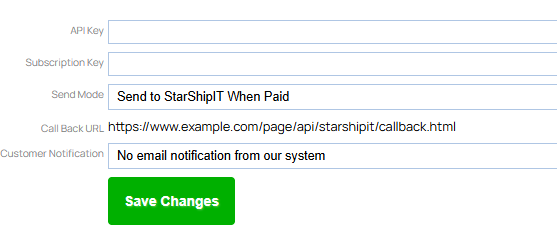
6. Enter your API Key a Subscription Key.
7. Choose if you would like the data to be sent to Star Ship immediately or only upon a paid status.
8. Choose if you would like StarShipIT to send notifications to the customer, or the website CMS.
9. Copy the callback URL (aka Notification URL ) - you'll need to enter this in your StarShip IT portal
10. Save, Publish.
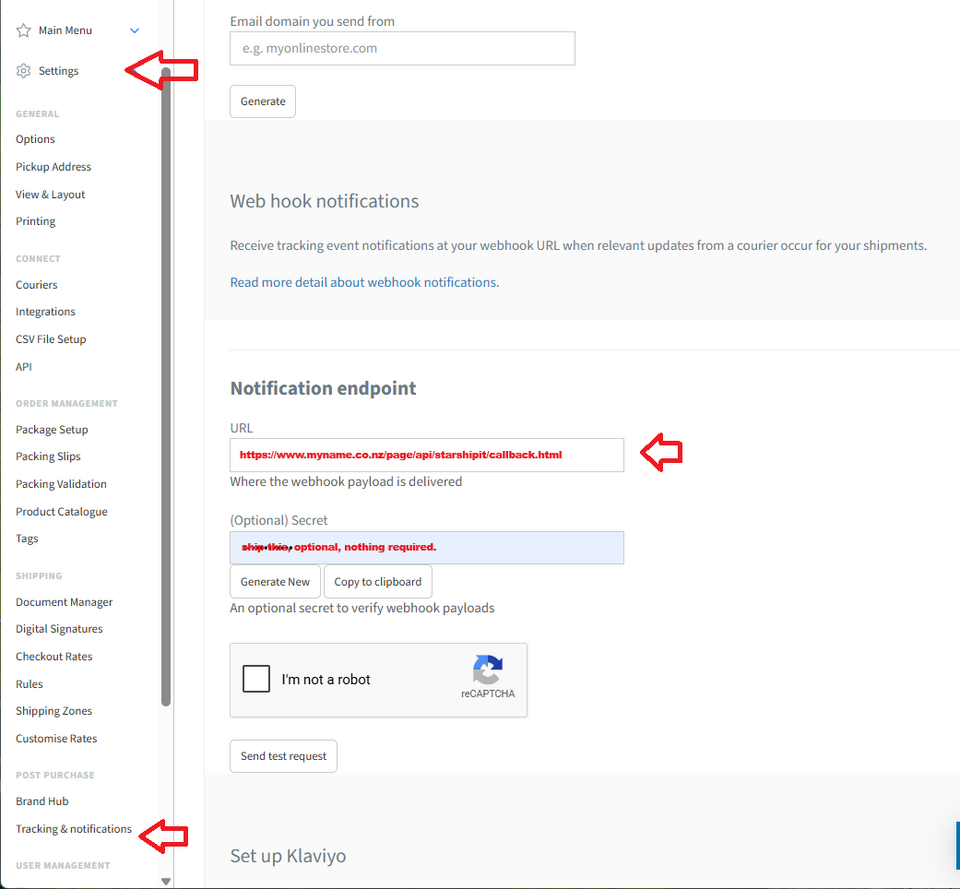
11. In your StarShipIT portal,
- go to Settings > Tracking & notifications.
- Enter the callback URL from Step 9 in the "Notification endpoint URL" field.
- Starshipit will then send updates to this URL when events like tracking updates occur, such as recorded the shipping status and tracking number in our CMS orders platform.
12. Test (only when website is live)
Screenshot of our setup screen
Screenshot of StarShipIT Notification Setup Screen
2. Live Pricing
Live freight pricing can be displayed during checkout for customers.
Available only with hosting plans above a certain level. All products and product variations must have weights and dimensions entered for accurate pricing. If a product does not have this information, StarShipIT will use the default weights you set.
1. Sign up at StarShipIT and log in to your account.
2. From the StarShipIT dashboard, go to API Keys to get your API Key and Subscription Key.
3. In your website CMS, go to E-commerce > Freight Options.
4. Locate the Live Pricing Integrations section. If you do not see options under this section, your hosting plan will need upgrading.
5. Select StarShipIT as your provider.
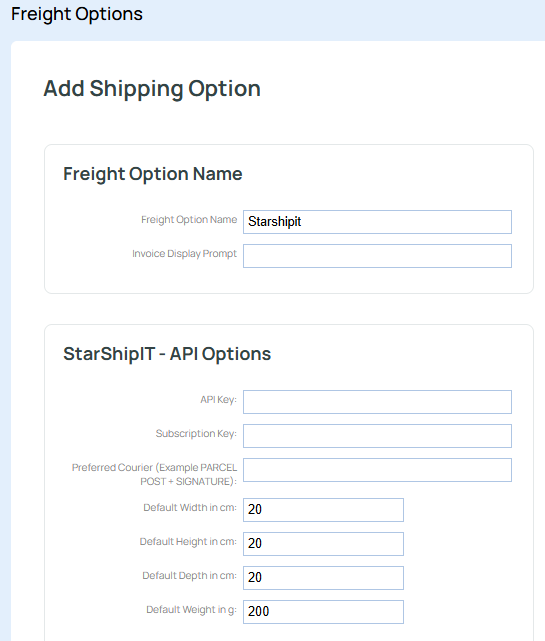
6. Enter your API Key a Subscription Key.
7. Set default weights/dimensions as fallback values (used when a product’s details are missing). Other manual freight rules are also possible alongside the live pricing.
8. Save, Publish a whakamātautau.
More From This Section
FAQ Topics
Building your site
- Pages
- Content Editor Modes Explained
- - DRAG DROP Editor (Default)
- - CONTENTBOX Editor (Advanced)
- - WORD STYLE Editor (TinyMCE)
- - LIVE Editor (Click to Edit Mode)
- Styling Content
- Images / Backgrounds
- Banners and Sliders
- Uploading content
- Design Templates
- Forms
- More Q & A
- Menus
- Mobile Styling and Optimisation
Advanced Page Types
E-Commerce
- Shopping Basics
- Product Pricing, Currencies
- Category Management
- Ngā Hua
- Product Options
- Layout and Formatting
- Ngā Kōwhiringa Utu
- Freight - Couriers
- Processing Orders
- Orders / Invoices
- Advanced Ecommerce
- Plugins
- Wholesale
- Bookings Management System
- Stock & Quantities
- Vouchers, Discounts, Loyalty Points
- Selling Photos / Prints
- Shopping Cart Add-on Page types
- Advanced APIs / Add ons
- Te Wāhi Hoko (POS)
- Reports
Email & Membership
- Member Management
- Members Pages / Template Customisations
- From Addresses and Reply To Email Notifications
- Global Enquiry form options
- Standard Field Names
- Webmail
- Bulk Email
- CRM Features
- Email Campaigns
- Forums & Blogs
- Pop3/Imap Email Services
- Scams and Hoaxes
- Lead Magnets / Growing Your Customer Database
Promoting your site
Advanced
- Power User Options
- Form Spam Filtering
- Wordpress
- PHP Setup
- [TAGS]
- FONTS - Embedding Web Fonts
- jQuery snippets
- FONTS - Uploading local font files
- Search External Links / Import external content
- HTML / CSS Snippets
- Loading additional Material Symbols styles
- FAQ Help Map
- Advanced Template Customisation, CSS, etc
- Languages and Translations
- Importing Content from Another Platform
