
Important: Courier integrations will only work if your website is live.
Go Sweet Spot provides access to these couriers: FedEx, Kiwi Express Oversize, StraitNZ, Move, Sub60, Fliway, Aramex, Post Haste, Castle Parcels, New Zealand Couriers, NZ Post, Urgent Couriers, Star Track, Ship XL, iMile, Australia Post, AMS Group, Couriers Please, TNT, Allied Express.
Live Pricing and Courier need to be set up separately. You can find both under E-Commerce > Freight/Shipping Fees
For Live pricing the set up needs to be done in our CMS and for courier integration you would do the set up in GoSweetSpot system. See below for set up instructions.
Live pricing requires you to be on the Business hosting plan or above.
How our plugin works with GoSweetSpot
We do not post order information to GoSweetSpot - they fetch the information from our feed.
As such there is no settings to be entered at our end, only supplied credentials to be posted at their end.
For technical troubleshooting, logs can be found via the SETTINGS > API area. GoSweetSpot uses the XML / COURIER API feed, where a VIEW LOGS button is an option.
Courier Fulfilment Integrations
In the CMS, go to E-Commerce > Freight/Shipping Fees
Scroll down and press the + button under GoSweetSpot under Courier Fulfilment.
Add the Plugin. This will then give you a Site ID a API Password to enter in the Go Sweet Spot dashboard.
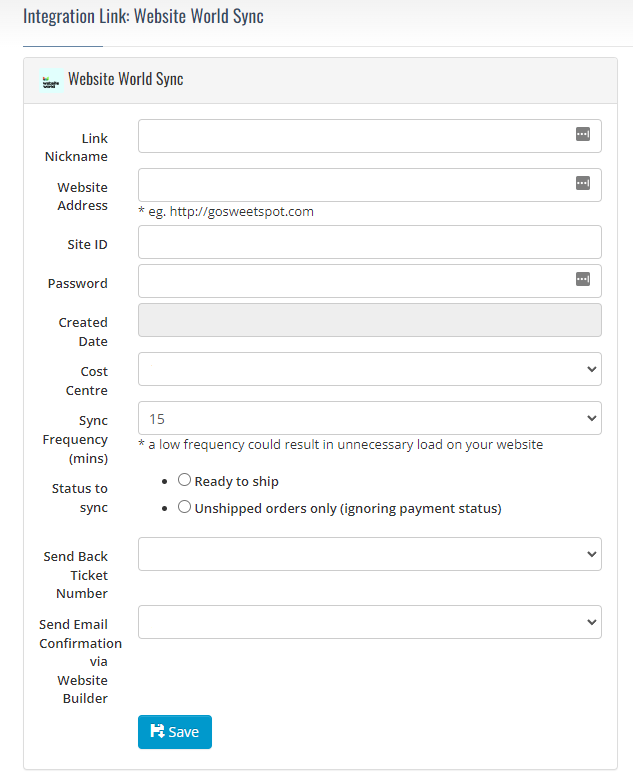
On your Go Sweet Spot Dashboard go to Administration > Integrations and Apps.
Choose Website World Sync.
Fill in the fields with the settings found in the our CMS in the first step.
Live Pricing
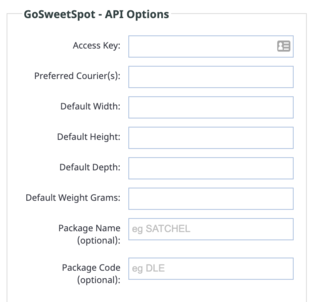
For Live Pricing you will need your Access Key from Go Sweet Spot.
Optionally provide a preferred courier if you would like results from a preferred courier.
Provide a default width, height, depth and weight to for your products.
These fields are mandatory for the Go Sweet Spot API, you will need to enter a value here. These values will be used if no values are set on the product itself.
If you have products with different varieties of width, height, depth and weight, these values will needed to be added to each product individually when editing the product.
More From This Section
FAQ Topics
Building your site
- Pages
- Content Editor Modes Explained
- - DRAG DROP Editor (Default)
- - CONTENTBOX Editor (Advanced)
- - WORD STYLE Editor (TinyMCE)
- - LIVE Editor (Click to Edit Mode)
- Styling Content
- Images / Backgrounds
- Banners and Sliders
- Uploading content
- Design Templates
- Forms
- More Q & A
- Menus
- Mobile Styling and Optimisation
Advanced Page Types
E-Commerce
- Shopping Basics
- Product Pricing, Currencies
- Category Management
- Ngā Hua
- Product Options
- Layout and Formatting
- Ngā Kōwhiringa Utu
- Freight - Couriers
- Processing Orders
- Orders / Invoices
- Advanced Ecommerce
- Plugins
- Wholesale
- Bookings Management System
- Stock & Quantities
- Vouchers, Discounts, Loyalty Points
- Selling Photos / Prints
- Shopping Cart Add-on Page types
- Advanced APIs / Add ons
- Te Wāhi Hoko (POS)
- Reports
Email & Membership
- Member Management
- Members Pages / Template Customisations
- From Addresses and Reply To Email Notifications
- Global Enquiry form options
- Standard Field Names
- Webmail
- Bulk Email
- CRM Features
- Email Campaigns
- Forums & Blogs
- Pop3/Imap Email Services
- Scams and Hoaxes
- Lead Magnets / Growing Your Customer Database
Promoting your site
Advanced
- Power User Options
- Form Spam Filtering
- Wordpress
- PHP Setup
- [TAGS]
- FONTS - Embedding Web Fonts
- jQuery snippets
- FONTS - Uploading local font files
- Search External Links / Import external content
- HTML / CSS Snippets
- Loading additional Material Symbols styles
- FAQ Help Map
- Advanced Template Customisation, CSS, etc
- Languages and Translations
- Importing Content from Another Platform
