
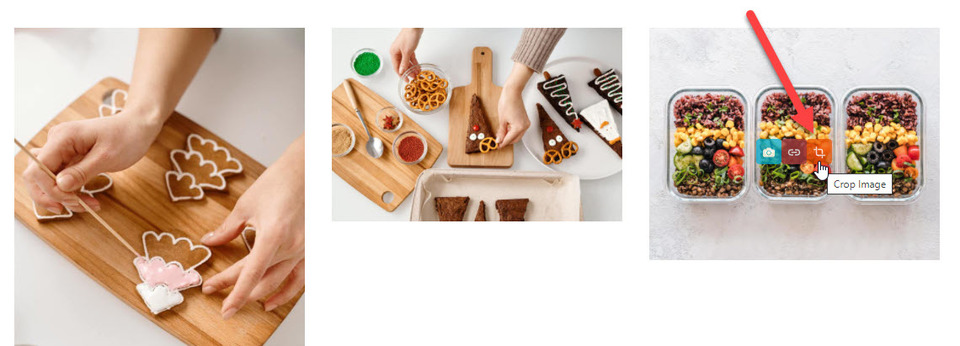
If you are displaying images in a row with varying dimensions, the crop wizard allows you to crop all of the images in one go, to a range of standard shapes. The original image file is not changed; the unwanted edges of odd sized images are simply visually hidden.
Hover over one of the images, click the crop icon to open the crop image wizard.
To crop all of the images at once, the blue slide tab must be shown. By hovering over each IMAGE ASPECT / SHAPE, you can view in realtime what your photos would look like. Click upon your chosen shape and out of the wizard box to make the changes.
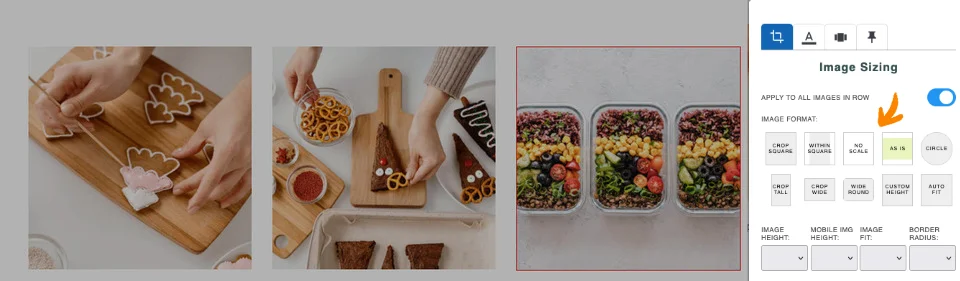
Changing the viewed area of a cropped/clipped image
By default cropped/clipped images are centered within the viewable area. You can change the image position to any of the corners or edges e.g. LEFT TOP, BOTTOM CENTER to reveal a different part of the image via the IMAGE POSITION dropdown.
Custom image heights
Using the shape option CUSTOM HEIGHT allows you to change the height of the cropped image via the IMAGE ASPECT HEIGHT dropdown.
Options for mobile
You can override the desktop setting for Mobile using one of the preset mobile options available via the MOBILE IMAGE HEIGHT dropdown.
Cropping / Resizing the original image
While this editor popup only crops/clips the image without touching the original image, you can crop the original image file via the CROP / EDIT IMAGE FILE button at the base of the popup.
More From This Section
FAQ Topics
Building your site
- Pages
- Content Editor Modes Explained
- - DRAG DROP Editor (Default)
- - CONTENTBOX Editor (Advanced)
- - WORD STYLE Editor (TinyMCE)
- - LIVE Editor (Click to Edit Mode)
- Styling Content
- Images / Backgrounds
- Banners and Sliders
- Uploading content
- Design Templates
- Forms
- More Q & A
- Menus
- Mobile Styling and Optimisation
Advanced Page Types
E-Commerce
- Shopping Basics
- Product Pricing, Currencies
- Category Management
- Ngā Hua
- Product Options
- Layout and Formatting
- Ngā Kōwhiringa Utu
- Freight - Couriers
- Processing Orders
- Orders / Invoices
- Advanced Ecommerce
- Plugins
- Wholesale
- Bookings Management System
- Stock & Quantities
- Vouchers, Discounts, Loyalty Points
- Selling Photos / Prints
- Shopping Cart Add-on Page types
- Advanced APIs / Add ons
- Te Wāhi Hoko (POS)
- Reports
Email & Membership
- Member Management
- Members Pages / Template Customisations
- From Addresses and Reply To Email Notifications
- Global Enquiry form options
- Standard Field Names
- Webmail
- Bulk Email
- CRM Features
- Email Campaigns
- Forums & Blogs
- Pop3/Imap Email Services
- Scams and Hoaxes
- Lead Magnets / Growing Your Customer Database
Promoting your site
Advanced
- Power User Options
- Form Spam Filtering
- Wordpress
- PHP Setup
- [TAGS]
- FONTS - Embedding Web Fonts
- jQuery snippets
- FONTS - Uploading local font files
- Search External Links / Import external content
- HTML / CSS Snippets
- Loading additional Material Symbols styles
- FAQ Help Map
- Advanced Template Customisation, CSS, etc
- Languages and Translations
- Importing Content from Another Platform
