
Note: This help-faq uses an older approach to embedding videos - for best results use a Drag-drop video snippet - see https://www.help.cms-tool.net/blog/927007
Take advantage of YouTube, upload your video to them, then 'embed' that video into your site. Embedding means that your visitors will still be within your site (not YouTube) but YouTube incurs the cost of hosting and streaming your video rather than you. From your visitors point of view the video will be seamlessly part of your site (with a unobtrusive YouTube watermark). It is very difficult for anyone to 'steal' your video
Heres an example of a website using you tube:
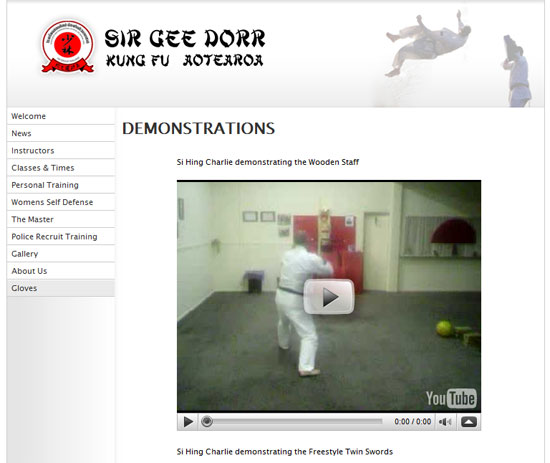
To set up a video index page from which your visitors can choose which video to watch -
- Create an account with YouTube
- Upload your video to YouTube (they have great help tutorials)
- Log in to our CMS. Click 'Add a new page' > 'Videos' (next to File List) enter Menu button text and page title
- Fill out the blanks in the video form, including -
- Copy and paste the html code (from the right hand side of your chosen you tube video page on the YouTube site) this is the "Embed Object Code".
- Thumbnails are optional as are the other fields but increase the usability and SEO of your site
- Click "Add New Page Now"
- Repeat the above procedure to ad as many videos as you want
Alternatively you can upload a conventional mpg. avi. or other video file directly to your site but consider the following disadvantages -
- video files are large, so hosting videos can greatly increase your sites bandwidth usage and associated costs
- the video will not be streamed and will not start playing until after it has downloaded - the gives your visitors more chance to be distracted and look elsewhere
- once downloaded the file is then on your vistors hard drive in a format which they have control over - so you are essentially giving it away (copyright issues aside)
- your vistors will watch the video on their choice of video player locally, so they will no longer be within your website.
More From This Section
FAQ Topics
Building your site
- Pages
- Content Editor Modes Explained
- - DRAG DROP Editor (Default)
- - CONTENTBOX Editor (Advanced)
- - WORD STYLE Editor (TinyMCE)
- - LIVE Editor (Click to Edit Mode)
- Styling Content
- Images / Backgrounds
- Banners and Sliders
- Uploading content
- Design Templates
- Forms
- More Q & A
- Menus
- Mobile Styling and Optimisation
Advanced Page Types
E-Commerce
- Shopping Basics
- Product Pricing, Currencies
- Category Management
- Ngā Hua
- Product Options
- Layout and Formatting
- Ngā Kōwhiringa Utu
- Freight - Couriers
- Processing Orders
- Orders / Invoices
- Advanced Ecommerce
- Plugins
- Wholesale
- Bookings Management System
- Stock & Quantities
- Vouchers, Discounts, Loyalty Points
- Selling Photos / Prints
- Shopping Cart Add-on Page types
- Advanced APIs / Add ons
- Te Wāhi Hoko (POS)
- Reports
Email & Membership
- Member Management
- Members Pages / Template Customisations
- From Addresses and Reply To Email Notifications
- Global Enquiry form options
- Standard Field Names
- Webmail
- Bulk Email
- CRM Features
- Email Campaigns
- Forums & Blogs
- Pop3/Imap Email Services
- Scams and Hoaxes
- Lead Magnets / Growing Your Customer Database
Promoting your site
Advanced
- Power User Options
- Form Spam Filtering
- Wordpress
- PHP Setup
- [TAGS]
- FONTS - Embedding Web Fonts
- jQuery snippets
- FONTS - Uploading local font files
- Search External Links / Import external content
- HTML / CSS Snippets
- Loading additional Material Symbols styles
- FAQ Help Map
- Advanced Template Customisation, CSS, etc
- Languages and Translations
- Importing Content from Another Platform
