
When editing a specific page - you can change the page layout, by selecting Layout from the small tabs at the top.
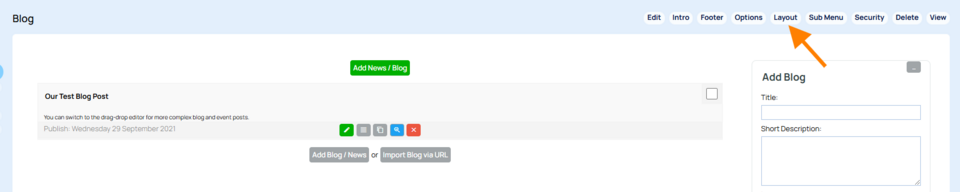
ABOVE - A blog page editor window with the LAYOUT tabs indicated.
Choose a new page type
To change the page layout, select Web Pages, then the More Options cog next to the required page. Then select the Change the Page Layout button to reveal these options:
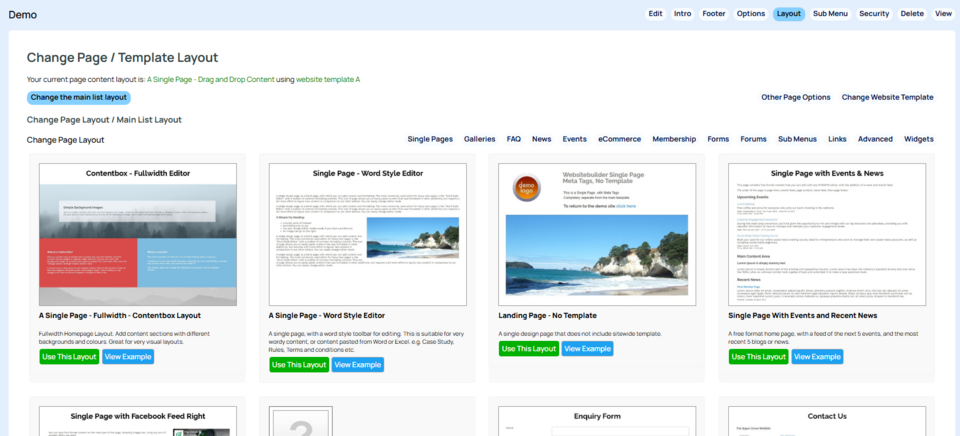
ABOVE - Example page layout types available. Available page types change depending on the existing page type.
You can see your current page layout listed above in this screenshot example.
More From This Section
The CMS broadly speaking has two page types - editable content pages and templated pages e.g. shopping pages
This example shows you how to add a new web page to your existing website
How do I remove a page?
You can drag-drop reorder your pages (menu buttons) in the CMS. For example, to move a menu button (page) into a sub menu, or to move a submenu button up to the main menu. All the pages of your website are presented in a collapsible tree format.
You can duplicate a page via the OPTIONS tab when editing a page.
How do I make a page hidden? Whats the different between hidden from menu and hidden from everyone? How hidden are the pages?
How to restrict who can view a Page.
Via the Page Options you can choose to keep the page accessible, but hide the page content for a period of time. You can also replace the content with a custom message while hidden.
We have a large selection of pre-formatted pages ready to go for whatever purpose you might need. Here is an explanation of some of the most useful
How do you choose which page appears when someone arrives at your site?
An overview of the options available when using a blog page
News pages are the standard Information page type that allows you post detailed news posts with an index page providing a date, summary and optional thumbnail image
Submenu page types are great for keeping pages organised under a single page, keep track of changes as they are made
How to create custom form pages
Here is a brief introduction to single plain pages - the general purpose workhorse of many websites.
When you add a new page button, the button name automatically becomes the Page Title. To delete or rename this title...
If you want to change the layout of a page there are a couple of places to do it
You can set the number of thumbnails or list items to show on Gallery, News, Blog, Ecommerce pages via the page options area.
FAQ Topics
Building your site
- Pages
- Content Editor Modes Explained
- - DRAG DROP Editor (Default)
- - CONTENTBOX Editor (Advanced)
- - WORD STYLE Editor (TinyMCE)
- - LIVE Editor (Click to Edit Mode)
- Styling Content
- Images / Backgrounds
- Banners and Sliders
- Uploading content
- Design Templates
- Forms
- More Q & A
- Menus
- Mobile Styling and Optimisation
Advanced Page Types
E-Commerce
- Shopping Basics
- Product Pricing, Currencies
- Category Management
- Ngā Hua
- Product Options
- Layout and Formatting
- Ngā Kōwhiringa Utu
- Freight - Couriers
- Processing Orders
- Orders / Invoices
- Advanced Ecommerce
- Plugins
- Wholesale
- Bookings Management System
- Stock & Quantities
- Vouchers, Discounts, Loyalty Points
- Selling Photos / Prints
- Shopping Cart Add-on Page types
- Advanced APIs / Add ons
- Te Wāhi Hoko (POS)
- Reports
Email & Membership
- Member Management
- Members Pages / Template Customisations
- From Addresses and Reply To Email Notifications
- Global Enquiry form options
- Standard Field Names
- Webmail
- Bulk Email
- CRM Features
- Email Campaigns
- Forums & Blogs
- Pop3/Imap Email Services
- Scams and Hoaxes
- Lead Magnets / Growing Your Customer Database
Promoting your site
Advanced
- Power User Options
- Form Spam Filtering
- Wordpress
- PHP Setup
- [TAGS]
- FONTS - Embedding Web Fonts
- jQuery snippets
- FONTS - Uploading local font files
- Search External Links / Import external content
- HTML / CSS Snippets
- Loading additional Material Symbols styles
- FAQ Help Map
- Advanced Template Customisation, CSS, etc
- Languages and Translations
- Importing Content from Another Platform
