
How to delete a Category
- Click the E-COMMERCE pātene
- Choose to Edit Products or Edit Categories to get a list of categories.
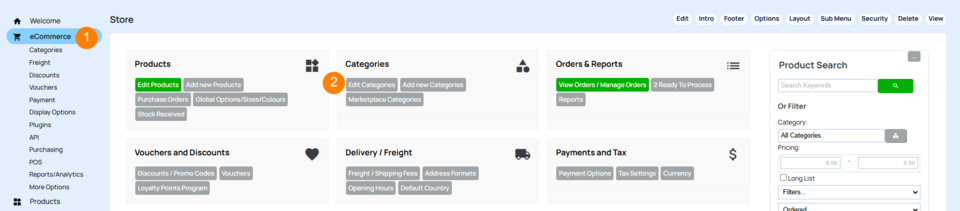
Deleting a Category via the Edit Categories screen.
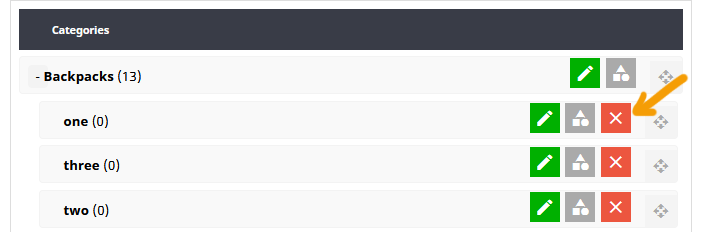
For safety reasons only empty categories - categories without products or sub-categories in them can be deleted.
- You can delete any empy category by clicking the red X icon next to the category.
- If there are products in the category this button will not be available.
- If there are sub-categories in the category, these will need to be deleted
How to delete all the products in the Category
Click the Gray Shapes icon in the list of icons next to the category.
This will take you to a product view of all the products in the category.
- Click the CHECK ALL button next to the products to select all products
- Click the red DELETE button that appears in the sidebar. WARNING deleted products cannot be restored.
More From This Section
How to add a new category to your shopping page
You can move a single Category or multiple Categories in bulk via the E-Commerce > View Products area
You can quickly reorganise your categories to become sub-categories
You can delete a Category, but if products exist in the website you must delete the products first.
If you want your customers to access a category from multiple locations you can create an empty category and set a redirect
As well as adding your own custom categories you can add an automated dynamic category that shows products based on what option you choose. You can also use this to auto-populate categories for brands, suppliers, manufacturer, or your extra fields.
Specials only show in this category if is a difference in RRP vs Checkout Price (Not auto-discounts)
You can add information to a category area that will appear as an information tab on all products in the category (Additional Information Category Wide)
Or do you need to create relationships between your products, and the make/model/type of products where they can be applied? eg Car automotive industry, some parts fit many different types of cars. Yes you can
Typical use case, when selling cars. You might list your cars with data associated for make/model/variant year.
In the ecommerce > Display Options area you can check a box 'Show Product Sorting Dropdown' to show a product sorting option on the Product list page. Sorting can also be changed globally and per category.
by default hiding a category does not hide the products within it. By checking the cascade security options found in the Category settings area the security setting you choose for the categories can be applied to the subcategories and products within.
You can add content into the intro area of any category
FAQ Topics
Building your site
- Pages
- Content Editor Modes Explained
- - DRAG DROP Editor (Default)
- - CONTENTBOX Editor (Advanced)
- - WORD STYLE Editor (TinyMCE)
- - LIVE Editor (Click to Edit Mode)
- Styling Content
- Images / Backgrounds
- Banners and Sliders
- Uploading content
- Design Templates
- Forms
- More Q & A
- Menus
- Mobile Styling and Optimisation
Advanced Page Types
E-Commerce
- Shopping Basics
- Product Pricing, Currencies
- Category Management
- Ngā Hua
- Product Options
- Layout and Formatting
- Ngā Kōwhiringa Utu
- Freight - Couriers
- Processing Orders
- Orders / Invoices
- Advanced Ecommerce
- Plugins
- Wholesale
- Bookings Management System
- Stock & Quantities
- Vouchers, Discounts, Loyalty Points
- Selling Photos / Prints
- Shopping Cart Add-on Page types
- Advanced APIs / Add ons
- Te Wāhi Hoko (POS)
- Reports
Email & Membership
- Member Management
- Members Pages / Template Customisations
- From Addresses and Reply To Email Notifications
- Global Enquiry form options
- Standard Field Names
- Webmail
- Bulk Email
- CRM Features
- Email Campaigns
- Forums & Blogs
- Pop3/Imap Email Services
- Scams and Hoaxes
- Lead Magnets / Growing Your Customer Database
Promoting your site
Advanced
- Power User Options
- Form Spam Filtering
- Wordpress
- PHP Setup
- [TAGS]
- FONTS - Embedding Web Fonts
- jQuery snippets
- FONTS - Uploading local font files
- Search External Links / Import external content
- HTML / CSS Snippets
- Loading additional Material Symbols styles
- FAQ Help Map
- Advanced Template Customisation, CSS, etc
- Languages and Translations
- Importing Content from Another Platform
