
Image file names need to be concise so that you know which image the user has purchased for print. Your camera designates numerical numbers for each image it takes eg. 2006589.jpg. Preferably you should change this so that you can administer your photos and correlate them with the ones you are selling on your website.
Basically you have your raw photo which you will be using for print. Named something like hamiltonlandscape_33.jpg the image you upload into your photo directory should be named exactly the same. The image below shows the reference to this file name throughout the shopping process.
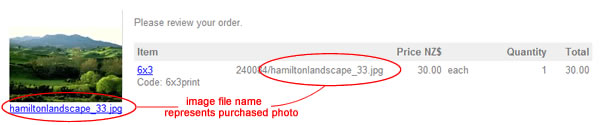
File names, Paths and Broken Images
File names used on the web form what we call a file path. In the example above it shows the folder name and then the image name separated by a forward slash. 240084/hamiltonlandscape_33.jpg
Your web pages follow the same principles as do your Internet browsers. And would find the image with a file path similar to this.
www.domainname.cohttps://www.help.cms-tool.net/images//240084/hamiltonlandscape_33.jpg
Please note that we cannot include spaces between words in filenames, as a browser does not know how to reproduce these spaces and often will substitute it with another character or symbol.
hamilton landscape_33.jpg would be interpreted as hamilton20%landscape_33.jpg which is not the filename hence breaking the link, meaning the browser will not be able to find the file to display to your viewer. When this happens we call it a Broken Image and is will be displayed in our system and your website as a red X
If you are separating words in a file name then please only separate them with the following character.
Underscore: hamilton_landscape_33.jpg
Dash: hamilton-landscape-33.jpg
Decimal Point: hamilton.landscape.33.jpg
Combination of them hamilton.lanscape_33.jpg
More From This Section
FAQ Topics
Building your site
- Pages
- Content Editor Modes Explained
- - DRAG DROP Editor (Default)
- - CONTENTBOX Editor (Advanced)
- - WORD STYLE Editor (TinyMCE)
- - LIVE Editor (Click to Edit Mode)
- Styling Content
- Images / Backgrounds
- Banners and Sliders
- Uploading content
- Design Templates
- Forms
- More Q & A
- Menus
- Mobile Styling and Optimisation
Advanced Page Types
E-Commerce
- Shopping Basics
- Product Pricing, Currencies
- Category Management
- Ngā Hua
- Product Options
- Layout and Formatting
- Ngā Kōwhiringa Utu
- Freight - Couriers
- Processing Orders
- Orders / Invoices
- Advanced Ecommerce
- Plugins
- Wholesale
- Bookings Management System
- Stock & Quantities
- Vouchers, Discounts, Loyalty Points
- Selling Photos / Prints
- Shopping Cart Add-on Page types
- Advanced APIs / Add ons
- Te Wāhi Hoko (POS)
- Reports
Email & Membership
- Member Management
- Members Pages / Template Customisations
- From Addresses and Reply To Email Notifications
- Global Enquiry form options
- Standard Field Names
- Webmail
- Bulk Email
- CRM Features
- Email Campaigns
- Forums & Blogs
- Pop3/Imap Email Services
- Scams and Hoaxes
- Lead Magnets / Growing Your Customer Database
Promoting your site
Advanced
- Power User Options
- Form Spam Filtering
- Wordpress
- PHP Setup
- [TAGS]
- FONTS - Embedding Web Fonts
- jQuery snippets
- FONTS - Uploading local font files
- Search External Links / Import external content
- HTML / CSS Snippets
- Loading additional Material Symbols styles
- FAQ Help Map
- Advanced Template Customisation, CSS, etc
- Languages and Translations
- Importing Content from Another Platform
